
On November 20 alone, 143 people downloaded this app from the App Store for the first time. Most of them were in the United States, and almost none had seen our promotional posts. Cosmos 3D is a space flight simulation app that an EasyTicket developer built by vibe coding. It launched on the App Store and Google Play on November 8, 2026, and lets you pilot a spaceship through the real solar system as it looks today, based on NASA/JPL orbital data.
We first promoted it on Instagram. Views barely moved. After that we ran no ads and no events, yet the number of users kept growing. This article follows those two weeks through the numbers, and looks at why it was the U.S. and whether the same path can be extended to other apps.
Two weeks after launch: from 1 a day to 143
The first App Store download came on November 9, just 1 person. Then 20 on the 12th, 58 on the 14th, 62 on the 17th, 82 on the 19th, and 143 on the 20th. Apart from one dip (44 on the 16th), it grew almost every day. Through November 20, the App Store recorded 577 first downloads, plus 59 more from people who deleted the app and downloaded it again.
On Google Play, 171 people had newly installed the app through November 17. The best single day was the 14th, with 44. By the numbers, the App Store curve climbed much more steeply.
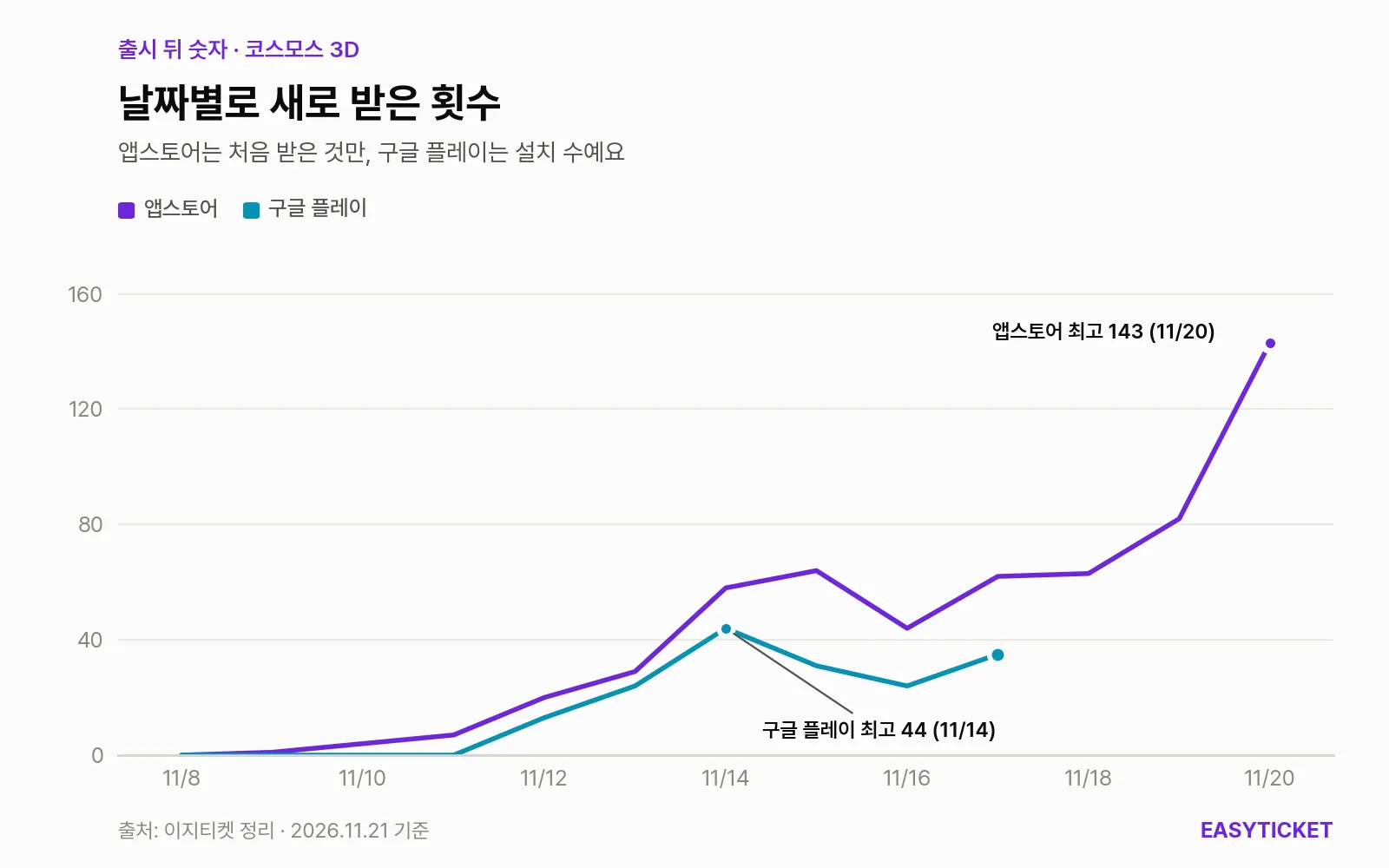
New downloads per day. The App Store counts first downloads only, and Google Play counts installs only.
Nor is it an app people download and never open. As of November 21, 253 people opened the app that day, and 714 opened it over the past 7 days. Each person spent an average of 19.9 minutes in it. Considering that the free tier covers only the automatic tour and flight around Earth, 20 minutes is a fairly long stay.
Why Instagram got nowhere
This is what we ran into first. In the same period, the Instagram Reels on the EasyTicket account that drew the most views were all Korean-language topics, such as office workers leaving work and procrastination (160,000 views for the November 10 Reel, 140,000 for the November 12 Reel). A space app story had no place in that feed.
The numbers for the Korean landing page tell the same story. From November 8 to 21, 26 people visited, all from Korea. Of those, 16 came through Instagram.
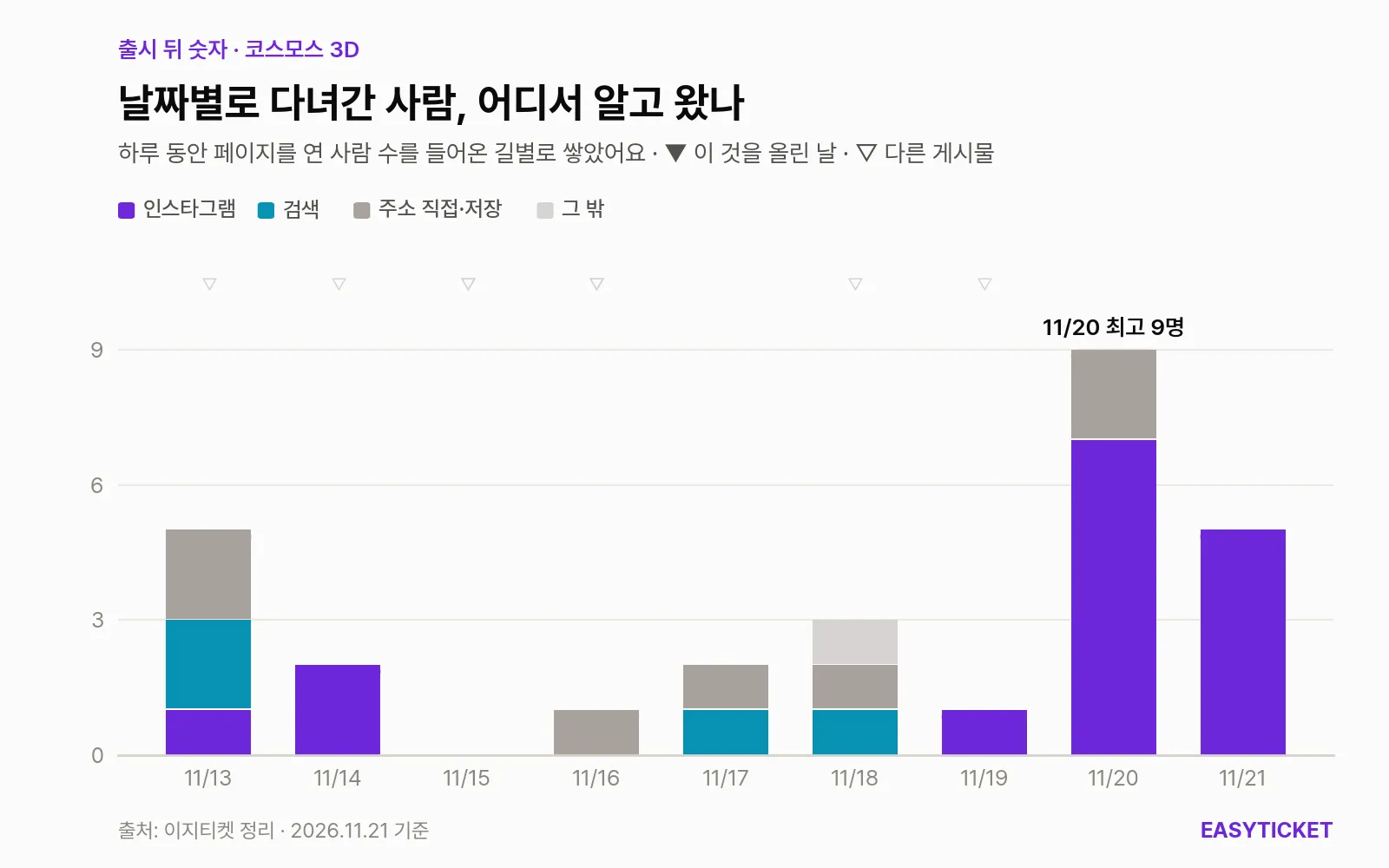
Visitors to the Korean landing page. Even the best day had only 9, so this was a different path from the hundreds who downloaded the app.
The conclusion is simple. The people who downloaded the app and the people who viewed the landing page barely overlap. Promotion that showed a space app to Korean followers and the stream of Americans who went looking for the app and downloaded it were, from the start, different paths.
Why Cosmos 3D worked in the U.S.
Broken down by country, the skew is clear. Of the App Store’s 577 first downloads, the U.S. accounted for 425 (about 74%), followed by Russia with 54, the U.K. with 28 and Canada with 17. Korea did not even make the top 8. Counting people who opened the app, the U.S. is also at the top with 439.
There is no breakdown of whether downloads came from search or from browsing. So what follows is not a firm conclusion but a judgment from matching the numbers against the store page.
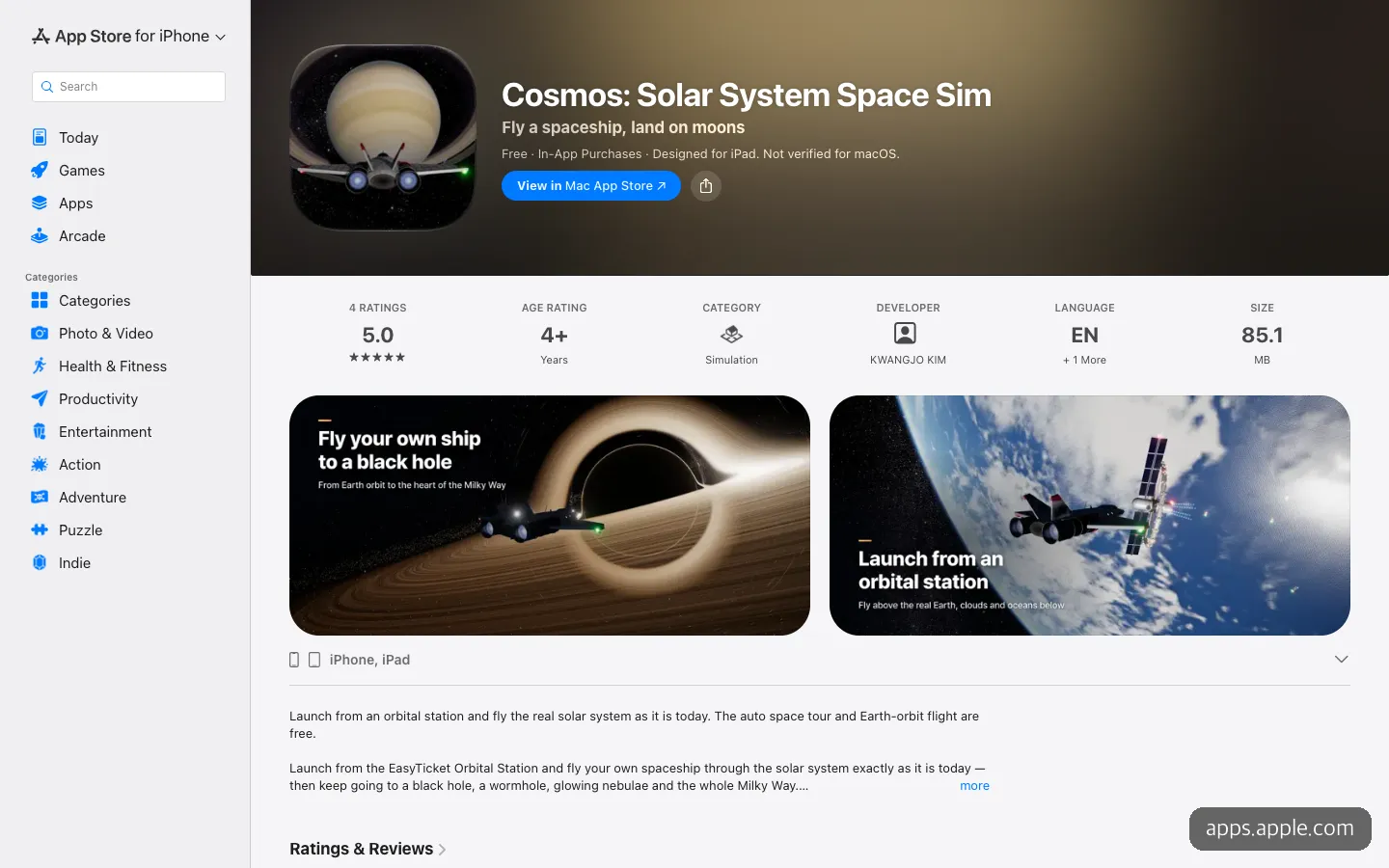
How it looks on the U.S. App Store. The name and subtitle contain English search terms as they are.
First, the name was the search term. The U.S. App Store name is “Cosmos: Solar System Space Sim” and the subtitle is “Fly a spaceship, land on moons.” The words an English speaker would type into the search bar, solar system and space sim, are right there in the name. We set up a separate Korean name too (우주 비행 시뮬레이터: 코스모스 3D, or “Space Flight Simulator: Cosmos 3D”). Apple’s advertising guide states that more than 70% of App Store visitors find apps through search (Apple’s own claim). A steady daily rise with no ads fits the search explanation best.
Second, many downloads came on iPad. Split by device, App Store downloads were 299 on iPhone and 276 on iPad. Nearly half were on iPad. We think it could be demand from families or classes that want to show space on a big screen (this is a guess). The fact that most competing apps are in the Education category supports that hunch.
Third, the pricing is simple. There are no ads and no subscription. You start free, and buying “Unlock the Whole Universe” once opens everything. Through November, it was open at a launch discount of $2.99 (4,400 won in Korea), and from December 1 it switches to the regular price. The U.S. is the world’s largest market for in-app purchase revenue. According to Sensor Tower’s 2026 report as summarized by eMarketer, it reached $59 billion in 2025, more than double the combined total of No. 2 China and No. 3 Japan. In a market used to paying, a one-time purchase that does not touch subscription fatigue is an easy option to pick.
News like Artemis II, NASA’s crewed lunar flight this spring, may also have supported American interest in space. But there is no evidence that it connects to downloads, so we treat it only as background.
After installing and using it: what holds you, and what snags
When you open the app, there is no sign-up screen. Tap Board on the “Space Boarding Pass” stamped with today’s date, and within 5 seconds you are out above Earth’s orbit. A first-flight tip pops up saying “Pick a destination with the map button at the top,” so even a first-timer does not get lost.
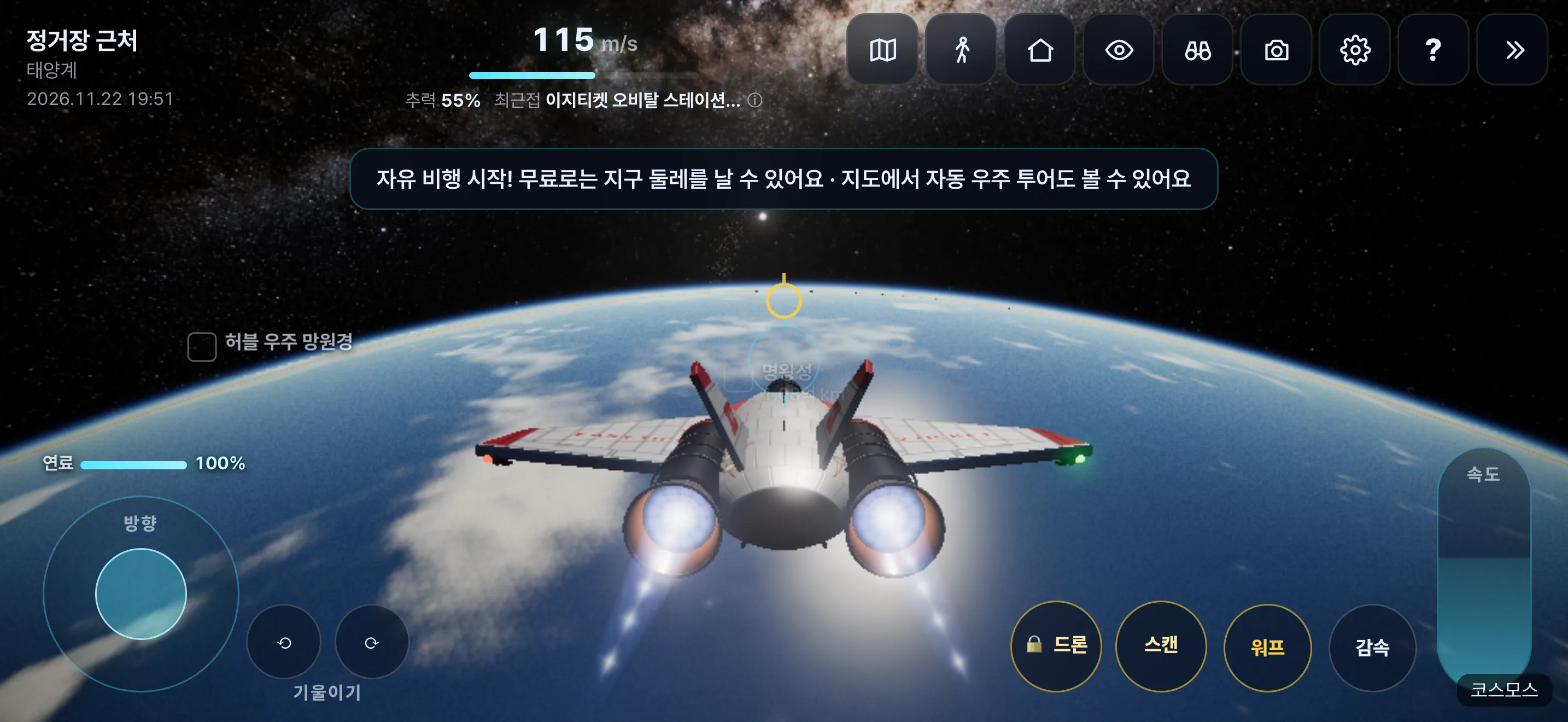
Tap Board and you are in control above Earth’s orbit within seconds. The first screen also tells you how far you can fly for free. From the 3D app
What keeps people hooked is the game-like features. Version 1.1.0, released on November 15, added 8 new activities, a job board that changes daily and 6 arcade minigames. You take cargo requests such as “Fireworks Set Delivery,” collect points and raise your pilot rank. The sky ticker shows real astronomical events for today, like “Moon 93%, two days before full, and Moon-Jupiter 1.1° in 8 days.” In the special experiences, tap the Orion Nebula and you arrive about 8 seconds after a warp effect. No ad appeared even once, and the app never asked for notification or location permissions.
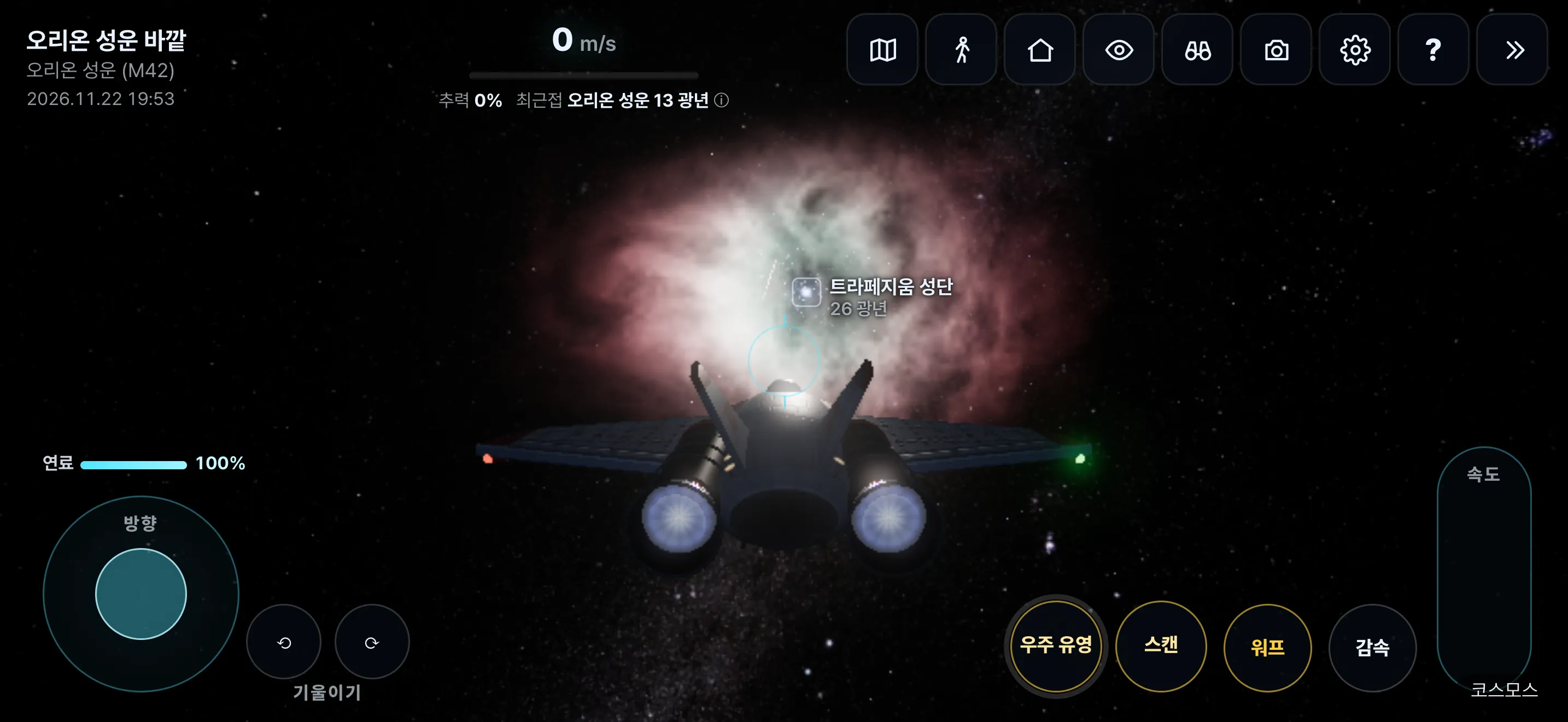
A jump to the Orion Nebula from the special experiences. A real-distance marker and a spacewalk button appear together. From the 3D app
There are clear snags too. It is landscape only, so you cannot use it held upright. The buttons at the top are icon-only, so their meaning is hard to guess at first, and the navigation map has about 10 tabs that you must swipe sideways to see in full.
The line between free and full is drawn clearly. For free you get the entire automatic space tour, flight around Earth (within 150,000 km of Earth’s center), launching from and returning to the station, photos, the telescope, space radio and browsing the catalog. The Moon is about 380,000 km away, so the Moon is where the full version begins. If you try to leave Earth orbit or jump to a special experience such as a black hole or nebula, the “Unlock the Whole Universe” screen appears. Things to do, such as walking inside the station and spaceship, landing on the Moon and planets, spacewalks, requests and mining, and races, are also opened by this one purchase.

The purchase screen that appears when you try to leave Earth orbit or jump to a nebula or black hole. Buy once and everything opens. From the 3D app
Compared with competing apps on the U.S. store
We opened three apps that show up in the same solar system searches on the U.S. App Store on November 22, 2026.
| App | Price | Rating (number of ratings) | Size | Languages | Standout points |
|---|---|---|---|---|---|
| Cosmos (Cosmos 3D) | Free, one-time purchase to unlock all (November discount $2.99) | 5.0 (4) | 85.1 MB | English, Korean | Direct spaceship control, landings, Simulation category |
| Solar Walk | $4.99, in-app purchases extra | 4.7 (8.2K) | 472.6 MB | 13 | Real-time 3D solar system, time travel, No. 117 on the Education chart |
| Celestia | Free, subscription ($1.99/month) or $79.99 lifetime | 4.4 (348) | 577.0 MB | 28 | Sky as seen from a celestial surface, game controller support |
| Planetaria | $4.99 | 4.2 (16) | 535.1 MB | English | AR mode, time travel across 1900 to 2400 |
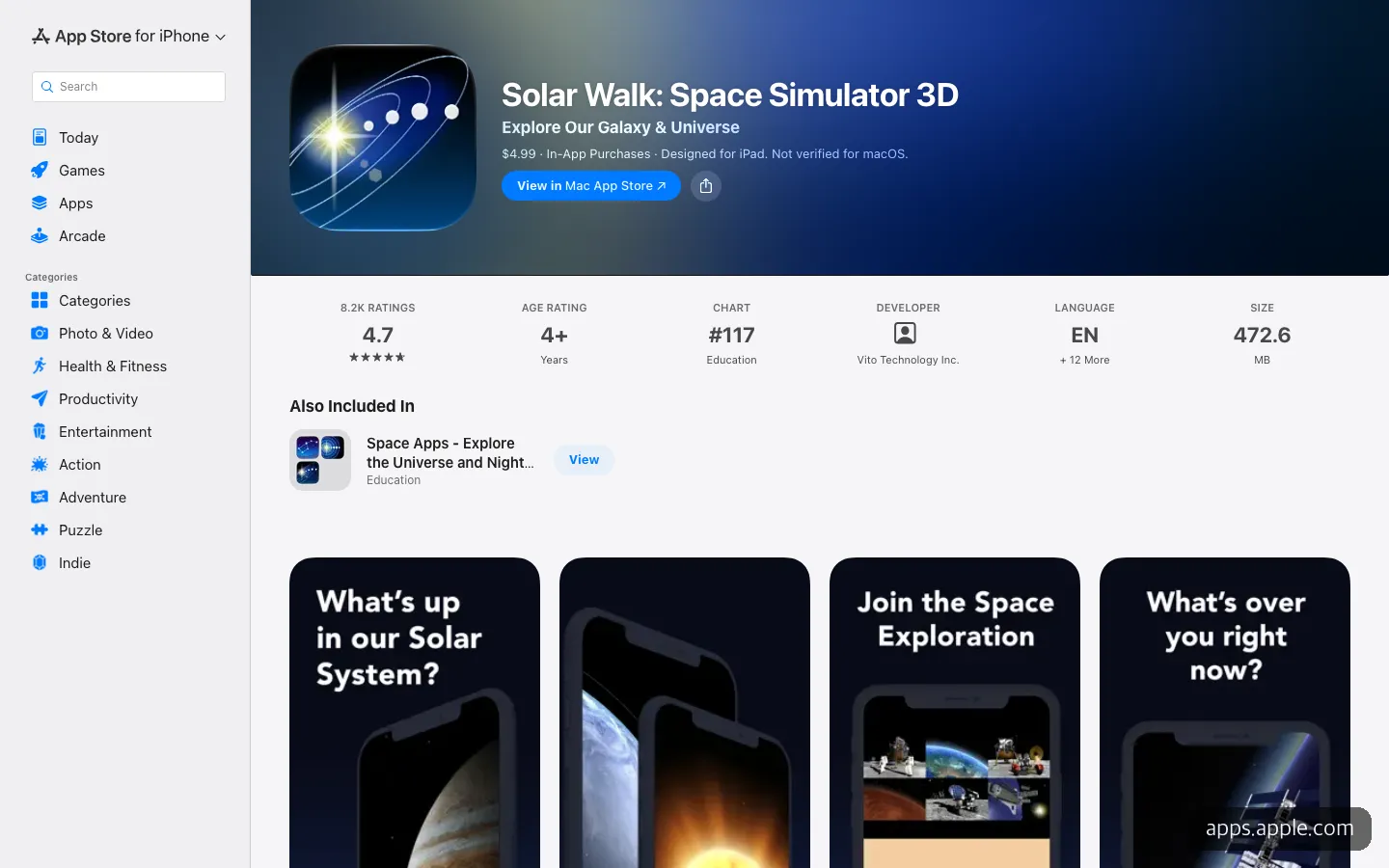
Solar Walk, which has held its place in the same search for a long time. It has more than 8,000 ratings.
All three competitors are in the Education category, and their screenshots lean toward “look and learn” planet information and orbits. Cosmos stands alone in the Simulation category and leads with piloting, as in “Fly your own ship to a black hole.” That makes it a different kind of choice within the same search results. Its size is about one fifth of the competitors’, and because you can try it free before deciding to buy, it also differs from the $4.99 up-front apps.
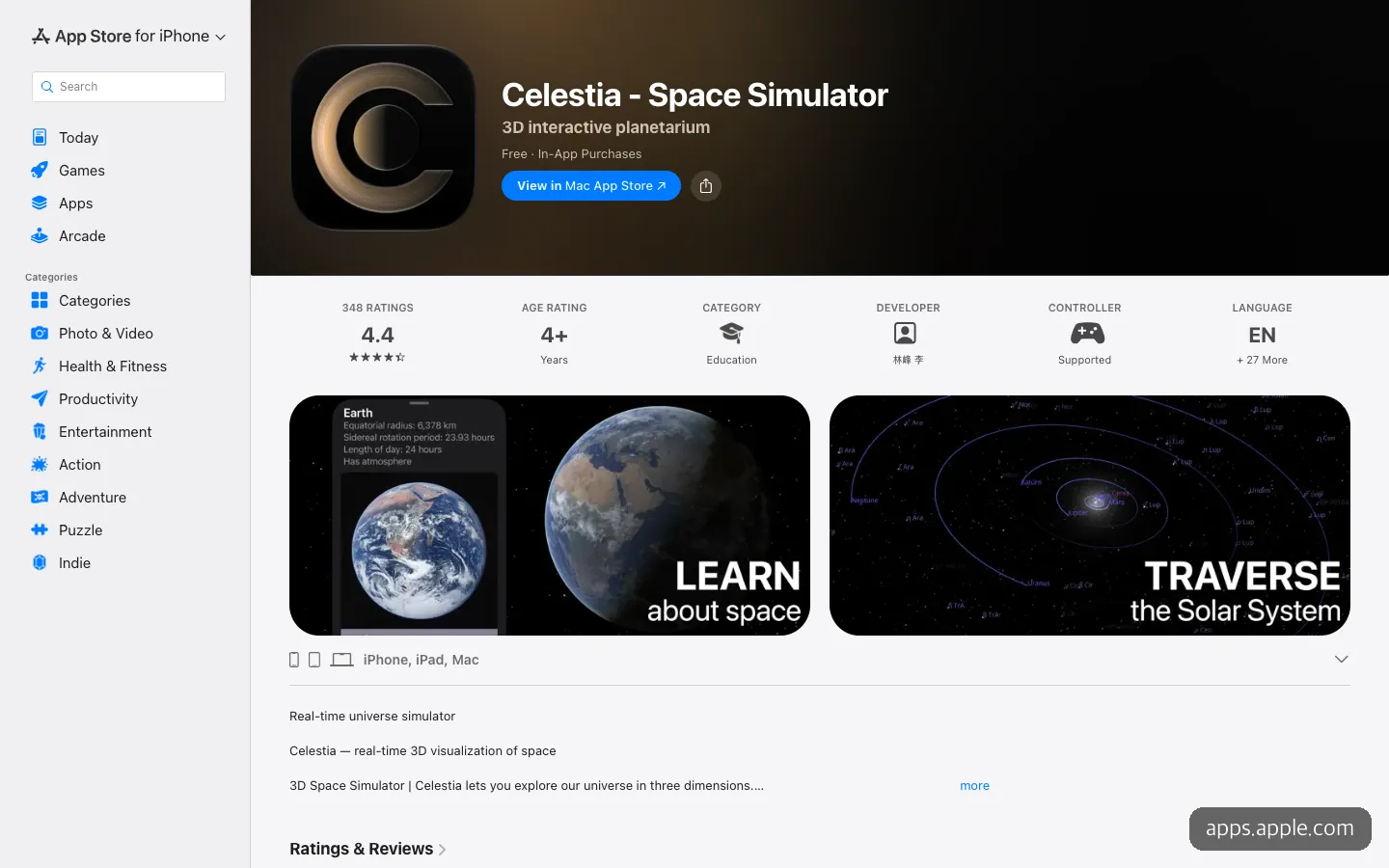
Celestia, which starts free and unlocks through a subscription. It supports 28 languages.
On the other hand, the weaknesses show up right in the table. 4 ratings next to 8.2K is hard to trust. The “4 Ratings” label catches the eye more than the 5.0 number. There are only two languages, too, so people in Russia, the second-biggest source of downloads, are using the English screens.
Four improvements coming next
Here they are in the order the numbers point to.
- Collect reviews first. This is why the latest update was changed to occasionally ask people who have used the full version for a review. The number of ratings largely decides whether someone who opens the page from search taps install.
- Open an English demo. The free browser demo is currently in Korean only. For Americans, that leaves no way to get a taste other than installing the app. With an English version, Google search could bring people in too.
- Add languages, starting with Russian. Apple’s developer guide also recommends switching the description and keywords into each country’s language. The 54 downloads from Russia came with no preparation at all, so there is a lot of room to grow.
- Handle iPad screens separately. Nearly half of App Store downloads (276) are on iPad, but the store screenshots are currently just two with English text. Putting iPad screenshots that spread the solar system across a big screen up front, along with scenes of a class or a family watching together, would match the people arriving now better.
The next idea to widen this path
What Cosmos showed is the possibility that “even if you cannot beat the Instagram feed, you can win in the English search bar.” So the criteria for picking the next idea change too. Before asking whether something would be shared in Korea, we should first ask whether it has a clear English search term and whether the existing apps in that field are expensive, subscription-based or heavy.
By that standard, here are the candidates we came up with (they are at the idea stage). A night sky calendar that tells you the dates of eclipses, meteor showers and planetary alignments could be split off from the “Today’s Sky” feature Cosmos already has. If the iPad demand really is for classes, a science experiment simulator for experiencing Moon landings or orbital principles with a one-time purchase would also be an app in the same search niche. Either way, the order is the same. Name the app and write the subtitle as English search terms first, and attach the Korean name separately later.
This is an app that drew more than 400 Americans without a single ad. The next job starts with raising the number of reviews these people leave from 4 to double digits.
Frequently asked questions
Is Cosmos 3D free?
You can download it for free and take the automatic space tour and fly in Earth orbit. Every destination, such as a Moon landing or a black hole, opens with a single purchase. Through November it is at the launch discount price ($2.99 in the U.S., 4,400 won in Korea), and from December 1 it switches to the regular price. There are no ads and no subscription.
Can I use it in Korean?
Yes. The app supports English and Korean, and if your phone’s language is Korean, the screens appear in Korean. On the Korean App Store you can find it under the name “우주 비행 시뮬레이터: 코스모스 3D” (Space Flight Simulator: Cosmos 3D).
Does it work without internet?
After installation, you can use it offline. You can download it on iPhone, iPad and Android phones, and on the U.S. App Store it is also listed for Macs with M1 or later and for Apple Vision.
Sources 8
- 코스모스 3D 소개 페이지
- Cosmos: Solar System Space Sim (App Store 미국)
- 우주 비행 시뮬레이터: 코스모스 3D (App Store 한국)
- Apple Ads, Search tab 안내
- Apple Developer, Expanding your app to new markets
- eMarketer, GenAI, social apps drive non-gaming app revenues past gaming in 2025
- Solar Walk: Space Simulator 3D (App Store 미국)
- Celestia - Space Simulator (App Store 미국)
AI helped with research and the first draft; the operator tried the subject firsthand, checked and edited this article before publishing. Let us know if you spot a mistake.