
Tell a coding agent “build a feature that saves uploaded photos to S3,” and the code shows up fast. The hard part comes next. To see whether it actually works, you have to put keys into a real AWS account, create a bucket, and worry about whether charges will pile up. aws-emulator is a free local emulator that AWS released on November 11, 2026. It imitates AWS APIs such as S3 and DynamoDB on your own computer or in CI, so you can test code without an AWS account.
The key point is that an agent can repeat “run it, fix what’s wrong” dozens of times without a bill building up. That said, it is not a tool you can hand every test to. Knowing how far you can trust it is half of this article.
A Local Emulator Built by AWS Itself
According to the official documentation, aws-emulator is a program with no graphical interface (GUI). When you run it, a single AWS API address opens on your computer, and your app or the AWS CLI sends requests to that address instead of to real AWS. Requests and resource data never leave for AWS, and there are no extra charges. You only pay for the resources you use when you actually deploy to AWS.
The license is CC0-1.0, which is close to public domain (only the vendor folder is Apache 2.0). As of November 12, 2026, it has 2,951 GitHub stars, and the latest release is v1.0.322, published on November 11. Between November 8 and 11 alone, releases ran in quick succession from v1.0.265 to v1.0.322, and the documentation says updates ship several times a day.
How it was built also drew attention. According to a post on About Amazon by Matthew Goldberg, a senior principal engineer at AWS, the emulator was built by a team of autonomous AI agents that write tests, find issues, and fix them. The first SQS version took about 15 minutes, and a prototype covering the rest of AWS took one weekend day.
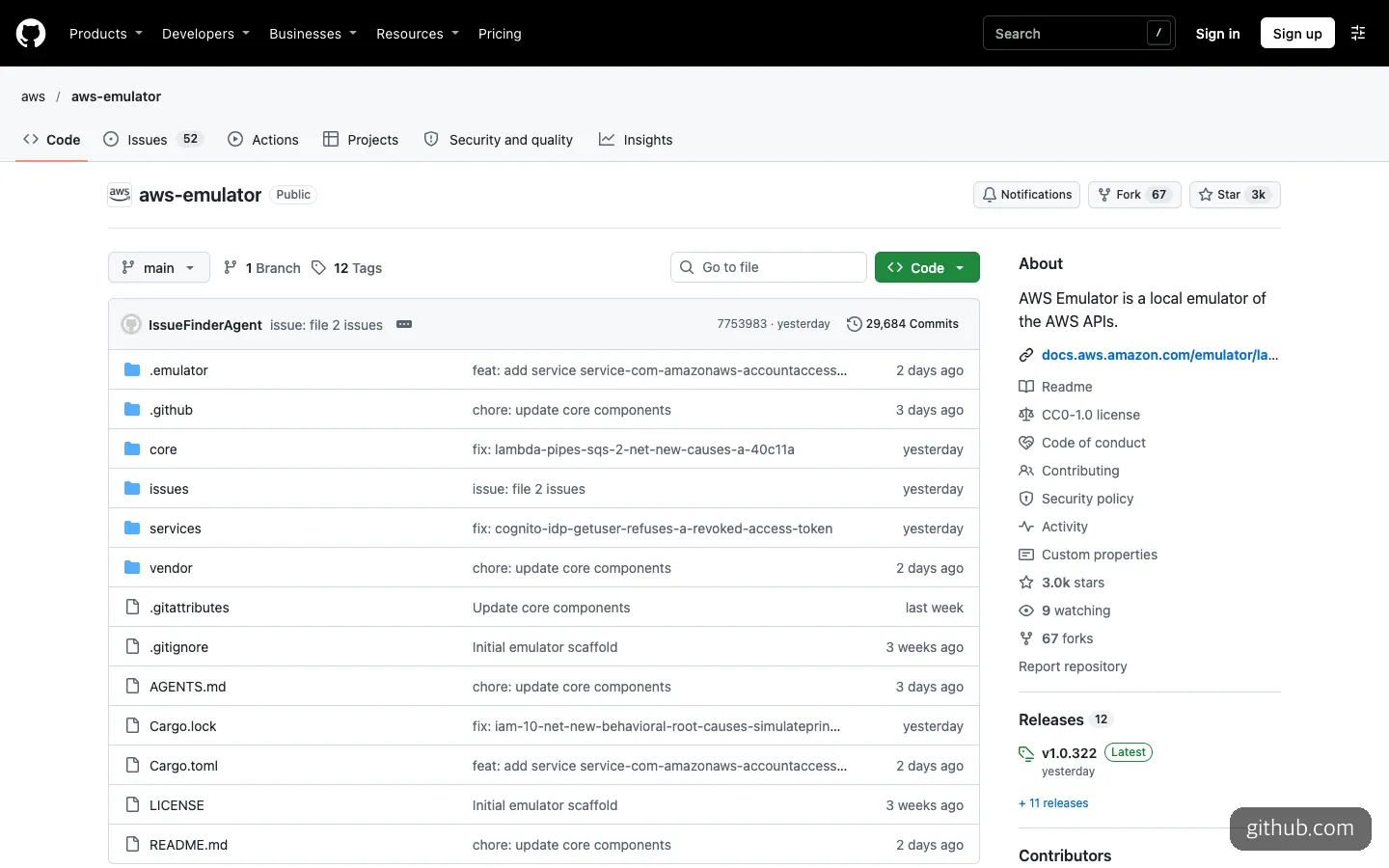
The repository’s front page. The author of the last commit appears under an agent name, IssueFinderAgent.
Once you open the repository, you can see that claim on screen. The contributors section is empty, and there are about 29,700 commits, an enormous number for a repository created in September. Commit messages also follow a pattern that takes issue names verbatim, such as “fix: cognito-idp-getuser-refuses-a-revoked-access-token.” Features that don’t work and features that have been fixed are recorded separately in the issues/ folder, so you can check ahead of time whether the APIs your project needs work right now.
The supported scope is “AWS services whose API models are public.” The number of services varies by report: InfoWorld says 426, GeekWire says more than 200, and the official AWS documentation gives no number. If you call an operation that hasn’t been built yet, you get an HTTP 501 (NotImplemented) back.
When Should You Use It?
There are three situations where it fits well. They also overlap with the uses the official documentation lists.
- When you want an agent to run AWS code repeatedly. You can create and delete buckets, or write to and read from tables, dozens of times with no cost and no cleanup burden. You also don’t have to worry about an agent creating real resources with the wrong settings.
- When you are building a prototype quickly. It suits the stage before you create an AWS account, when you just want to see whether an idea runs.
- When you run integration tests in CI. AWS explains that each instance has its own port, keys, and in-memory state, so multiple tests or multiple agents can start instances at the same time without interfering with each other. Because resources live only in memory, a restart returns everything to a clean state.
There are also clear situations where it doesn’t fit. The biggest is permission checks. The emulator does not evaluate IAM policies or resource policies the way AWS does. That means that just because something ran well on the emulator, there is no guarantee you won’t get “Access Denied” on real AWS. The documentation itself says not to use it for security testing.
Architectures that span multiple regions are a problem too. It doesn’t separate regions and accounts, so you have to start a separate emulator for each region. Behavior is also verified only in us-west-2 (us-east-1 for global services). Long-running execution and load testing haven’t been verified. An IDC analyst quoted in InfoWorld also pointed to its inability to reproduce situations such as throttling or outages as a limitation.
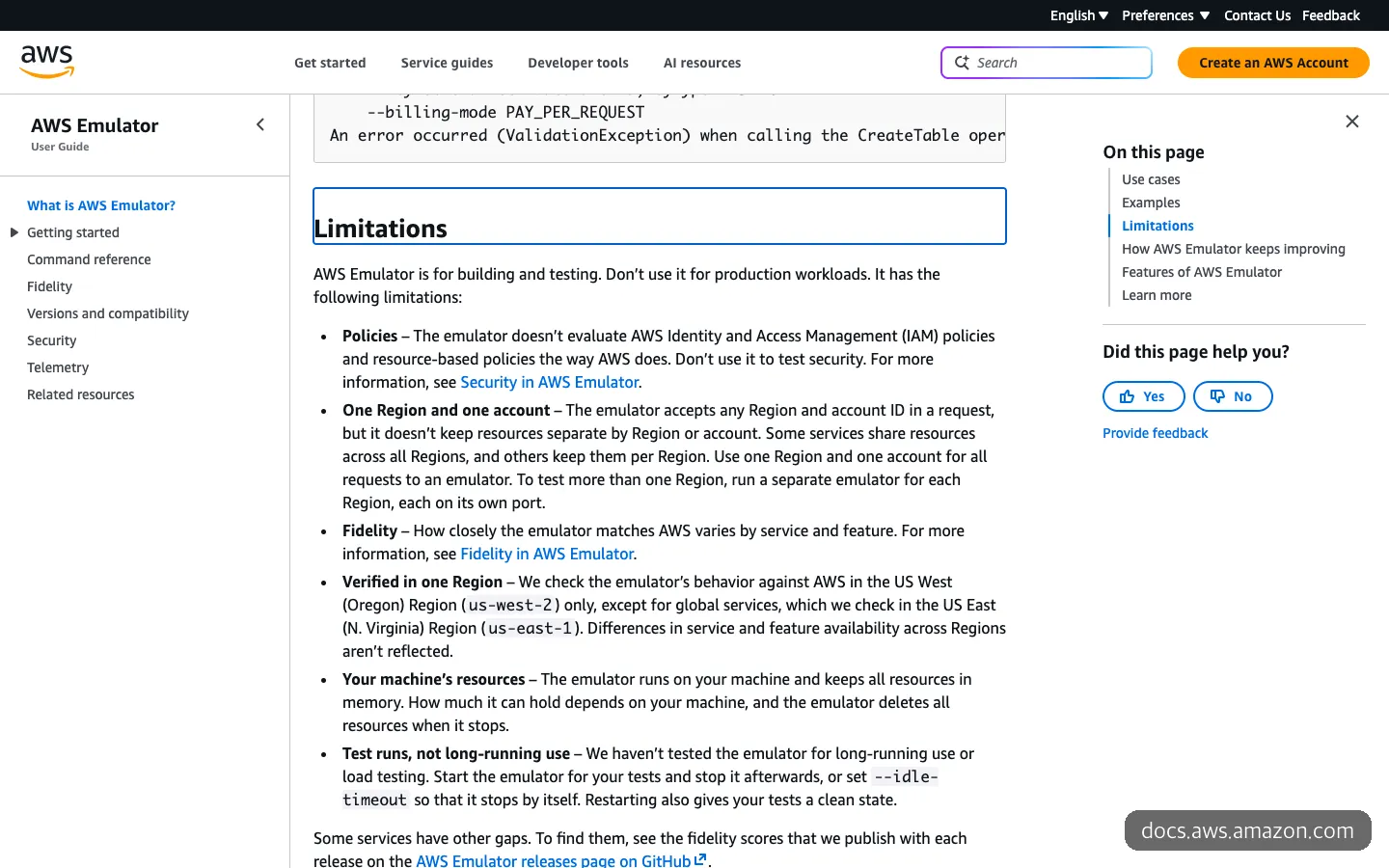
The limitations list in the official documentation. It states that IAM policies are not evaluated, that it covers one region and one account, and that resources are deleted when it stops.
In short, it is useful when you want to see whether your code is calling AWS APIs correctly, but when you want to know whether your deployment will really run safely, you still need real AWS. If you are building a service on your own with vibe coding, the right flow is to run the development stage on the emulator and check once in a real account just before deployment. That cuts costs without missing permission problems.
How Do You Use aws-emulator?
What you need depends on your operating system.
| Environment | Install path | Notes |
|---|---|---|
| Linux (x86_64, aarch64) | RPM and Debian packages | Install directly. About 160 MiB of idle memory |
| macOS, Windows | Docker | No prebuilt image. Build it yourself from the official Dockerfile |
| Rust projects | Embedded mode | Runs inside your test code |
If you work on a Mac, using the agent skill is much easier than building with Docker by hand. All you need is AWS CLI 2.35.0 or later. After checking the version, run the one-line command below, and the skill is installed in every coding agent the AWS CLI finds (Kiro, Cursor, Claude Code, and others). The command is exactly as written in the Getting started with agents documentation.
aws --version
aws agent-toolkit add-skill --skill-name aws-emulator --region us-east-1
The skill installs the emulator through a Linux package or Docker depending on your operating system, runs it, and then connects the CLI and SDKs. It also fixes connection, certificate, and signing errors. The documentation says it asks first before touching anything outside your working folder, such as running sudo or editing your shell profile. Even when you hand the work to an agent, the permission to change your system stays with you.
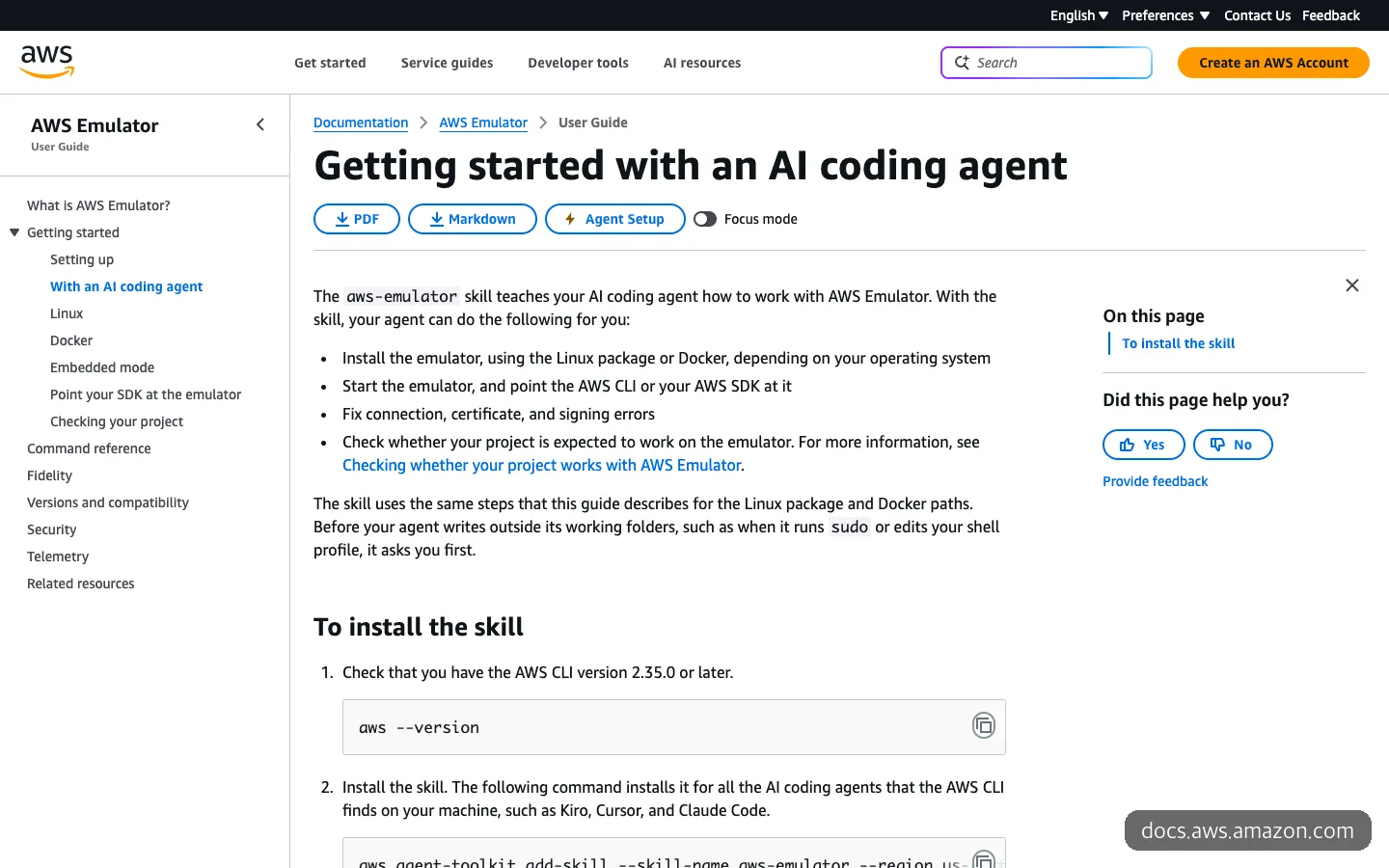
The four things the agent skill does, and the installation steps. It says the skill asks the user first before using sudo.
Once the skill is installed, you can make requests to your agent like this. The documentation gives two examples: “Install AWS Emulator and point my project at it.” and “Will my app in this repo work on AWS Emulator?” To be a bit more specific, it helps to split your requests into two branches.
The first is installation and connection. You ask the agent to install the emulator and attach your project to it, and add that it should clear any real AWS key environment variables in the shell you test in, and show you the result of aws sts get-caller-identity after connecting. The second is a check. You ask it to find the AWS operations this repository uses and sort them into the parts you can trust on the emulator and the parts you can’t.
The second request is especially useful. The skill finds the AWS operations your project uses, compares them against the per-service verification scores (fidelity), and tells you how far you can trust it. If it finds a behavioral difference, it drafts an issue and shows it to you before filing it.
One number tells you whether the connection worked. If aws sts get-caller-identity returns the account number 000000000000, you are attached to the emulator. If a real account number comes up, you are still calling real AWS, so stop right away.
There are also a few spots where you can get stuck when connecting by hand. The default address is port 9297 on your own computer (127.0.0.1), and if you write the address as localhost, S3 requests don’t reach it properly. The emulator generates new keys each time it runs, and you have to make each runtime trust the certificate separately: NODE_EXTRA_CA_CERTS for Node.js, the truststore for Java, and SSL_CERT_FILE for Rust and .NET. The skill handles these small settings for you, so if you work with agents, the skill route is the right one.
How Does It Differ from LocalStack, Floci, and moto?
Tools that imitate AWS locally existed before. When the news was posted on GeekNews, a Korean developer news community, the comments were also filled with comparisons to Floci, LocalStack, and Moto.
| aws-emulator | LocalStack | Floci | moto | |
|---|---|---|---|---|
| Made by | AWS | LocalStack | Open-source community | Open-source community |
| License | CC0-1.0 | Commercial plans | MIT | Apache-2.0 |
| Cost | Free | Hobby is free (non-commercial only), Base $39 per month, Ultimate $89 per month (billed annually) | Free | Free |
| Account or token | Not required | Account and auth token required | Not required | Not required |
| Form | Local server built in Rust | Docker image | Local server built in Java | Python mocking library for tests |
Pricing and star counts as of November 12, 2026
Since March 23, 2026, LocalStack has merged its images into one and now requires an auth token to use it. Even the free plan can’t be used for commercial purposes. If you are doing company work or building a service that earns revenue, this is a sticking point. In exchange, the paid plans include IAM policy testing, which aws-emulator lacks. If you want to check permissions locally too, LocalStack’s paid tier is still the answer for now.
Floci is a free tool that works without an account, and it is introduced as a drop-in replacement for LocalStack (port 4566). moto is a Python library that has been around since 2013, so it is a bit different in nature. Instead of starting a server, it attaches @mock_aws to your test code and intercepts AWS calls.

GitHub star counts of the three local AWS emulators. They were released at different times.
By star count alone, aws-emulator (2,951) is less than one tenth of Floci (31,502). But Floci’s repository was created in February 2026 and moto’s in 2013, while aws-emulator’s number is just a day or two after its official release. Rather than popularity, the reason to pick this tool would be that “AWS built it itself and it starts from the API models.”
What to Know Before You Use It
The first thing to look at is security. According to the official security documentation, when the emulator runs things like Lambda function code, it does not isolate them from your computer. That means they run with your own user permissions. So the documentation says to pass in only code you trust, and not to put in real credentials or real data. The IDC analyst also named the lack of a sandbox as a security risk.
The documentation also warns that if you write the port in a short form like -p 9297:9297 when starting with Docker, it opens to the entire same network. When you hand this to an agent, it is worth asking once whether it opened the port only on 127.0.0.1.
It is also good to know that telemetry is on by default. It sends anonymous usage data, and you can turn it off with aws-emulator --telemetry off or the environment variable EMULATOR_TELEMETRY=off.
The way it is maintained is unusual too. The repository doesn’t accept pull requests, and it takes bugs and behavioral differences only through GitHub Issues. Security fixes come only in the latest release, and since releases come out several times a day, you lose out if you hold on to an old version. A complaint in the GeekNews comments was that it has no feature for quickly resetting state between tests. For now, restarting is the way to reset.
This article was written by opening the repository and the official documentation directly. I did not install the emulator and run S3 or DynamoDB calls. To be most certain of the real behavior, have your agent check your own project first with the second request above.
Frequently Asked Questions
Is it really completely free?
The emulator itself has no charge. You don’t need an AWS account either. When you later deploy to real AWS, you only pay for the resources you use then.
Can I use it with Claude Code or Cursor?
Yes. The skill installation command installs the skill in every coding agent the AWS CLI finds, and the agents the documentation gives as examples include Kiro, Cursor, and Claude Code. However, AWS CLI 2.35.0 or later must be installed first.
What happens to the data I created when I turn the emulator off?
It all disappears, because resources are kept only in memory. That is actually convenient for testing, but it doesn’t suit uses where you want to keep data and continue with it later.
I’m using LocalStack. Should I switch?
If you use IAM policy testing, it is better to stay put for now, because aws-emulator doesn’t evaluate permissions. If you needed a free tool for a commercial project, or wanted to run CI without a token, it is worth trying.
Sources 8
- aws/aws-emulator (GitHub)
- AWS Emulator is now available for building and testing AWS applications locally (AWS What's New)
- What is AWS Emulator? (AWS Emulator User Guide)
- Getting started with an AI coding agent (AWS Emulator User Guide)
- AWS Emulator: a local emulator built 100% by autonomous AI agents (About Amazon)
- AWS unveils local emulator service to help enterprises accelerate app development and testing (InfoWorld)
- AWS distills its cloud into a local emulator that runs on your PC (The Register)
- LocalStack Pricing
AI helped with research and the first draft; the operator tried the subject firsthand, checked and edited this article before publishing. Let us know if you spot a mistake.