
Anyone who sees an “AI note-taker” bot in a video call’s participant list wonders about it at least once. You also have no idea which company’s servers that recording is headed to. Yogurt is a free desktop app that the software company Frigade released on GitHub in November 2026 under the MIT license. It records call and microphone audio, then handles transcription and meeting summaries entirely with local AI on your own computer. It sends no bot into your calls, and it doesn’t ask you to create an account.
After it appeared on Hacker News under the title “A free, private, open-source Granola alternative,” it had collected more than 220 points and 92 comments as of November 12, 2026. The repository had roughly 560 stars the same day. But it is a version 0.3.x release that went public only days ago, so whether it’s worth using depends on your PC’s specs and the language of your meetings.
Meeting Notes Without a Bot
The README lists what Yogurt does in a few short lines: live transcription, meeting summaries, meeting search and folder organization, questions across multiple meetings at once (answers come with links to the source meetings), and Markdown copy and export. It offers to record when a call starts and stops on its own when the call ends.
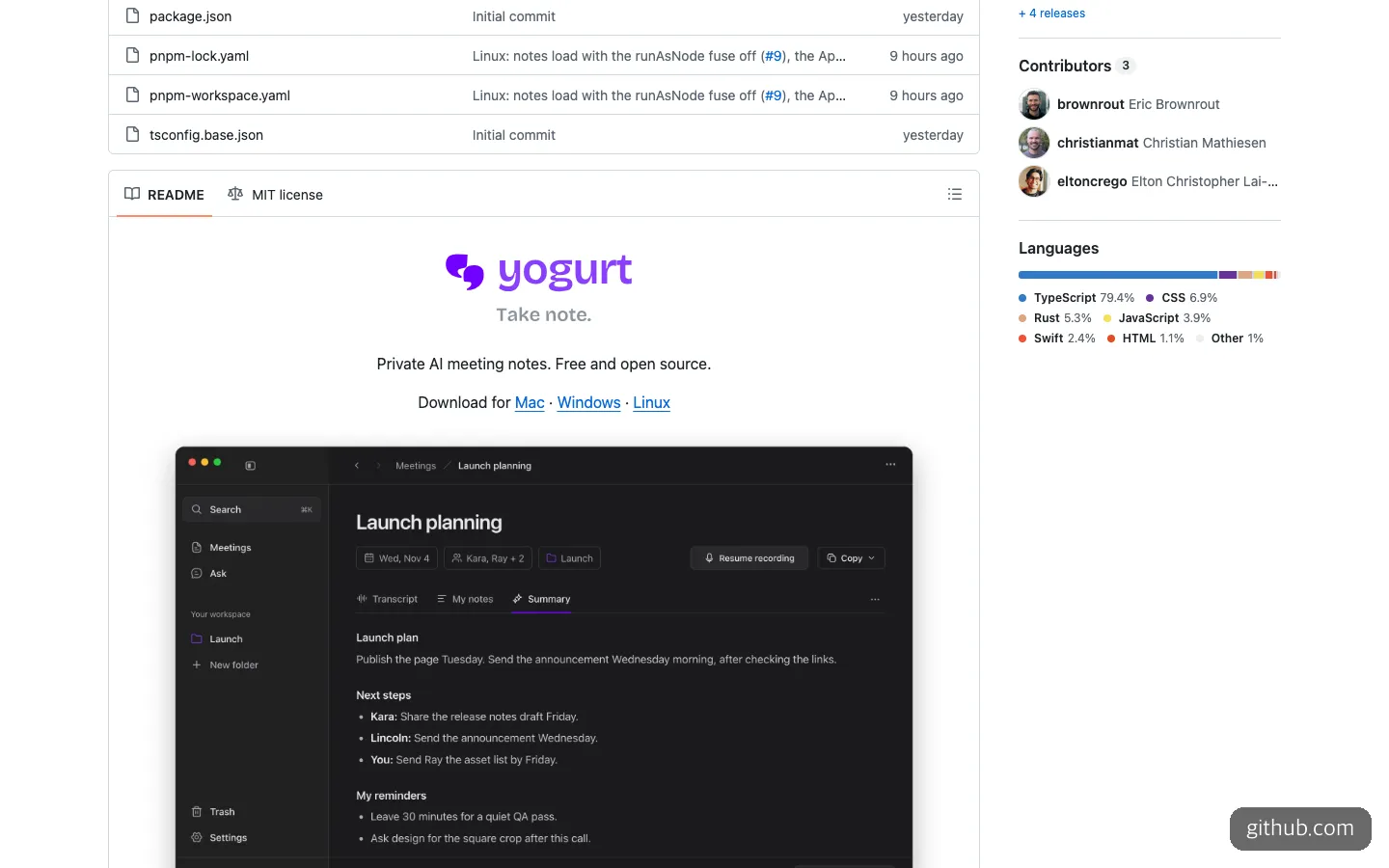
The top of the README. In the example meeting’s summary tab, the summary, next steps, and personal reminders are separated.
Under the hood it’s a familiar mix of open-source parts. According to the creator’s Hacker News post, the app shell is Electron, transcription runs on whisper.cpp (or Apple SpeechAnalyzer on supported devices), and summaries come from open-weight models run through llama.cpp, with the model size chosen automatically to fit your hardware. A local MCP server is added so AI apps such as Claude can read your meeting records. The makers’ claim is that “you don’t need a frontier model.”
The official help documentation states that audio, transcripts, notes, and questions are all processed locally, and that no usage data is collected. It says the internet is used only for downloading models, for Apple’s speech assets on Mac, and for update checks.
When Yogurt Makes Sense
Start with the cases where it fits. There are three.
- When you’re reluctant to put meeting content on outside servers. For internal planning meetings or calls where customer information changes hands, where the mere idea of a recording going to someone else’s cloud is a burden, Yogurt fits. From processing to storage, nothing leaves your computer.
- When you use an Apple Silicon Mac with plenty of memory. Speaker name labels and calendar integration for Zoom, Teams, and Meet work only on Mac. Mac is where you get the full feature set.
- When you want to pull your meeting notes back out in an AI coding tool or Claude. Connect it over MCP, and an AI app can read “the action items we settled on in last week’s meeting” directly.
There are clear cases where it doesn’t fit, too. First, when most of your meetings are in Korean. The README says only that multilingual transcription in 99 languages is an optional feature and that the default is English only. There is not yet any material for checking Korean transcription or summary quality. Second, when you have to get by on a single laptop with 8GB of memory. 8GB is only the minimum requirement, and the documentation says that on Windows and Linux, setup stops outright if transcription speed is too low.
The Models Are Bigger Than the Installer
The installer you download is only a few hundred MB. The real weight is in the AI models downloaded on first launch.
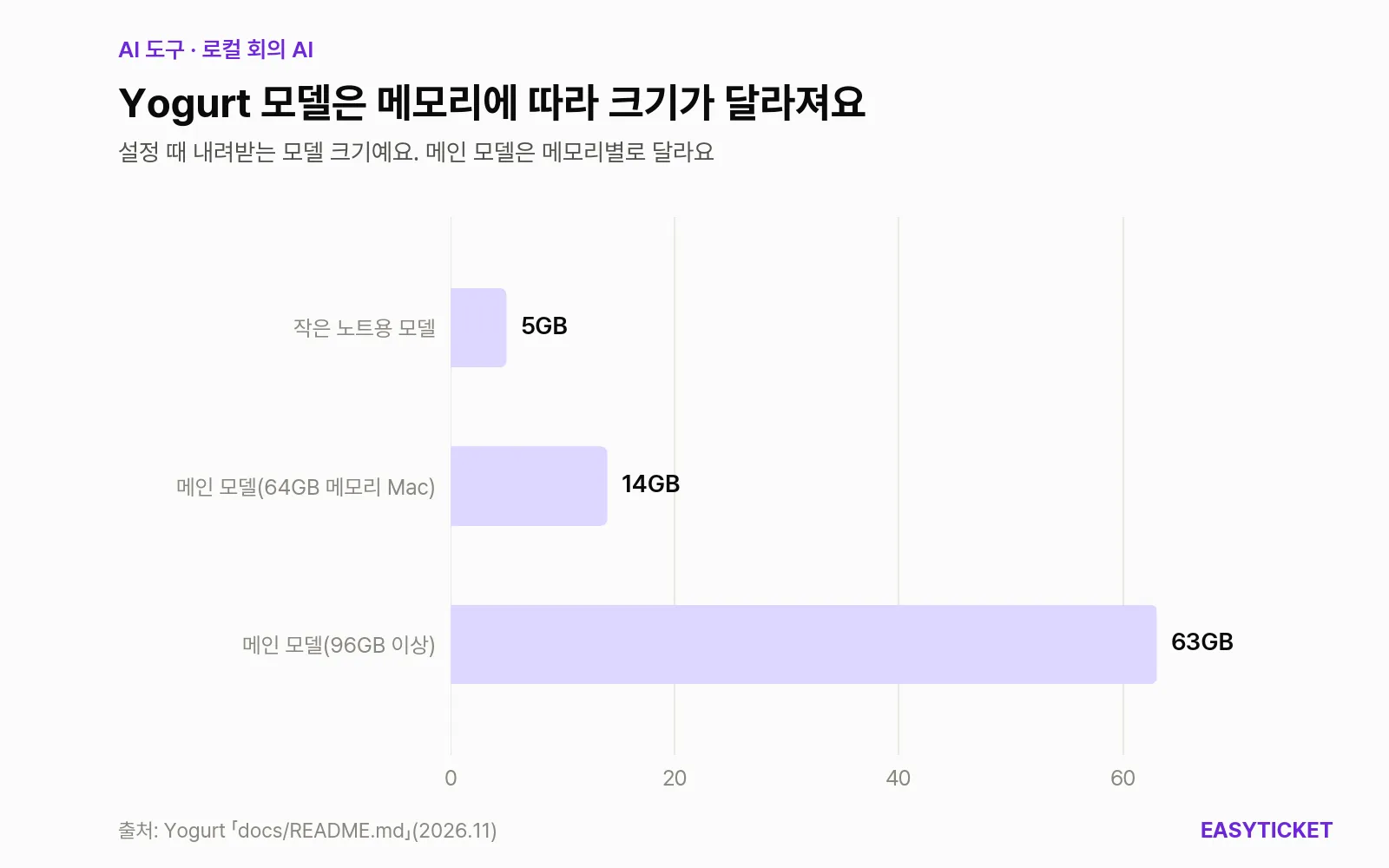
It first downloads a 5GB small model for notes, and the main model grows from 14GB to 63GB depending on your computer’s memory.
As the chart shows, on a Mac with 64GB of memory the main model is about 14GB, and with 96GB or more it’s about 63GB. The more memory you have, the larger the model it picks, so storage space gets used up accordingly. Fortunately, recording works as soon as setup finishes, and the notes model keeps downloading in the background. Once all the models are downloaded, notes and questions work offline too.
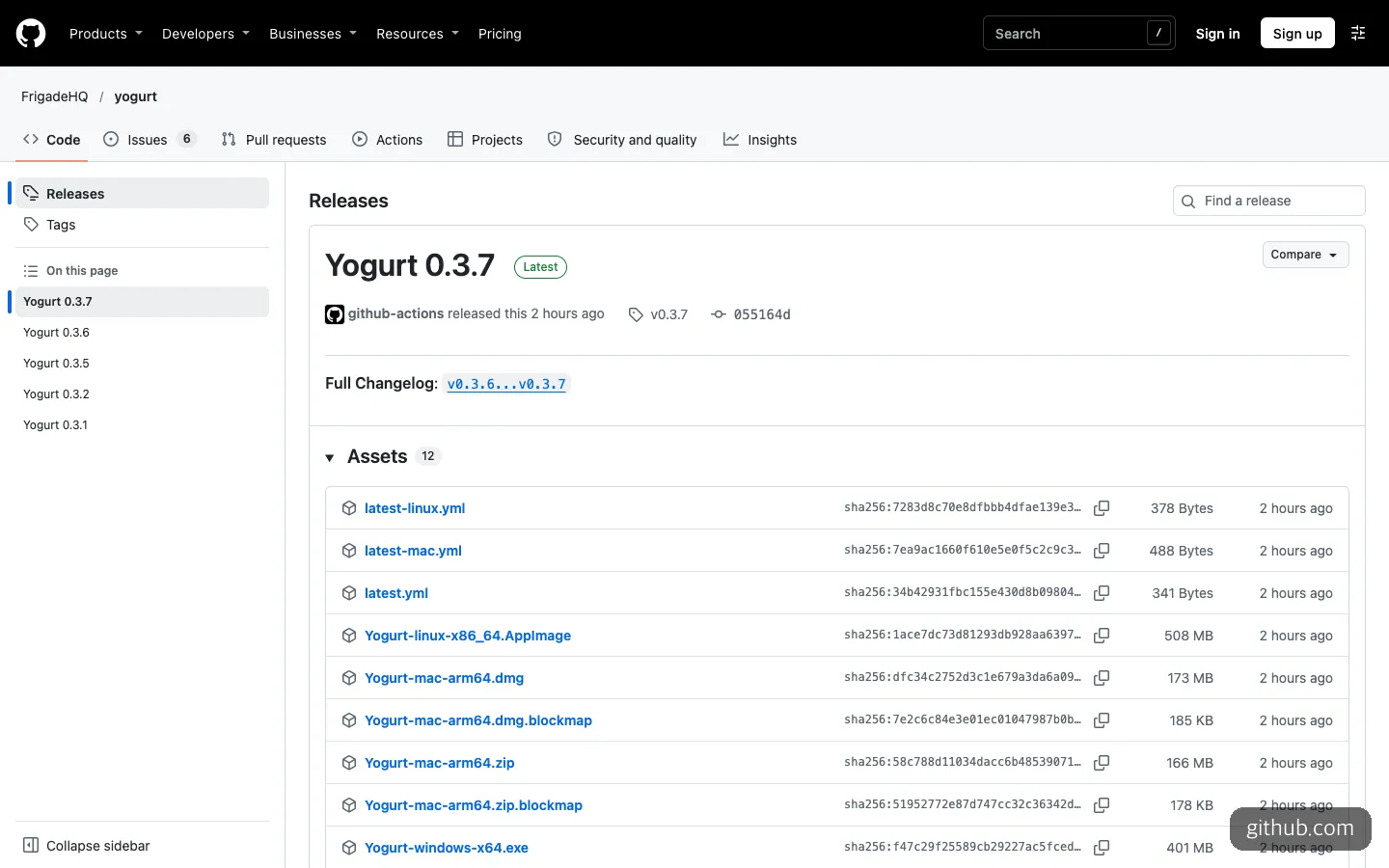
The latest release is 0.3.7. It has no description, only a link to the changelog, and the installers range from 173MB for Mac to 508MB for Linux.
Open the releases page and you’ll see five releases, 0.3.1 through 0.3.7, posted back to back within two days. The latest one has no line explaining what changed, only a link to the changelog. That means it is being fixed quickly, but it is also a sign that it’s still too early to rely on.
How to Use Yogurt: What to Prepare and What to Hand to AI
If you’re just using it, you’ll almost never need to type a command. Download the one installer that matches your operating system from the GitHub releases.
- Mac: Apple Silicon, macOS 14.4 or later.
Yogurt-mac-arm64.dmg - Windows: Windows 10 version 2004 or later, x64.
Yogurt-windows-x64.exe - Linux: Ubuntu 22.04 or later, x64, with PulseAudio or PipeWire required.
Yogurt-linux-x86_64.AppImage - All platforms: 8GB of memory or more, no account needed, and plenty of storage for models
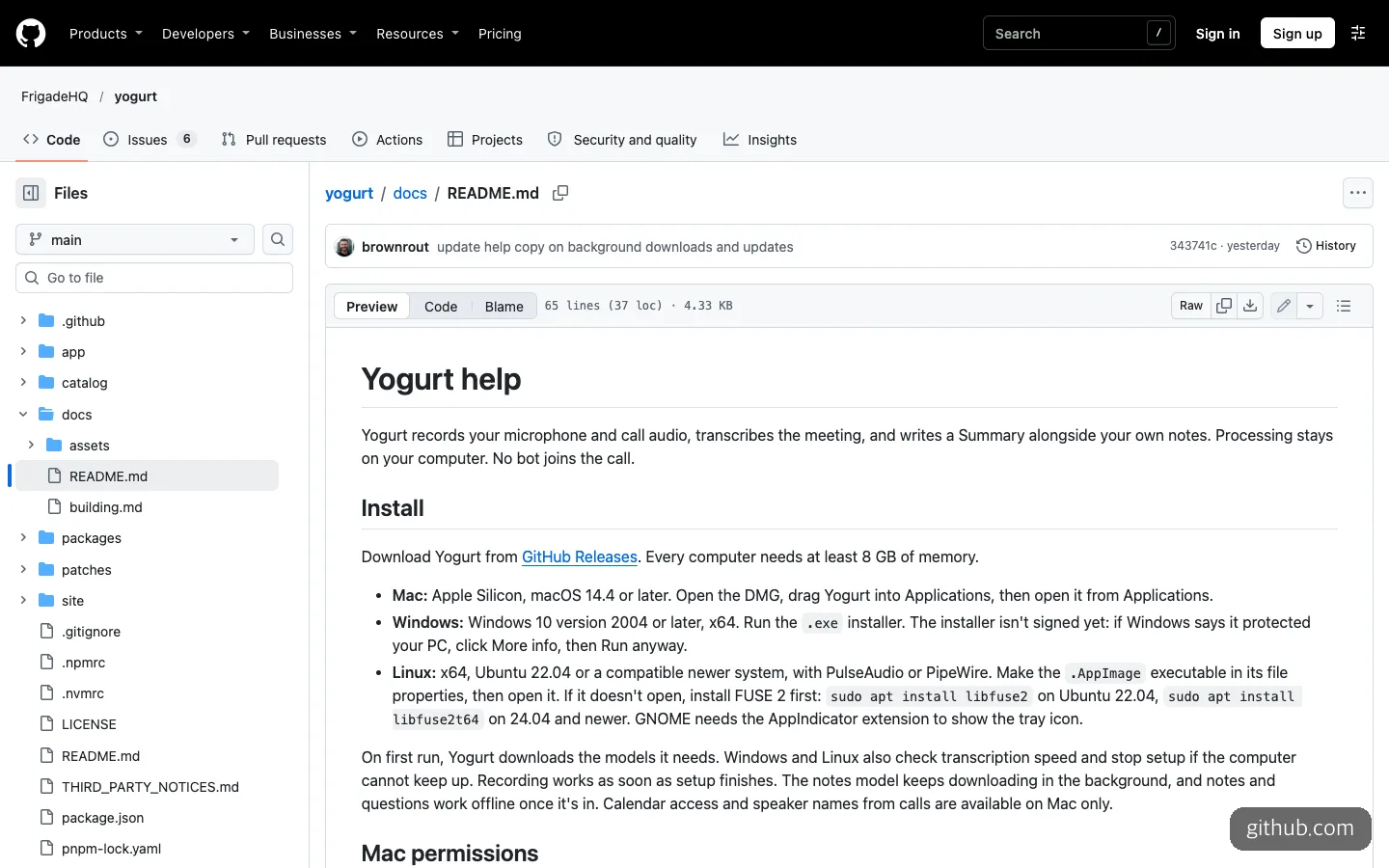
The installation section of the help docs. It notes the 8GB memory minimum, the Windows unsigned-app warning, and the Linux FUSE 2 instructions.
The Windows installer isn’t signed yet, so a protection warning appears, and you have to click “More info → Run anyway” to get past it. If the AppImage won’t open on Linux, the docs say to first install sudo apt install libfuse2 on Ubuntu 22.04, or sudo apt install libfuse2t64 on 24.04 and later.
If you want to tinker with the code or just get the screens up first, you can hand the source build to Claude Code or Cursor. The prerequisites are Node.js 24, pnpm 10.7.0, and CMake, plus Xcode command line tools on Mac, or Rust and the Vulkan SDK on Windows and Linux. The order given in the documentation is as follows.
git clone https://github.com/FrigadeHQ/yogurt.git
cd yogurt
pnpm install --frozen-lockfile
pnpm -C app native
pnpm dev
There’s also a way to run it in a fake mode without any models. It’s handy when you only want to see the screen flow before downloading tens of GB.
YOGURT_FAKE=1 pnpm devThree things are enough to include when you ask an AI coding tool. Have it download the repository and proceed in the order of the build docs, tell you first if anything is missing from your computer, and skip downloading models and bring up only the screens in the fake mode above.
To connect your meeting notes to an AI app over MCP, turn on access under AI apps in Yogurt’s settings and copy the helper command into the app. The documentation goes only that far, so you can leave the rest to the AI. Ask it to add the copied helper command as a local MCP server, and once it’s connected, follow up by asking it to summarize only the action items assigned to you in this week’s meetings, along with their source meetings.
How It Differs from Granola, Meetily, and Anarlog
Quite a few tools solve the same problem. Names like OpenWhispr, Muesli, OpenOats, and Anarlog came up one after another in the Hacker News comments too. Putting Yogurt next to three of the more widely used ones shows where it stands (as of November 12, 2026).
| Yogurt | Meetily | Anarlog (formerly Hyprnote) | Granola | |
|---|---|---|---|---|
| Type | Open source, MIT | Open source, MIT | Community app MIT, enterprise parts commercial | Commercial service |
| Price | Free, no account | Free | Community app free | $0 to $35 per month |
| Operating systems | Mac (Apple Silicon), Windows, Linux | Windows and Mac, Linux via source build | Mac, Windows, Linux, mobile beta | Desktop and mobile |
| Summary model | Local models only | Ollama (local) or a choice of Claude, OpenAI, and others | Local such as Ollama and LM Studio, cloud optional | Cloud |
| Speaker identification | Speaker names on Mac only | Speaker separation supported | Not in the sources | Supported |
| Korean | Multilingual mode optional, quality unverified | Not in the sources | Not in the sources | Officially supported on desktop and mobile |
| GitHub stars | About 560 | About 32,600 | About 9,900 | Not applicable |
What sets Yogurt apart is that it has no cloud option at all. Meetily and Anarlog run locally but let you switch to a cloud model when needed, while Yogurt closes off that path from the start. On Hacker News, people asked for a cloud summary option such as OpenRouter and a model picker, and the makers replied that both are in the plans.
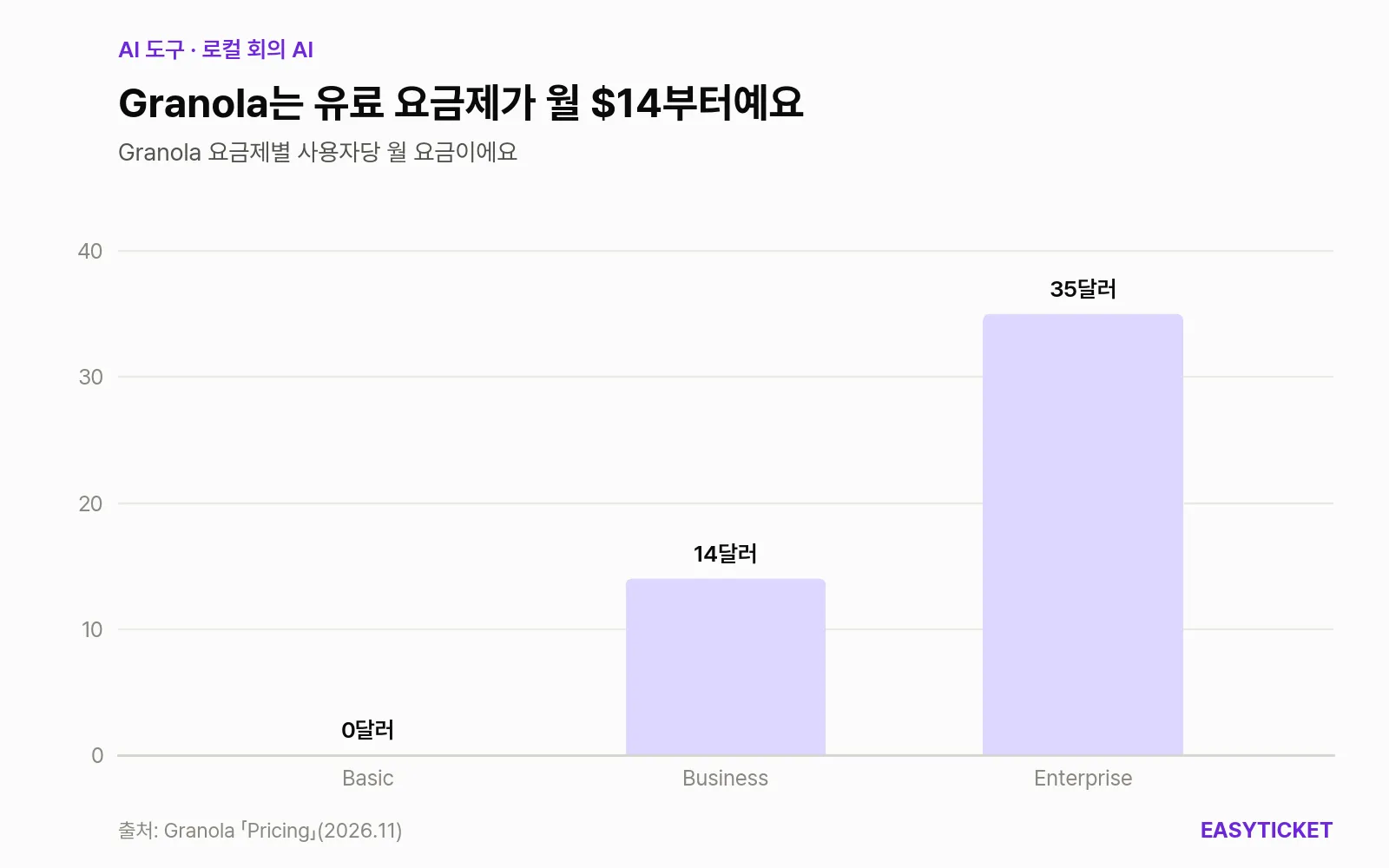
Granola’s Basic plan is free, Business is $14, and Enterprise is $35.
Comparing it with Granola ultimately comes down to money and language. The Granola pricing page lists a free base plan and a team plan from $14 per user per month, and it touts SOC 2 Type II certification and deletion of audio after transcription. If most of your meetings are in Korean, try Granola first. It’s the only one that states Korean support in its official documentation. If you have many English meetings and dislike the very idea of your data leaving your machine, choose Yogurt. If you want to switch between local and cloud and also want speaker separation, Meetily is the safer pick.
Four Things to Check Before You Use It
Turning on MCP can send meeting content outside. Local processing is the core of this app, and an MCP connection cuts a door into that fence. The documentation itself warns that a connected AI app can send what it reads to its own online model. That means connecting it to Claude Code or Cursor may pass your meeting records to their cloud models. On top of that, there are no per-app tokens, so with access turned on, every app running under the same user account can read them. The default is off and read-only, but while sensitive meetings are piling up, it’s safer to keep it off.
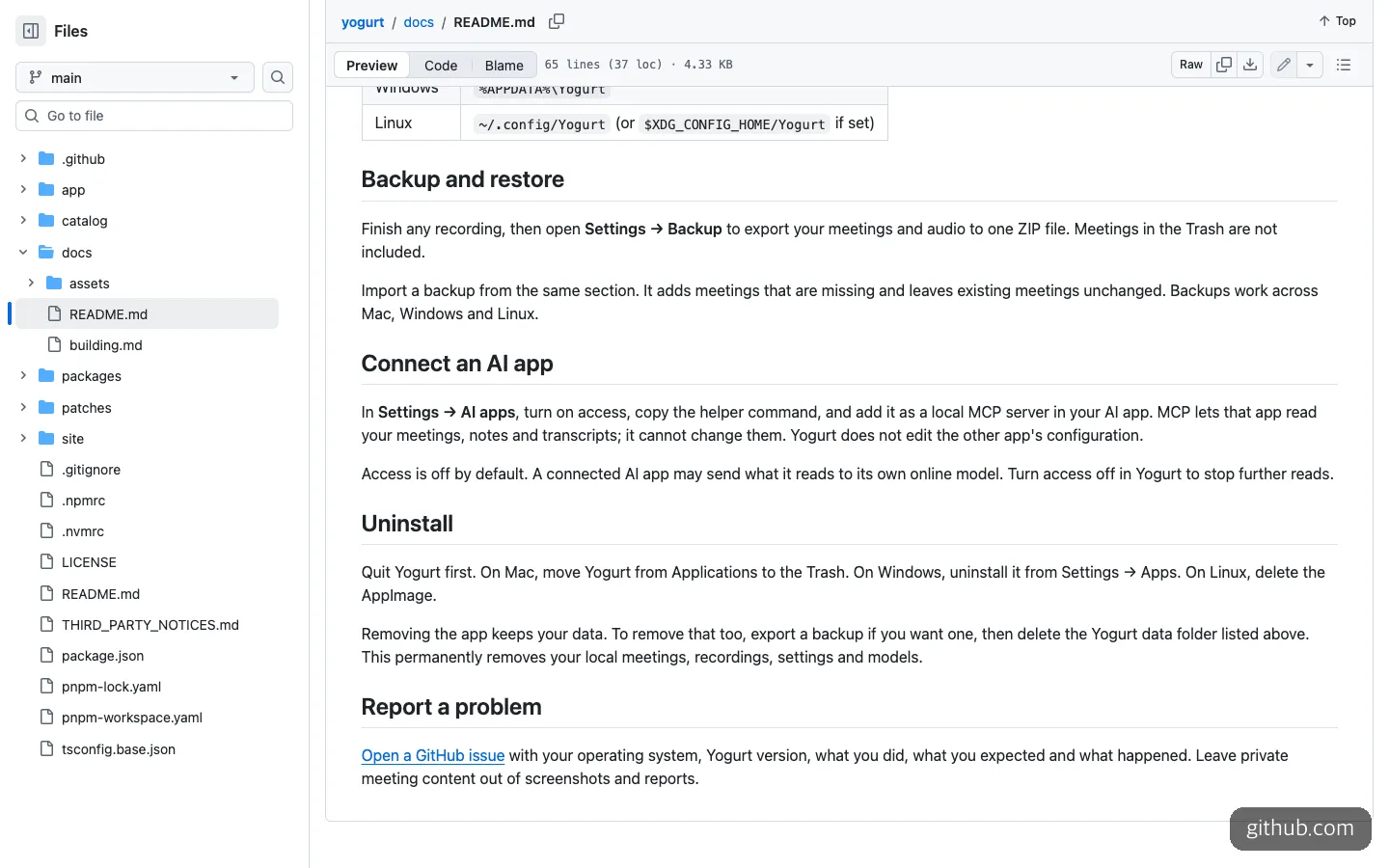
Connecting AI apps is off by default, and the documentation itself says a connected app can send what it reads to its own online model.
It doesn’t tell the other party you’re recording. This is the flip side of having no bot. No automatic notice goes to other participants, so you have to say you’re recording yourself. On Hacker News, people also asked for a recording-consent notice.
It is still a very early version. Three contributors, 91 commits, and a 0.3.7 release with no release notes. On Hacker News, one comment worried about the Electron app’s memory use, and another doubted the mood around the launch post because it came from a new account. Rather than trusting a single important meeting to this app alone, it’s better to use it alongside another way of keeping records for a while.
Deleting the app leaves your data behind. Meetings, recordings, and models pile up in ~/Library/Application Support/Yogurt on Mac, %APPDATA%\Yogurt on Windows, and ~/.config/Yogurt on Linux. To remove everything completely, you have to delete this folder yourself. Conversely, when moving, you can export meetings and audio as a single ZIP from Backup in settings and bring them to Mac, Windows, or Linux.
If you have frequent English meetings and a Mac with plenty of memory, it’s worth installing now. If your meetings are mostly in Korean, it’s better to wait until reviews of the multilingual quality accumulate.
Frequently Asked Questions
Is Yogurt really free?
Yes. It’s MIT-licensed open source, with no account or pricing plan. But because the models run on your own computer, storage space and memory pay the price instead.
Can I use it on an Intel Mac?
The official installer exists only for Apple Silicon (arm64). The Mac requirement stated in the documentation is also Apple Silicon with macOS 14.4 or later.
Is it okay to record company meetings?
Yogurt doesn’t automatically tell participants that they’re being recorded. Check your company’s security rules and get participants’ consent first, and as a basic courtesy, tell them yourself that you’re recording.
What happens if the internet drops during a recording?
The documentation says that once the models are fully downloaded, recording, notes, and questions work offline too. The internet is used only for things like downloading models and checking for updates.
Sources 8
AI helped with research and the first draft; the operator tried the subject firsthand, checked and edited this article before publishing. Let us know if you spot a mistake.