
The Reel got 2,567 views, but only 29 people made it to the game’s intro page over three days. That is the first result for Clock-Out Defense (칼퇴 디펜스), released on November 9, 2026. Clock-Out Defense is a pixel-art tower defense game for Windows and Mac that an EasyTicket developer built with vibe coding. You park it in a corner of your monitor and defend your desk until 17:59 so you can leave right on time (“칼퇴” in Korean, meaning leaving the office exactly at quitting time).
The same account once had a “secretly fishing at work” Reel that passed 430,000 views, so this was a quiet start. Here is what made us think the game would be fun, and where the path from Reel to website broke.
Guarding your seat from a corner of the monitor
The game board is an office, and the only thing you defend is your own desk. Unread emails, an assistant manager calling a meeting, and an old-school department head (the Korean “꼰대 부장” type) swarm in, while the clock stays frozen at 17:59. Click to stamp an approval seal down with a thud, and press Space to fire off a resignation letter. The 1, 2 and 3 keys change the game speed.
The key to this game is where it sits. You can pick a window size from 1x to 3x and keep it always on top in a corner of the screen. It is a game you leave running small next to a spreadsheet or a document. Press Ctrl+Alt+D (⌃⌥D on Mac) and when your team lead walks by, the game disguises itself as a spreadsheet or hides the window entirely.

The first screen of the intro page. A one-line description, the download button and four controls all fit without scrolling.
Why a secret-at-work game seemed like a good bet
We started from something whose reception we had already seen. On the same account, the “Beat the Monday Blues, Secret Fishing” Reel posted in October 2025 reached 437,553 views and 12,168 shares. The PC app Reel posted in October 2026, “If you don’t work, pigeons take over your monitor,” reached 11,677 views. The numbers showed that office workers secretly goofing off while pretending to work is a subject that gets a laugh without any explanation.
The wider trend pointed the same way. In September 2026, ZDNet Korea noted that “side games,” small games left running on one side of the monitor, are a key reason for the popularity of idle PC games, and reported that “Chronicles of Genesis: Idle” (창세기전 키우기) passed 50,000 concurrent players within a week of its Steam launch. Tiny Pasture, a ranch game that sits at the bottom of the screen and was featured in a Korea Creative Content Agency trend report, sold 600,000 copies. The report cited as a strength that, because you leave it running while doing something else, it doesn’t compete with other games for leisure time. Kotaku reported that Desktop Defender, a corner-of-the-screen defense game made by a single indie developer in about a month, made the top 50 Steam Next Fest downloads in October 2025.
That left one question. What if we put scenes only Korean office workers know onto a game that lives in the corner of the screen? The assistant manager’s meeting calls, the department head’s nagging, the clock that stops at 17:59.
Different enemies each weekday, from staff to director
Turning office memes into game rules is where we put in the most effort. The enemies and bosses change each day from Monday to Friday (23 bosses and 25regular enemies), and during breaks you buy gear and benefit cards. Collecting gear from the same department gives you synergy bonuses, and buying the same gear again and again promotes it from staff to director. Clear Friday and an endless overtime mode opens, which runs until you fall.
We also split the difficulty levels by quitting time. Easy and Normal mean leaving at 18:00 (27 rounds), Hard means working overtime until 21:00 (36 rounds), and Hell means pulling an all-nighter until the first train at 06:00 the next day (51 rounds). Hard unlocks after you clear Normal’s Friday, and Hell unlocks after you clear Hard’s Friday. Because “what time do you get to leave” is the difficulty, the names carry their weight without any explanation.
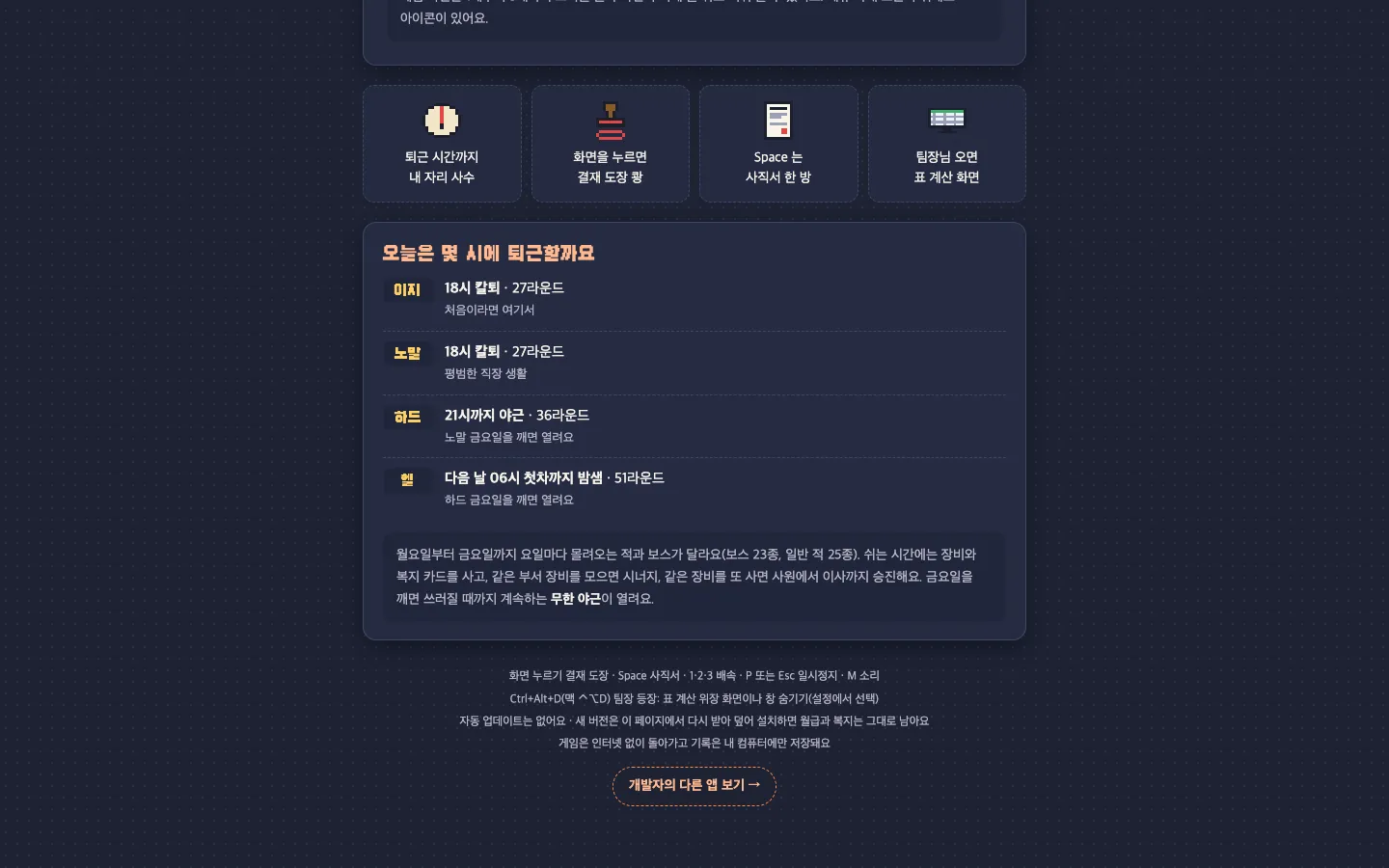
Quitting time is the difficulty. Below it come descriptions of each weekday’s enemies, promotions, endless overtime, and the control keys.
The intro page also shows one weak spot. Easy and Normal both say only “18:00 clock-out, 27 rounds,” so the text doesn’t reveal how they differ.
What it’s built with and how we released it
It is an installable PC game that runs on Windows 10 and 11 (64-bit) and macOS 13 or later (Apple silicon and Intel). The installers are hosted on GitHub Releases, and people download them straight from the intro page. There is no sign-up or login. The game runs without internet, and your progress is saved only on your own computer. There is no auto-update, so for a new version you download it again from the page and install over the old one, and your salary and benefits stay as they were.
The problem is the first hurdle on Windows. Because it is a new program without code signing, opening the installer brings up the blue “Windows protected your PC” window, and you have to click More info and then click Run anyway before it installs. The page previews this process with pictures, but anyone seeing that window for the first time on a work PC could easily freeze.
When we walked through the page ourselves, we found two more snags. The Mac tab is open when the page first loads, so even someone who wants to sneak a game onto a Windows work PC sees the Mac instructions first. And the sentence “runs without internet, and your progress is saved only on your own computer,” the one most needed by people hesitant to install on a work PC, sits in small print at the very bottom of the page.
How many people watched the Instagram Reel
There is one Reel that introduces Clock-Out Defense by name. We posted it on Monday, November 9 at 8:16 p.m. (Korea time), with a one-line caption: “Sneak in a round of Clock-Out Defense when you don’t feel like working.” The video shows the game running over a document window on a real office PC, with the subtitle “Defending my on-time exit on my work PC behind the team lead’s back.” The caption had no prompt to comment, but the account’s first comment said, “Leave any comment and we’ll send you the link.”
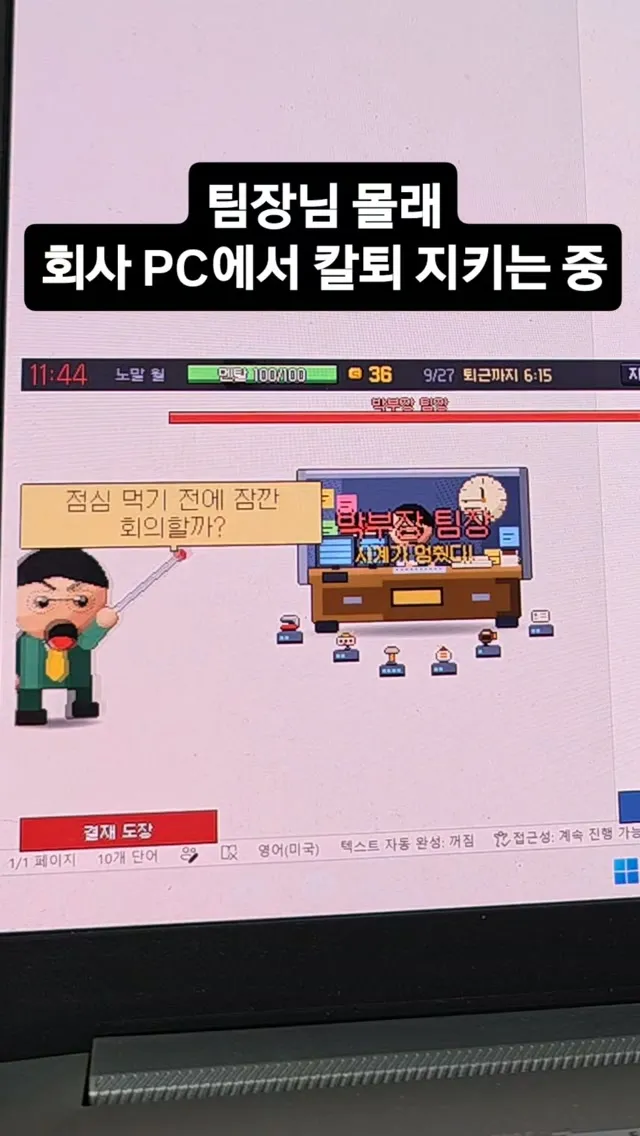
The cover of the Clock-Out Defense Reel. It shows an office PC screen with the game floating over a document window.
As of November 11, it had 2,567 views, 2,132 accounts reached, 14 likes, 17 comments, 22 shares and 3 saves. The account has 1,317 followers, so the Reel did travel a little beyond them, but the numbers show it did not spread widely through the recommendation feed. Lined up next to other Reels in the same “secret at work” vein, the difference shows.
| Reel (posted, Korea time) | Views | Shares | Shares per 100 accounts reached | Comment prompt |
|---|---|---|---|---|
| Secret fishing (Mon, Oct 26, 2025, 8:50 a.m.) | 437,553 | 12,168 | About 3.1 | In caption |
| Pigeon PC app (Mon, Oct 12, 2026, 10:14 p.m.) | 11,677 | 760 | About 7.7 | In caption |
| Secret Friday afternoon (Fri, Oct 30, 2026, 2:57 p.m.) | 2,622 | 9 | About 0.4 | In caption |
| Clock-Out Defense (Mon, Nov 9, 2026, 8:16 p.m.) | 2,567 | 22 | About 1.0 | First comment only |
What separates the rows is shares, not comment prompts. The Friday afternoon Reel had a comment prompt in its caption and still stalled at around 2,600 views, much like Clock-Out Defense. The pigeon Reel, on the other hand, had 7 to 8 of every 100 accounts reached send it to a friend. We think what made the difference was whether there was one scene that makes someone text a friend, “this is so you.” The Clock-Out Defense Reel has a small game screen and a lot of text, so it may have been hard to tell what game it was in the few seconds it takes to scroll past on a phone.
How many people came to the site
From November 9 to 11, the intro page was opened 34 times by 29 visitors. It did grow day by day: 3 on the 9th, 11 on the 10th and 15 on the 11th.
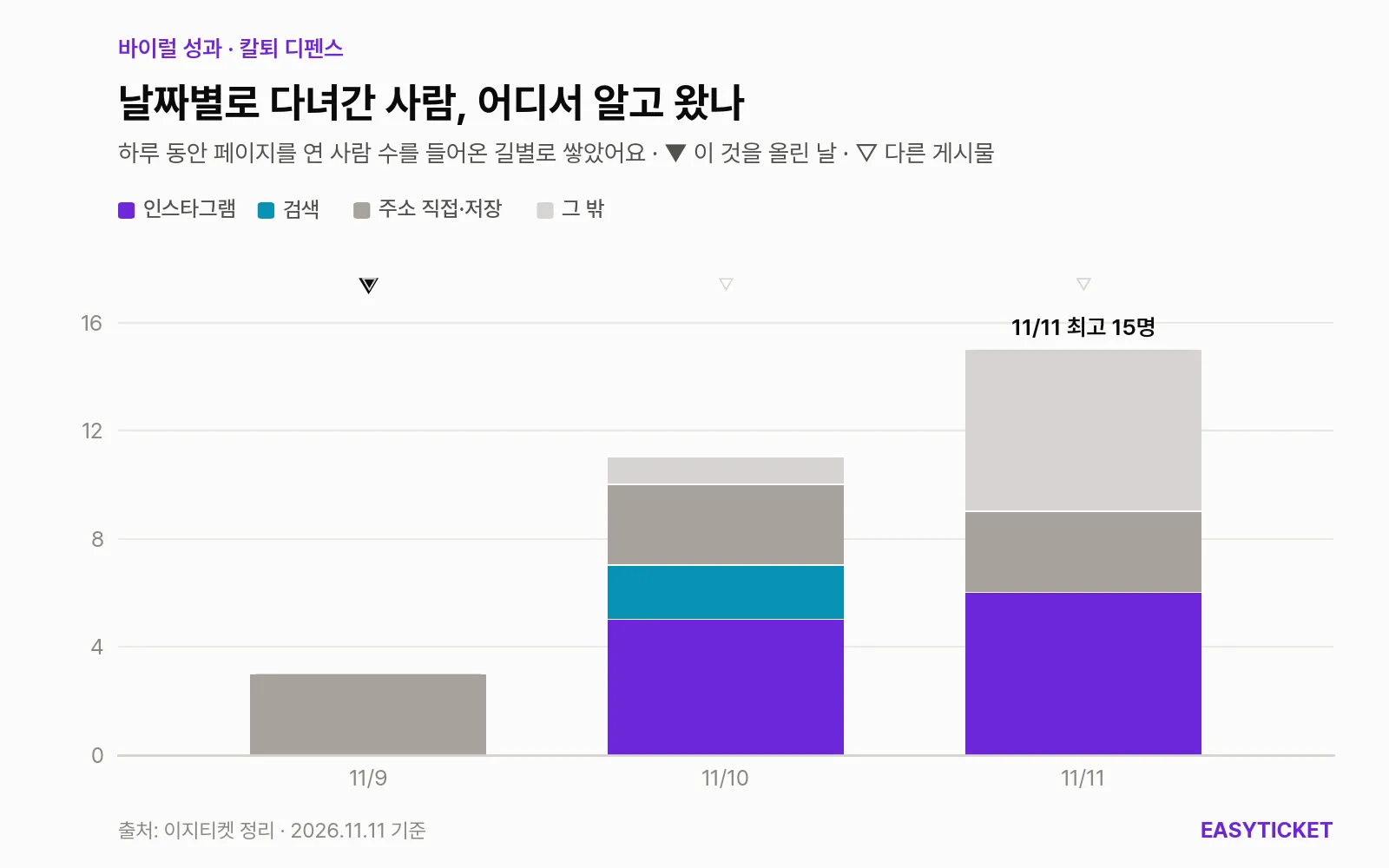
From 3 visitors on November 9 to 15 on November 11, stacked by day and by where they came from.
As the chart shows, on launch day, the 9th, all three visitors had typed the address directly or had it saved, and none came from Instagram. On the 10th, the day after the Reel went up, 5 people came from Instagram, and 6 on the 11th, so those appear to be connected to the Reel. However, another Reel the same account posted on the 10th (caption “Aw lol”) passed 160,000 views, so some of those visitors may have come through the profile from that one.
Of the 2,132 people who watched the Reel, 11 went through Instagram to the page, roughly one in 200. Two factors seem to overlap in explaining the drop-off. One is the device. Of the 29 visitors, 10 were on phones, and someone who watched the Reel on a phone and opened the link can’t download a PC game on the spot. The page explains how to send the link to your PC through KakaoTalk’s “Chat with Me” (Korea’s dominant messaging app), but that is one more step. The other is time on the page. Each person stayed an average of 15 seconds, and since the page has not a single image of actual gameplay, they likely left before getting a sense of what kind of game it was.
What worked, and what we’ll try next
What worked was the name and the one-line pitch. The name “Clock-Out Defense,” the description “the clock stops at 17:59,” and the difficulty levels split by quitting time are devices that any office worker can laugh at as soon as they read them. What got blocked was the next part, the path from watching to downloading.
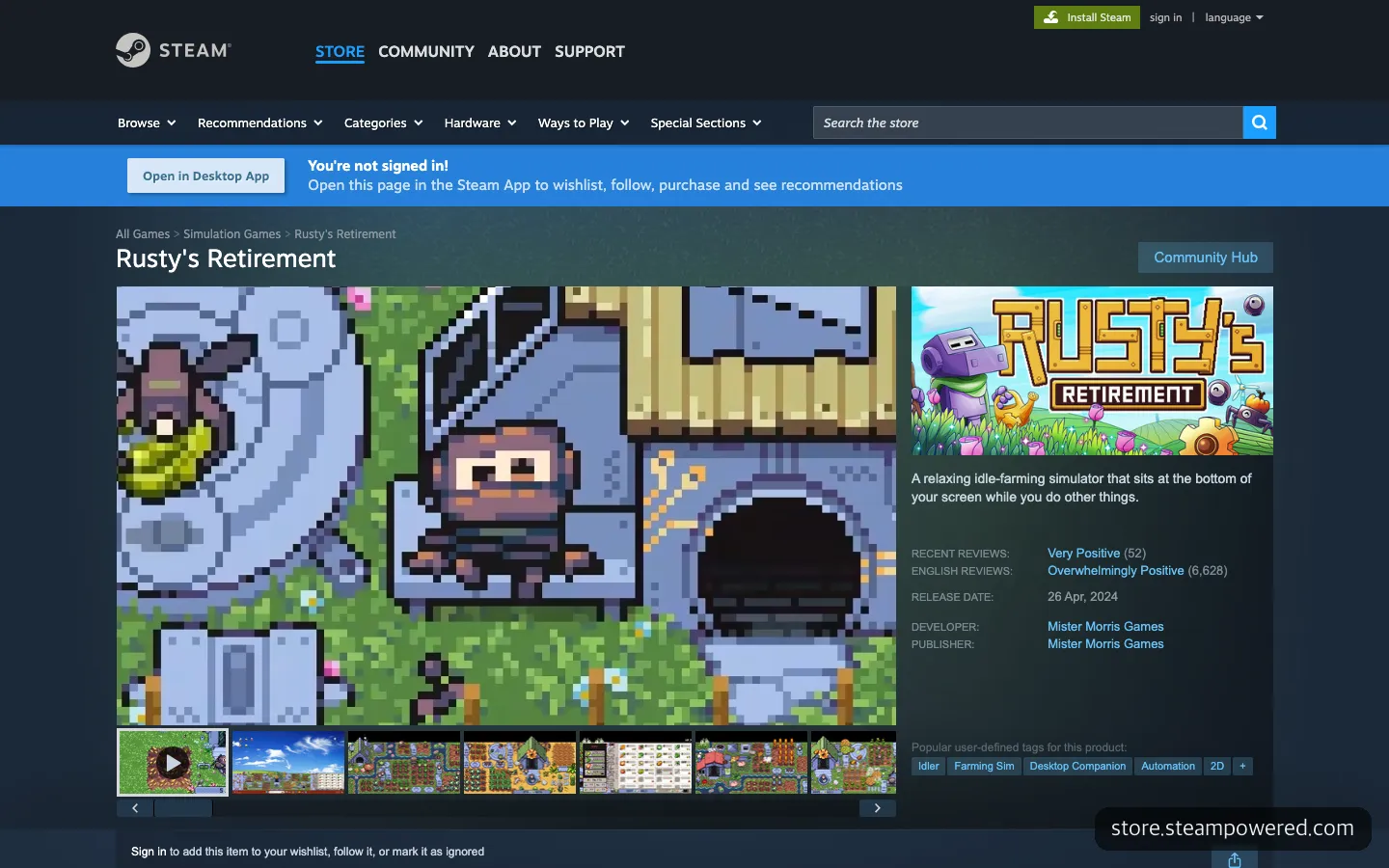
Rusty’s Retirement, a farm game you leave running at the bottom of your screen. Right from the first screen, real gameplay videos and screenshots line up.
The Steam page for Rusty’s Retirement, another “game you leave on while doing something else,” lays out videos and screenshots on the first screen and puts a line beside them: “while you work on other things at the bottom of your screen.” The Clock-Out Defense page has that one line but no actual gameplay. There are three things worth trying next.
- Put a short gameplay video or GIF running next to a document window at the very top of the intro page, and open the Windows tab first.
- Move “runs without internet, and your progress is saved only on your own computer” to directly below the download button.
- Swap the Reel’s opening scene for one that makes you want to send it to a friend, such as the moment the team lead approaches and Ctrl+Alt+D flips the screen to a spreadsheet, and repost it. As the pigeon Reel showed, games in this vein spread only when shares kick in.
If you promote an installable PC game with a phone Reel, the right move is to first create one reason for someone who watched on a phone to come back on a PC, before worrying about the video.
Frequently asked questions
Do I have to pay for Clock-Out Defense?
The intro page shows no price, and you can download the Windows and Mac files directly with no sign-up or login (as of November 2026).
Is it okay to install on a work PC?
The game runs without internet and your progress is saved only on that computer. On Windows, though, a warning window appears because there is no code signing, so if your company blocks program installs, it is best to check the policy first.
Can I play it on my phone?
No. It is a PC game that runs only on Windows 10 and 11 (64-bit) and macOS 13 or later. If you opened the page on your phone, send the link to your PC through KakaoTalk’s “Chat with Me” and download it on your computer.
Sources 7
AI helped with research and the first draft; the operator tried the subject firsthand, checked and edited this article before publishing. Let us know if you spot a mistake.