
I held down the W key for about four seconds, and the speedometer jumped from 16 m/s to the 3 km/s range. When I pushed on toward Earth, an orange flame flared around the ship, and the gauges read 21 km/s and 100 km to Earth. EasyTicket Cosmos is a browser space simulator that an EasyTicket developer built by vibe coding. It went live on November 6, 2026, and it’s a web app where you start at an Earth-orbit station, fly around today’s solar system yourself, and even make it all the way to a black hole. The line on the start screen, 「Get too close to the atmosphere and you’ll be pulled in, so be careful,」 turned out not to be decoration.
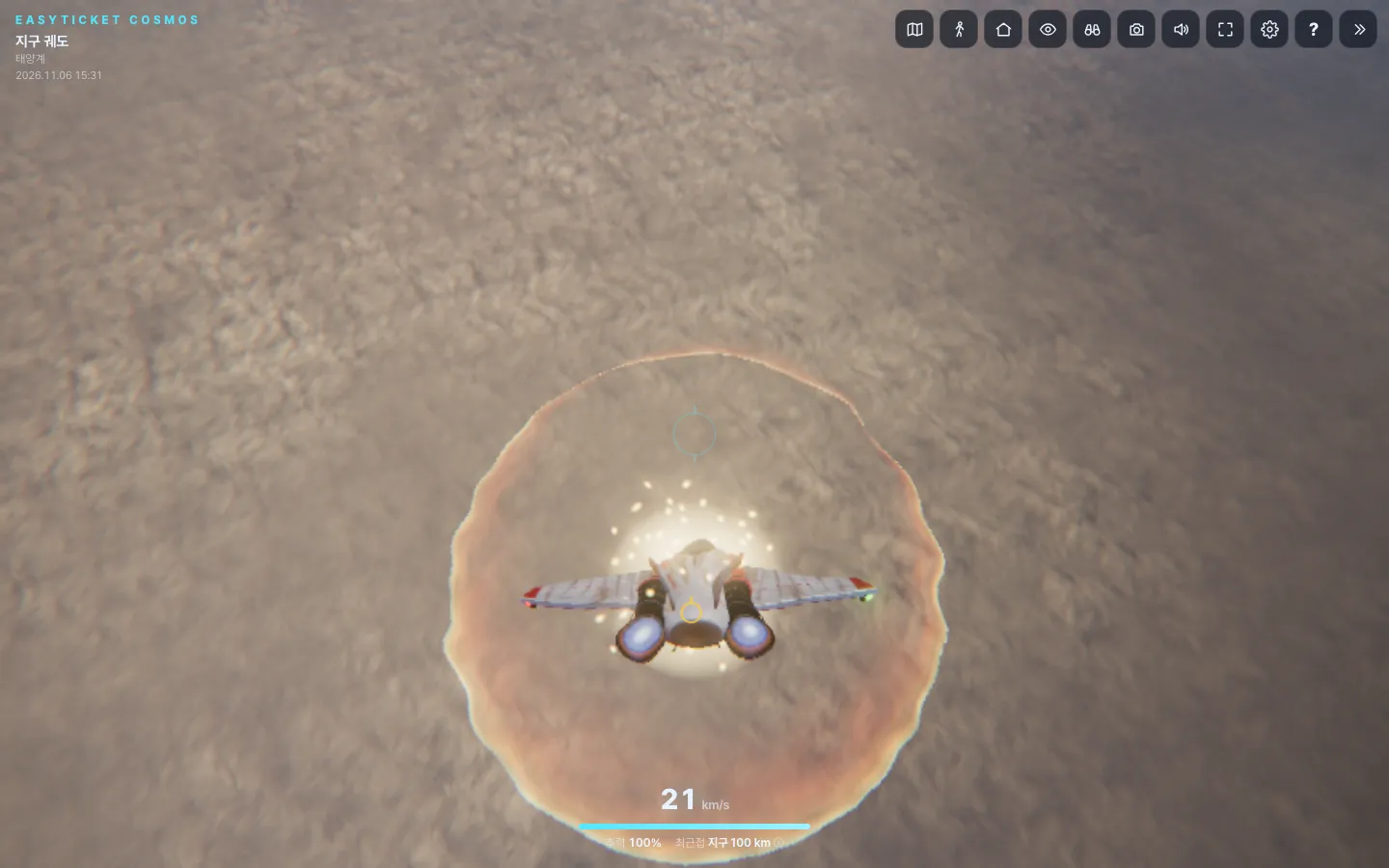
I got too close to Earth, the atmosphere pulled the ship in, and flames wrapped around it.
Why a Realistic Universe Instead of a Metaverse
It started with my feed a few months ago. When Anthropic released Claude Fable 5 (Fable) on June 9, 2026, posts saying 「look what people are making with Fable」 poured in for a while. The one that stuck with me most was a spaceship interior. Three days after the release, the Korean newsletter Daily Prompt pasted in a long prompt that had been posted on X and built a first-person spaceship, and it went about as far as walking around a cockpit, hallway, bedroom, kitchen, and bathroom with WASD. One of the demos Anthropic showed alongside the announcement was also a solar system simulation that predicts eclipses.
Since then, the star of the feed has changed to the metaverse. Metaverses thrown together with AI have been popping up everywhere, and their clumsy look (what people call 「bamti,」 Korean slang for charmingly cheap-looking) has been consumed as part of the fun. I’m not exempt from that. On November 3, the developer also released a metaverse version of a fishing spot for slacking off at work, and when I first checked that post, it had 1,243 plays, 32 comments, and 24 shares.
The problem was that the more I watched, the more I started thinking, 「But the quality is really bad.」 I wondered how long 「it’s good because it’s janky」 could keep working, so I flipped the question. What if, instead of a metaverse, I built an open-world space simulator that is truly realistic? How far could Claude take it?
There was a reason for choosing space, too. Earth’s atmosphere, Earth rising over the Moon’s horizon, and a black hole’s disk are scenes everyone has seen in photos and videos, so any sloppiness shows immediately. With such a clear standard, there was no better subject for testing 「how far can it go.」 If one room of a spaceship is doable, the real question of this project was what the whole solar system, the place that ship would fly through, would look like.
The Devices That Make It Feel Real
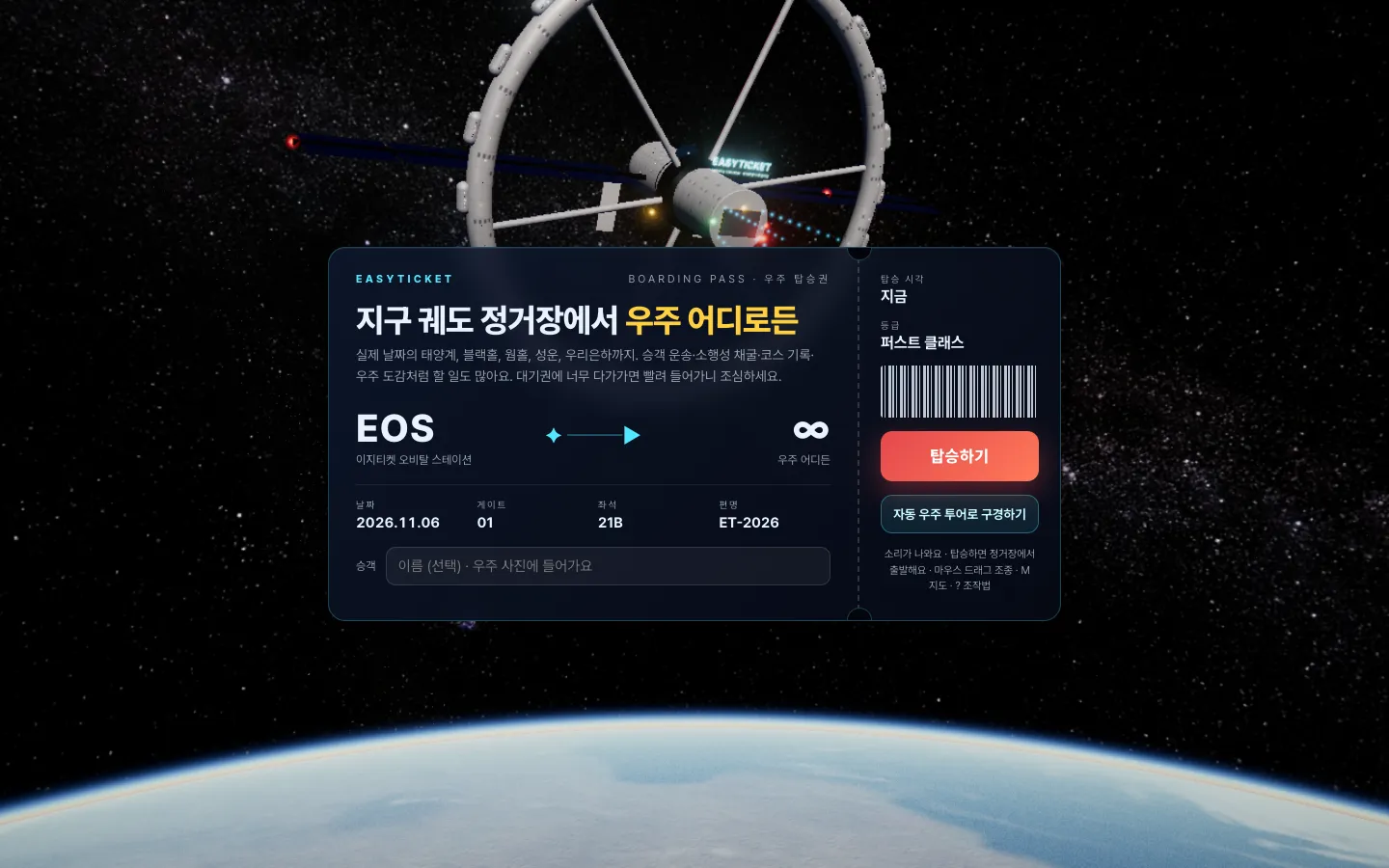
The first screen is a space boarding pass stamped with today’s date, a seat, and a flight number.
「Realistic」 doesn’t come from graphics alone. So I put more work into the context around the graphics than into the graphics themselves.
- Starting with a boarding pass: You get a space boarding pass printed with the station name, Gate 01, Seat 21B, Flight ET-2026, and today’s date. If you enter a passenger name, it appears in the photos you take in space.
- A hangar and a launch announcement: Once you board, you land right on the launch pad at Gate 1. A voice announcement says, 「EX-1, you are cleared to launch from Gate 1,」 and through the open door you can see Earth and the Milky Way. Instead of a plaza where avatars wander around, the craft you have to fly and its instruments (speed, thrust, propellant, nearest celestial body) take up the center of the screen.
- Today’s sky: The current time runs in the upper left, and a 「real sky right now」 caption tells you which meteor shower is active that day. The planets on the navigation map are placed where they are today.
- Rules you have to follow: Get too close to Earth and the atmosphere pulls you in. Because a warning comes back as a real consequence, flying gets tense.
- The fun of collecting and keeping: There are 21 landmarks to discover, tabs for missions, stamps, a field guide, and an album, and buttons for taking photos and launching a camera drone always sit at the bottom of the screen. I figured that what gets shared in the end is a single captured image.
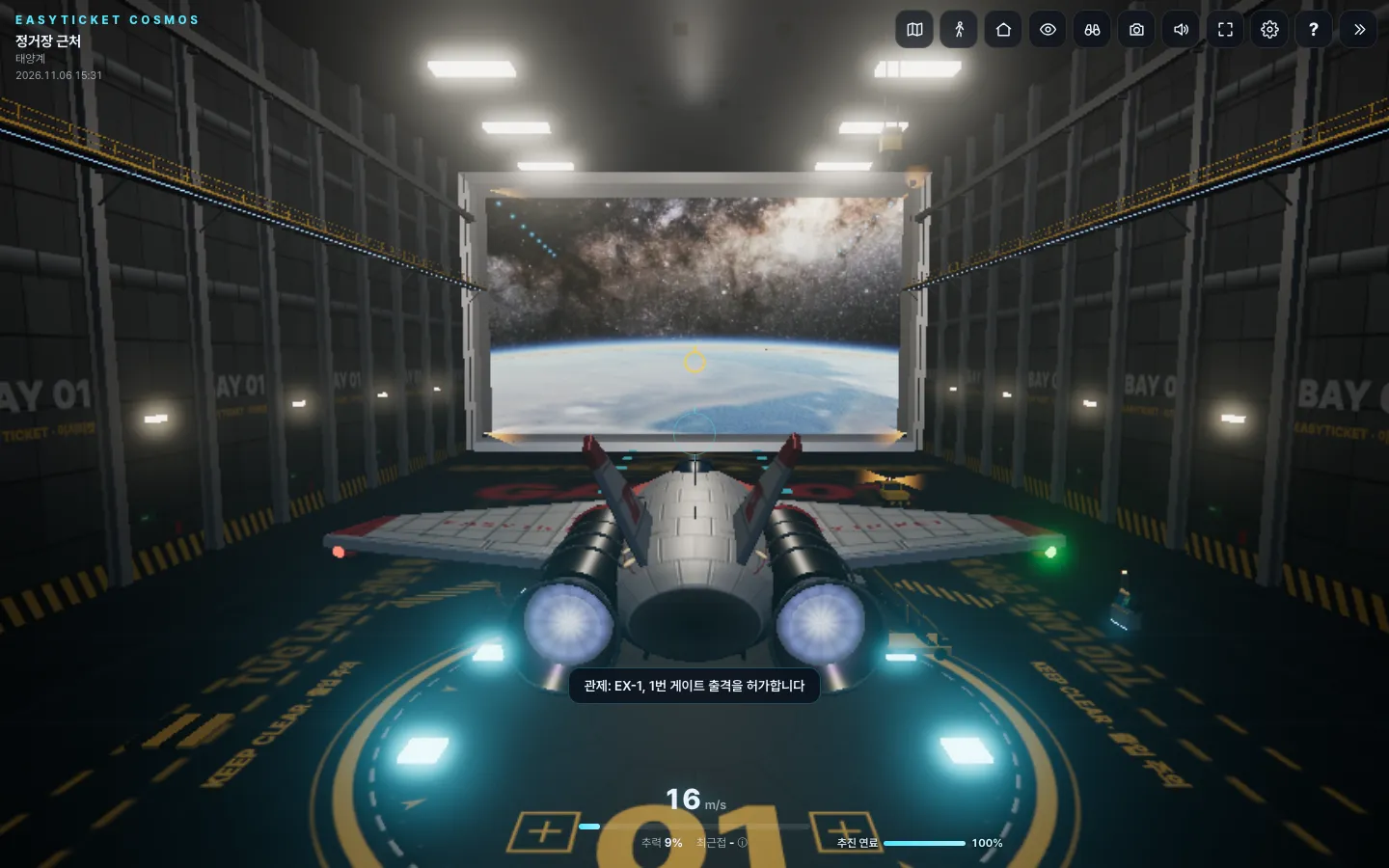
Once you board, you wait at hangar Gate 1 and listen to the launch announcement.
What It’s Built With: A 10MB Universe With No Install
I left the building to Claude. It’s vibe coding: I ask in plain words, load the result in a browser and fly around, and fix awkward spots by asking again in words. The result opens from a single web address, with nothing to install. The loading screen says 「You download about 10MB the first time,」 and when I pressed Board, the hangar appeared after about six seconds.
The road to building browser 3D with AI has gotten quite wide lately. In a piece the 3D studio Utsubo published in September 2026, they say the open-source library three.js works well with vibe coding because it is pure JavaScript, it runs without a server, and you can judge the result right away by eye. A 2025 vibe coding game jam required AI to write at least 80% of the code, and more than 1,000 entries came in. They also point out that WebGPU is on by default in Chrome, Edge, Safari 26, and Firefox, and that it falls back to WebGL 2 automatically where it isn’t supported. That means the obstacles to running a heavy scene like space on the web have shrunk accordingly.
Even so, the nature of what you hand to AI changes as the scale grows. A spaceship interior is a few rooms, but Cosmos had to fit distances ranging from 100,000 km to over 100 million km into one world. So instead of making you fly endlessly, I added both a method where you pick a place on the map and leap to it, and a method where clicking a marker takes you there on autopilot. It’s a compromise between the breadth of an open world and travel that doesn’t get boring.
How Do You Play EasyTicket Cosmos?
After boarding, you fly with a keyboard and mouse. W and S control thrust, mouse drag or the arrow keys control direction, Shift is warp, and Space is deceleration. Press M to open the navigation map, T for autopilot, R to return to the station, N to auto-land on the spot, V to walk around, and G for the automatic tour. A controls panel sits at the lower left, so even a first-timer won’t get lost.
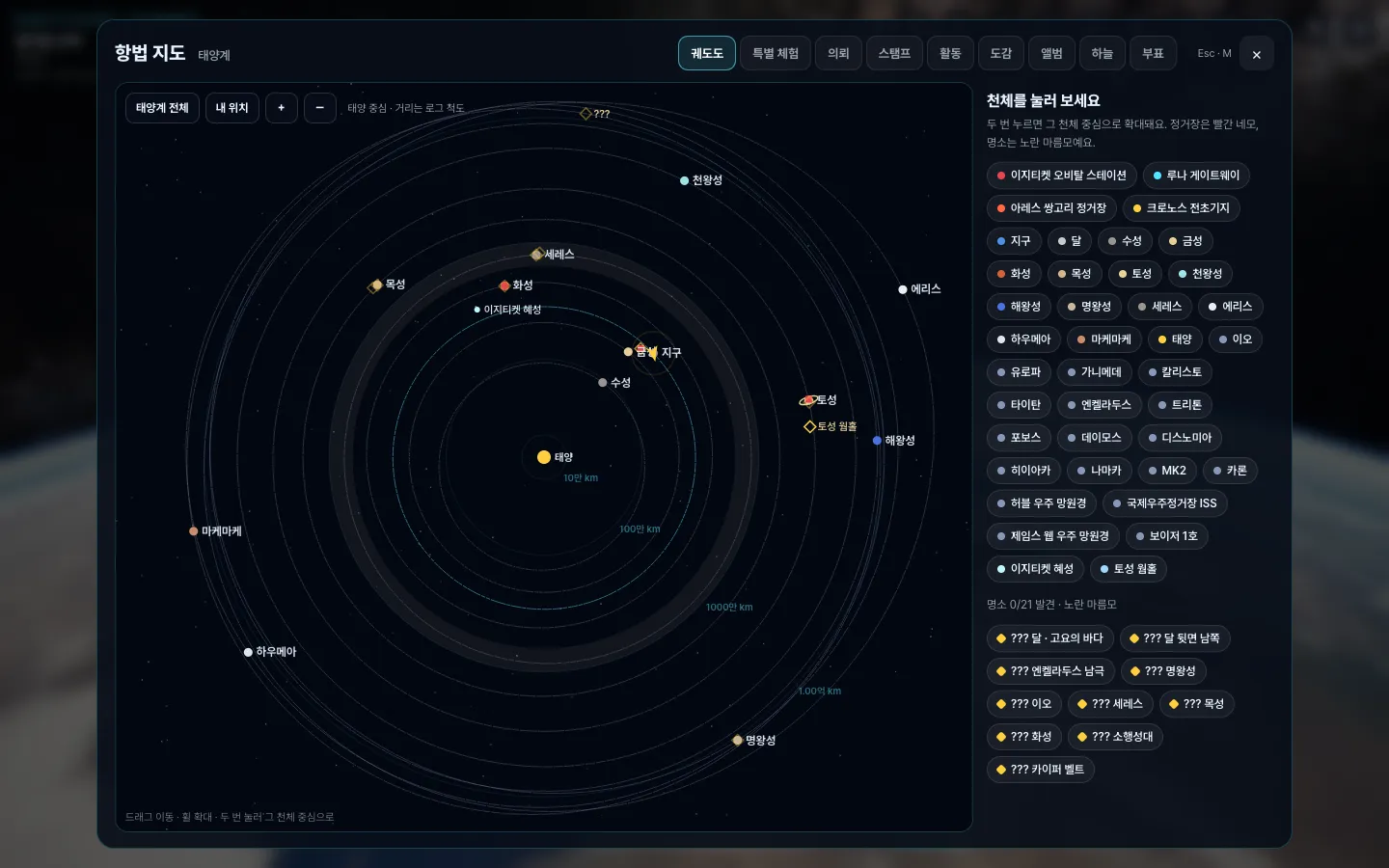
From the navigation map, you can go straight to about 40 celestial objects, including stations, planets, moons, and probes.
What surprised me once I got in and started flying was the size of the map. There are shortcuts to three stations and to planets, moons, asteroids, and comets, as well as the International Space Station, Hubble, James Webb, and Voyager 1. The 「Special Experiences」 tab gathers a wormhole beside Saturn, the Sagittarius A* black hole, the Orion Nebula, the Crab Nebula pulsar, a full view of the Milky Way, and the Earthrise scene from Apollo 8. When I clicked the black hole card, I arrived beside the dust disk about eight seconds later. The automatic space tour takes you through the orbits of Earth, the Moon, the Sun, Mars, Jupiter, and Saturn, and on to the black hole by itself.
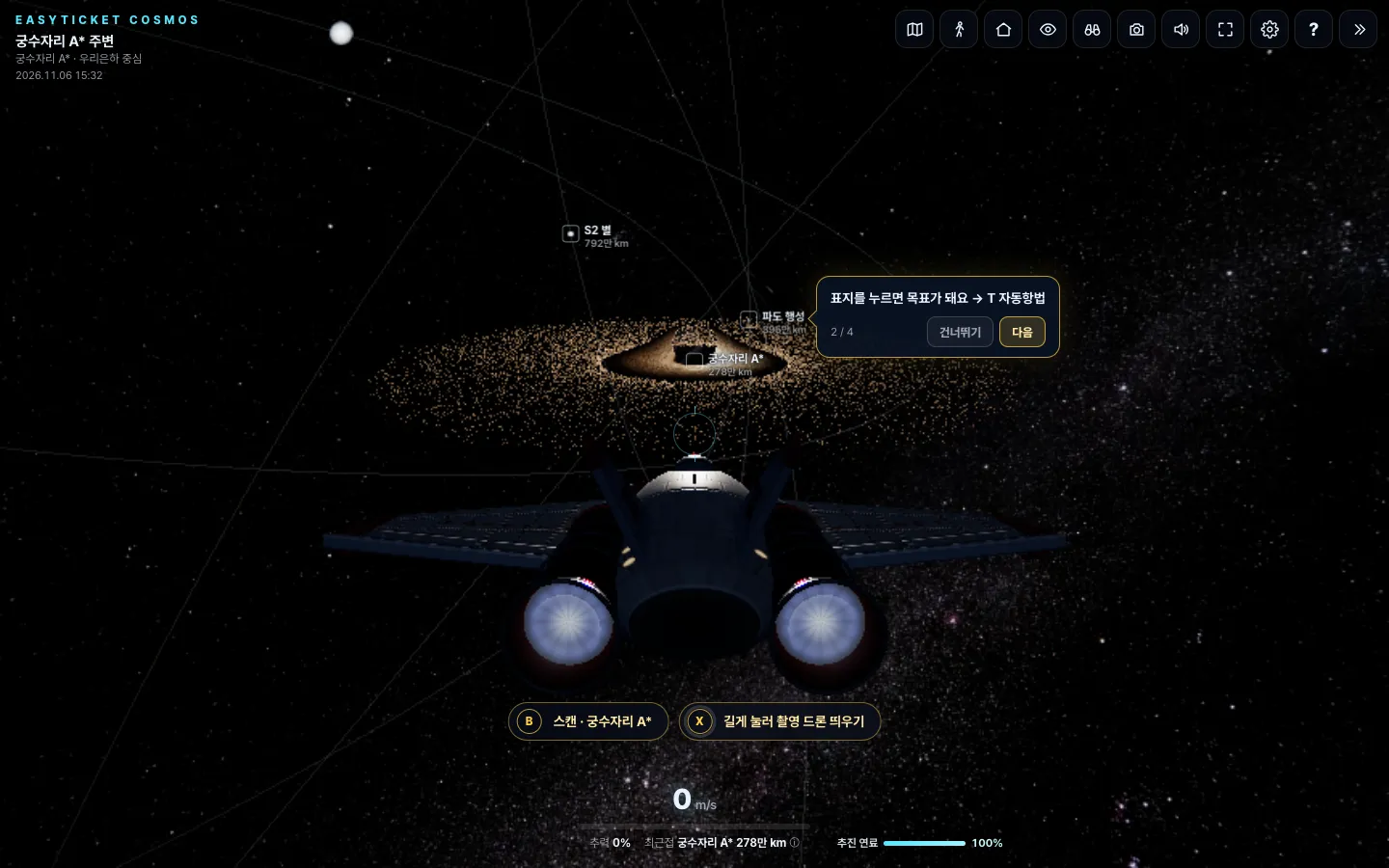
The scene about eight seconds after I picked the Sagittarius A black hole from Special Experiences and arrived beside it.*
There are clear rough spots too. The Orion Nebula looks convincing from far away, but up close the gas clouds look coarse, like clumped-together dots. After a leap, the ship sits at 0 m/s, so it feels less like you traveled a long way and more like the scene changed. For the first few times, the tutorial speech bubble overlapped at the top of the screen every time I arrived, which gets in the way just when you’re about to take a photo. When you aim for realism, these gaps become easier to see.
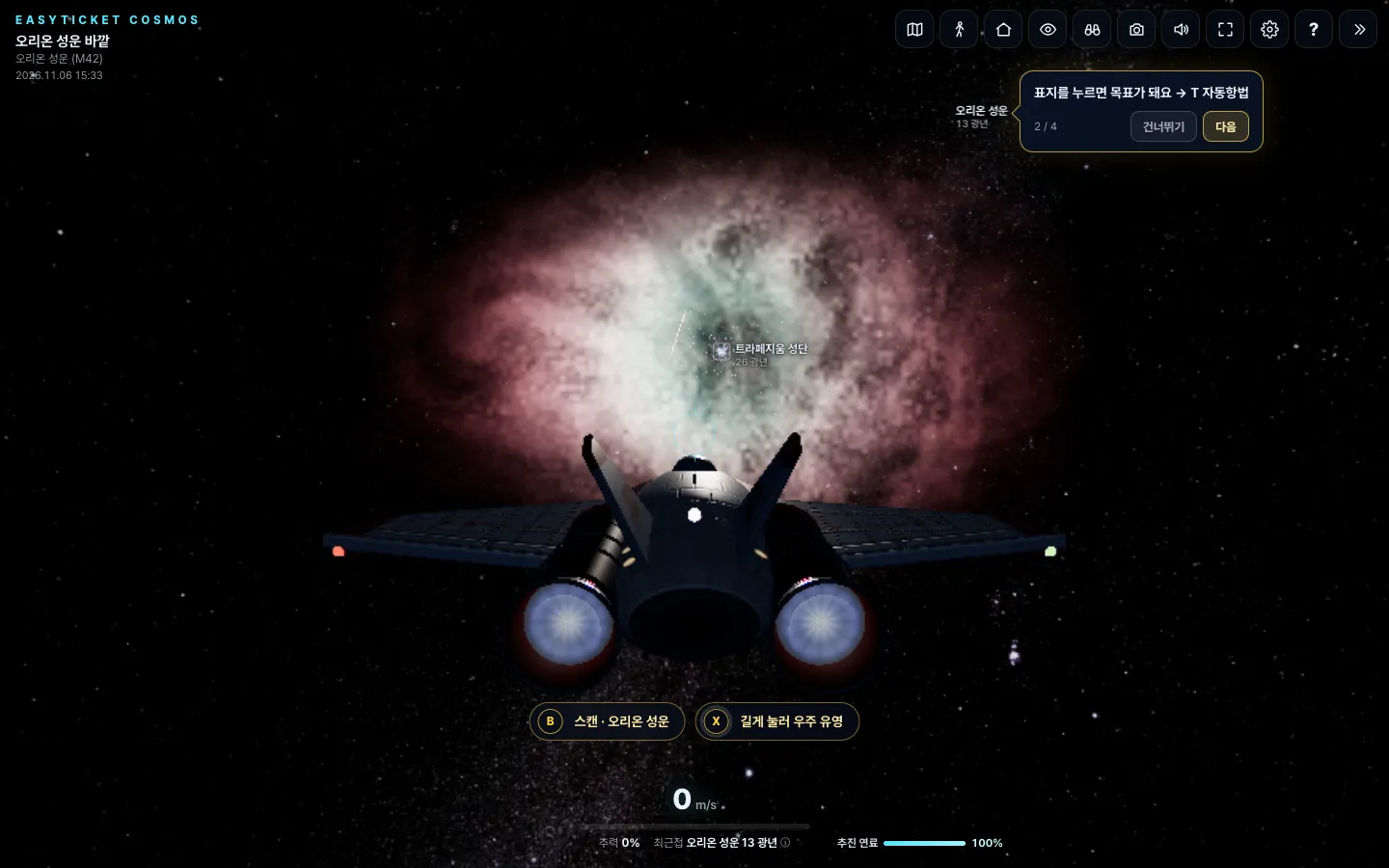
In front of the Orion Nebula. Up close, the gas clouds look coarse, like clumped-together dots.
How It Differs From NASA’s Solar System Tool
When it comes to free web tools that show 「the real solar system as of today,」 NASA JPL’s Eyes on the Solar System comes to mind first. Put it next to the Fable spaceship example that started all this, and the differences in character become clear.
| Fable first-person spaceship (Daily Prompt) | NASA Eyes on the Solar System | EasyTicket Cosmos | |
|---|---|---|---|
| What it does | Walk around inside a spaceship | View real orbits and probe positions | Fly a ship to planets, nebulae, and a black hole |
| Scope | The rooms of one spaceship | The solar system and NASA probes | The solar system plus a black hole, nebulae, and the whole Milky Way |
| Time | None | Real time, with forward and backward scrubbing | Planet positions as of today |
| Strength | A demo of how much AI can do | Accuracy | Piloting, place-to-place leaps, game elements like collecting and missions |
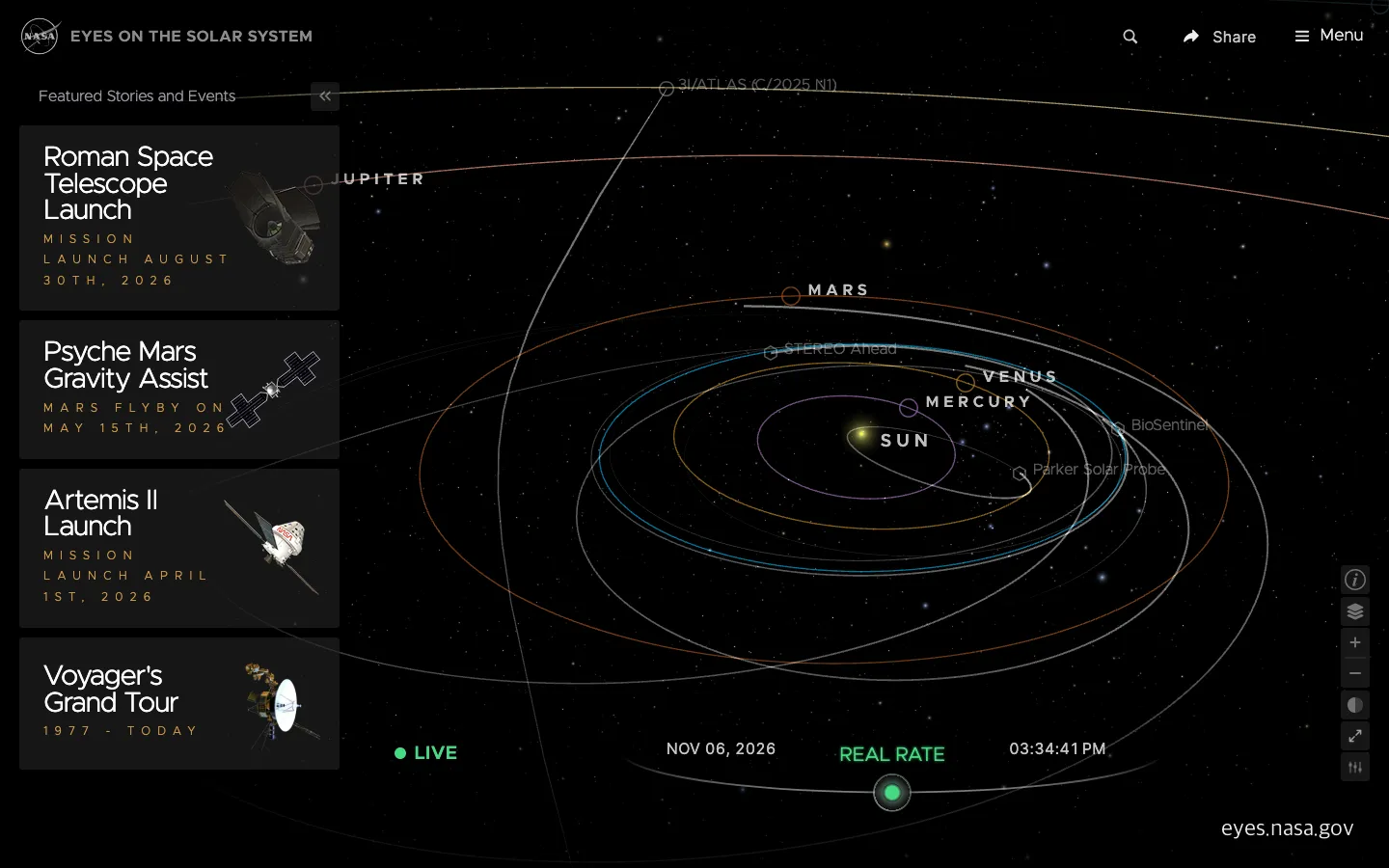
NASA’s solar system tool focuses on showing real orbits and probe positions.
If you want accurate astronomical data, NASA is the right place. It’s a tool for observing orbits, not one where you do the piloting. On the other hand, flying there yourself and landing, falling into the atmosphere, and taking a photo in front of a black hole are experiences you get with Cosmos. It’s a piece aimed at the feeling of 「I’m roaming around a place that feels real,」 not at an accuracy contest.
Does Realism Spread Further?
On release day, I posted a Reel titled 「I asked Claude to make a space simulator and got an open world.」 When I first checked on November 6, 2026, it had 139 plays, 4 likes, and 5 comments, with no shares or saves yet. Compared with the 1,243 plays and 24 shares on the fishing spot post three days earlier, it’s a quiet start.
It’s too early to judge from first-day numbers, but there’s something to take from it. The janky metaverse may spread well less because of quality and more because of the playground around it, the feeling of 「we’re all doing this on the sly.」 Cosmos gave a fairly clear answer to how realistic a universe Claude can build for one person to enjoy alone. Going from one room of a spaceship to a black hole took no install and no login. The remaining question is how to turn that realism into a single scene people want to send to others.
Frequently Asked Questions
Is EasyTicket Cosmos free?
Yes, it’s free. It opens right in the browser with no login or install, and you download about 10MB the first time.
Can I play it on a phone?
Yes. When you open it on a phone, a direction joystick, a tilt button, a vertical speed bar, and warp and deceleration buttons appear automatically. However, the row of menu buttons on the right is long and the joystick covers part of the scene, so a computer screen is better for enjoying the view.
Can I build a space game like this with Claude too?
Early Fable examples showed that something like a spaceship interior can come out of a single long prompt. When the scale grows, as with a whole solar system, it doesn’t finish in one go, and you have to repeat the cycle of flying and fixing several times. If you’re a beginner, starting with a small scene, such as one room or one planet, gets you stuck less often.
Sources 6
AI helped with research and the first draft; the operator tried the subject firsthand, checked and edited this article before publishing. Let us know if you spot a mistake.