
I typed in one task and tapped save, and the app answered like this: “Okay, I’ll put it off for now. I’ll wake you when it gets risky.” Bleh is an anti-to-do app that an EasyTicket developer built through vibe coding. It’s for people who feel suffocated by a task list: you write down only what you’re putting off and its deadline, and the app wakes you in stages as things get risky. As of November 2026, you can get it on the App Store and Google Play.
What Kind of App Is Bleh?
In the stores, you’ll find it as “Bleh: 할 일 미루기 · 투두리스트” (“Bleh: Put Off Tasks · To-Do List”), or “Bleh: To-Do & Procrastination” on the App Store. Its one-line pitch is “It’s okay to put it off, just don’t forget it.” Even the input field is labeled “Things to put off” rather than “Things to do,” and the save button reads “Just put it off for now.”
What the app does is simple. While the deadline is far away, it keeps quiet. As the deadline approaches, it raises its voice through four stages: Relaxed, Getting There, Imminent, and Final Ultimatum. The last stage isn’t a notification but a real alarm.
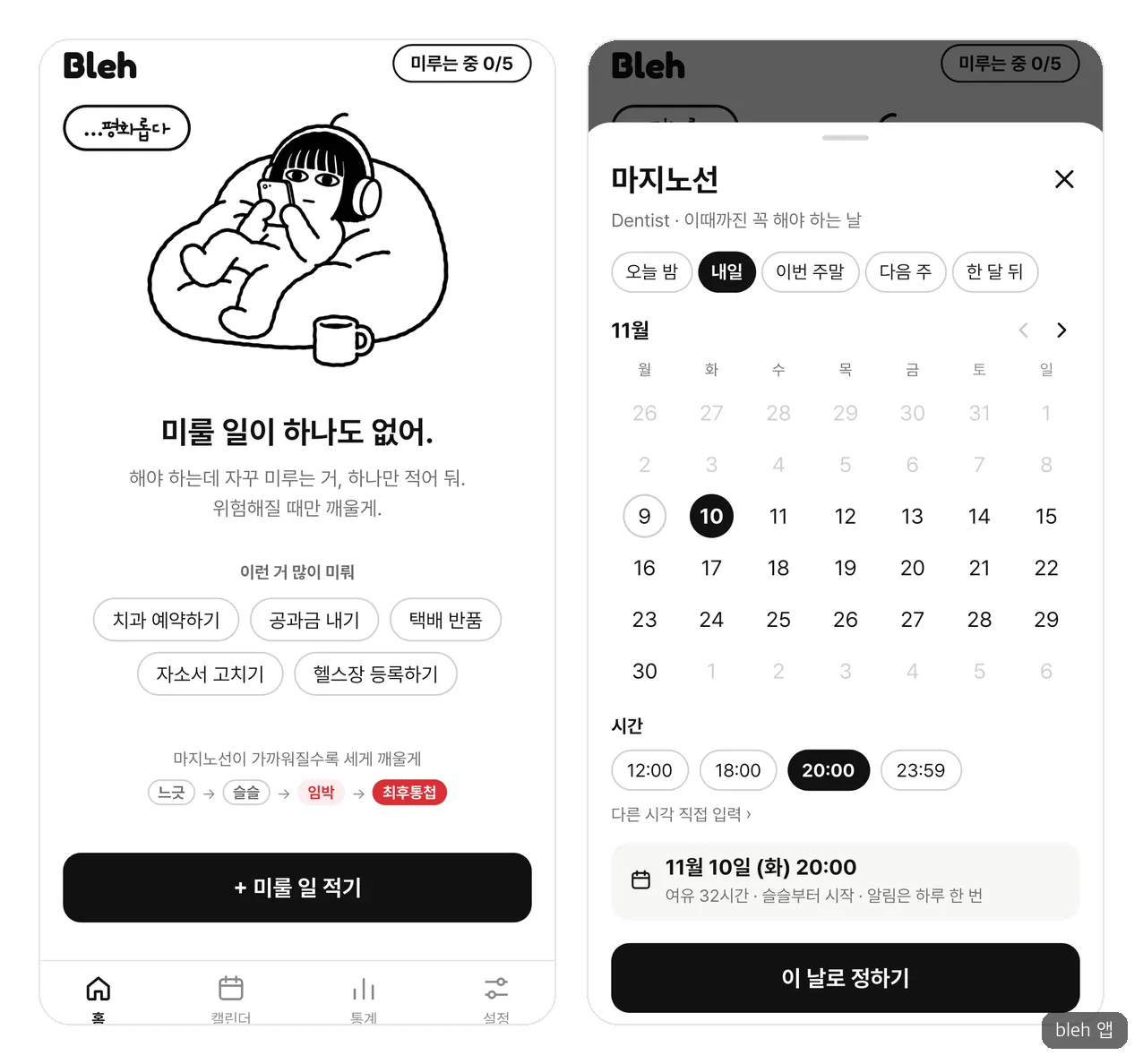
From the left: the first screen and choosing a deadline.
Why Do We Stop Opening To-Do Apps?
It didn’t start with anything grand. I’d install a to-do app and then stop opening it, and on the rare occasion I did open it, the backlog felt like pressure. So what about the opposite: an app that lets you put things off with a clear conscience and tells you only when it’s truly risky? That one question was the beginning of Bleh.
This feeling may not be only mine. Some researchers see procrastination as a problem of emotions more than of time management. According to a 2013 explainer in Scientific American, putting things off to avoid feelings like anxiety or self-criticism may lift your mood briefly, but regret grows. It isn’t research that measured the pressure of to-do apps, but it fits well with the unease you feel when you look at a list.
Of course, not everyone feels that way. To-Do Mate, which Caret (a Korean trend media outlet) covered in 2021, became popular because users share today’s tasks with followers and enjoy being praised. For people who are driven by a list, Bleh is an app they don’t need.
What We Put In and What We Left Out
There was one planning principle: no pressure in everyday use, but absolute certainty at the moments you can’t afford to miss. That’s why checkbox lists you fill in and completion rates had no place from the start, and sign-up was left out too. Apple and Google sign-in is only for when you want a backup.
| Decision point | What we chose | Why |
|---|---|---|
| Imminent stage | Tried a soft alarm, then dropped it to one sound notification a day | iPhone alarms always break through silent mode and Focus, and the app can’t control the volume |
| When you clear a notification | Not counted as a reply; one more reminder 3 hours later | The app can hardly tell when an iPhone user taps “Clear All” |
| Times when you have an event | Hold the notification and send it again 15 minutes after the event ends | A nag in the middle of a meeting only earns resentment |
| Estimated time | Learns from the actual time you spent in Focus mode and adjusts | Everyone misses their own estimates by a different amount |
| Character movement | Still frames and code effects | A method that needs a professional animator is too heavy for a first version |
The decision in the first row best shows this app’s character. As Apple’s developer video explains, iPhone alarms break through silent mode and Focus. If we used that from the Imminent stage, it would interrupt your day several times a day. So the real alarm is kept for the Final Ultimatum only, and for people who habitually clear notifications, we included an “Alarm from Imminent” switch, turned off by default.
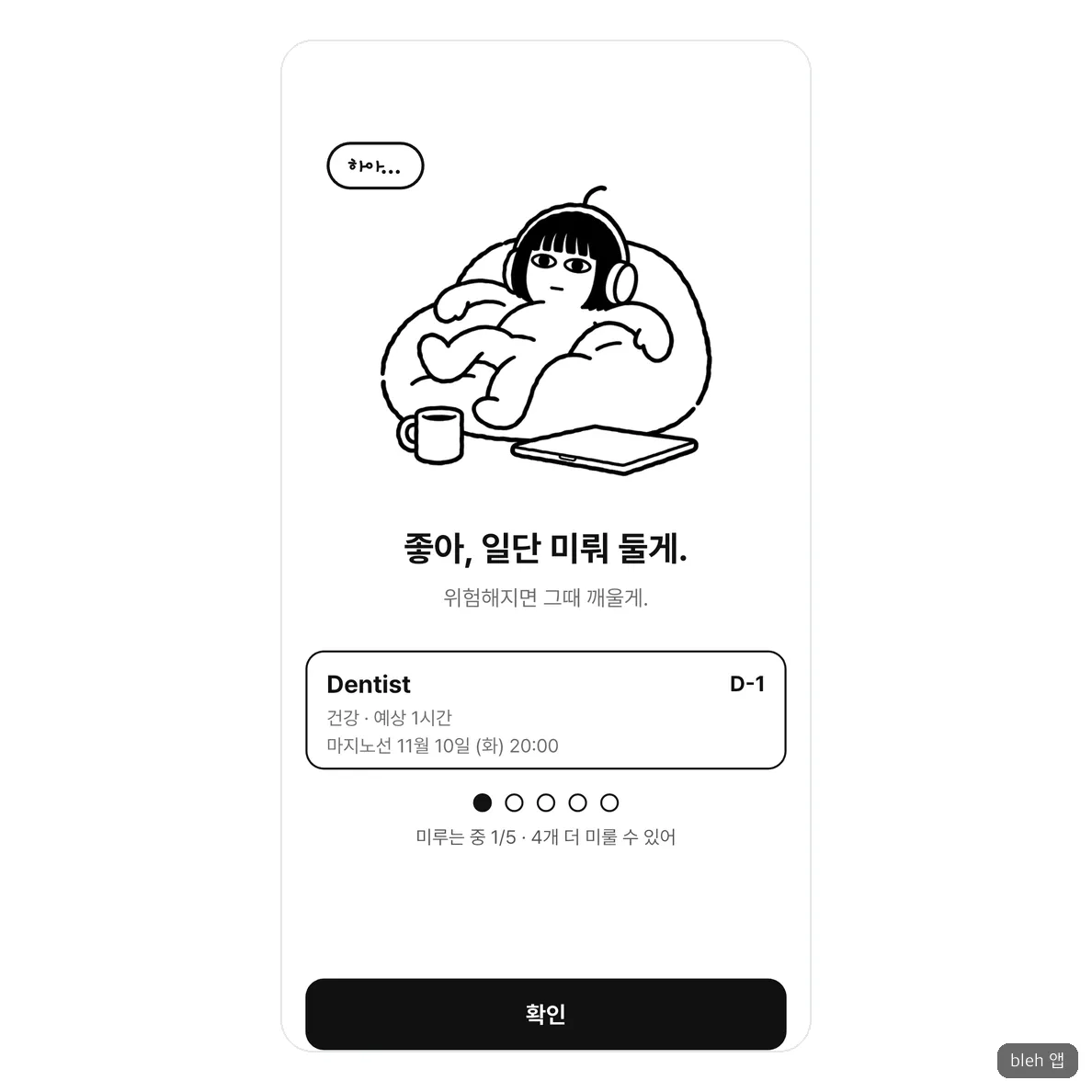
The app screen right after saving something to put off. The character on the bean bag is the face of the whole app.
To avoid showing pressure as numbers, we also made a character. As the postponed tasks pile up, it sinks into the bean bag and wears out, and if you put things off to the very end, it lies face down in the rain. That conveys the situation while hurting less than a red number.
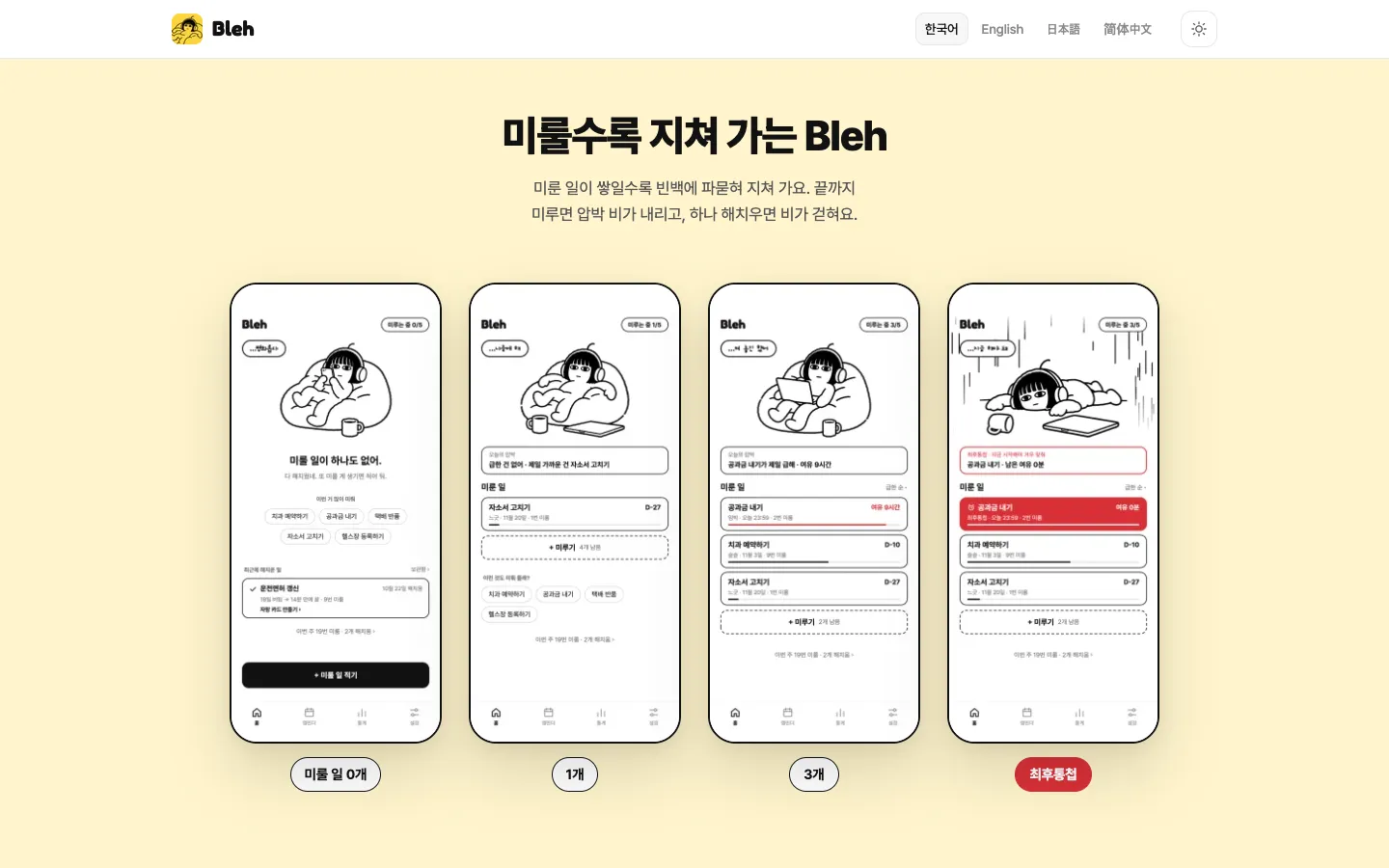
The more tasks you put off, the more worn out the character gets, and at the Final Ultimatum, a pressure rain falls.
Is It Okay to Tell People to Put Things Off?
This is a question that could be the app’s weak point. A study featured in the British Psychological Society’s Research Digest in 2016 looked at 586,808 tasks from more than 28,000 productivity app users over 538 days, and found that tasks whose deadlines were changed were less likely to be completed. However, it also found a tendency for busier people to be better at finishing delayed tasks.
So we allowed postponing but put a fence around it. You can only put things off within the deadline, from the third postponement the app suggests writing down the smallest first step, and when you try to postpone for the fifth time, it first offers to break the task into pieces. Whether these mechanisms actually get tasks finished hasn’t been proven yet. It’s something to judge from how people use the app after launch.
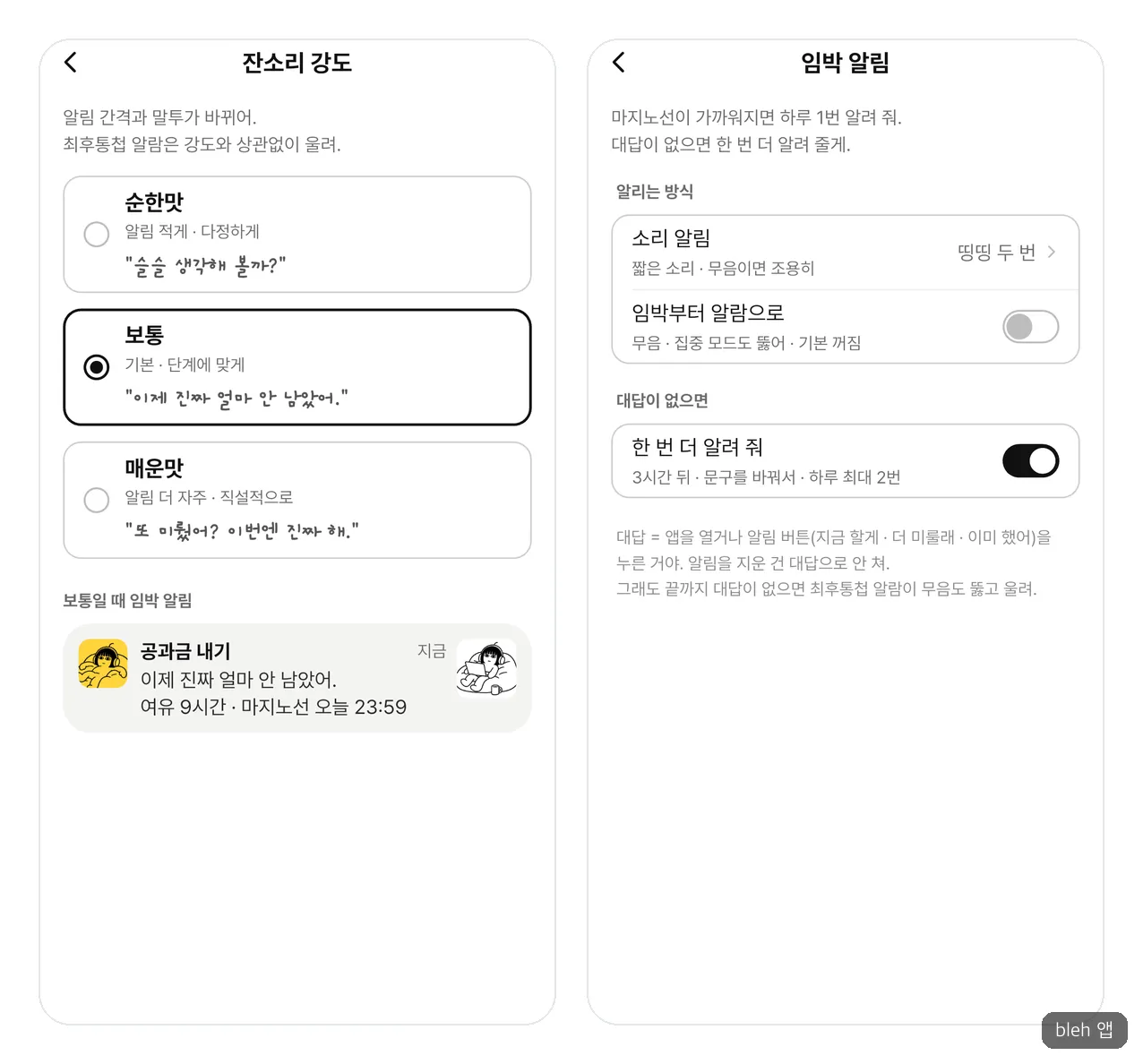
From the left: nag level and Imminent notification settings.
84 Screens and the Alarm That Wouldn’t Ring
We finished the screen design before the app code. I wanted to edit Figma through conversation, but on the free plan the official connection could be used only 6 times a month. So I first built a plugin linking Claude and Figma, plus a small server, myself. Each time we checked for gaps, the screens grew from 33 to 70, 79, and then 84, and instead of cutting any, we decided to put all 84 into the first version. The app was built with Flutter, and for the character drafts we generated them one by one with Codex and picked by eye. We started planning and character work around October 24 and submitted for the first review on November 1, so it took a little over nine days.
The hardest part was the core of the app. On an Android phone, the Final Ultimatum I tested arrived as an ordinary notification instead of an alarm, and because the phone was on silent, I didn’t even know it had come. I fixed it once, and it still didn’t ring. The cause was the clock. The alarm went off on time, but the sleeping app’s sense of “now” was almost a minute behind, so the screen still thought it was in the Imminent stage and even turned the sound off. It hadn’t shown up before because, when testing, I had moved the clock to the middle of the Final Ultimatum. On October 31, I moved on only after confirming that, on a silent phone with the screen off, the alarm appeared over the lock screen and the sound didn’t cut out.
There was something the AI missed, too. When I told it to compare the design draft with the app screen, it skimmed through using shrunken-down images. Only after I pointed it out did it lay them over each other at the same size and realign them in 1pt steps. Even when automated tests passed 1,000, some things were left for human eyes to catch.
There was also a time we withdrew a review ourselves. After submitting for review on November 1, I kept using the app and found that if you quit and reopened it during Focus mode, you couldn’t tell whether you were in focus, and you couldn’t edit or discard that task. Data wasn’t corrupted, but we canceled the review, fixed it, and tested again on real Android and iPhone devices.
What It’s Like to Install and Use
When I installed it on an Android phone, the home screen opened right away with no sign-up. I typed in Dentist, meaning a dental appointment, and the category was automatically chosen as “Health.” The moment I set the deadline to tomorrow at 8 p.m., it told me in advance, “32 hours to spare, starting from Getting There, one notification a day.”
What I liked was the Calendar tab. A sound notification at 9 a.m. tomorrow, another at noon, and a Final Ultimatum alarm at 6:30 p.m. were already laid out. That’s the 8 p.m. deadline minus 1 hour 30 minutes, which is the 1-hour estimate multiplied by a starting adjustment of 1.5. Because you can see when it will wake you, you can finally put things off with peace of mind. It’s a moment when this app’s promise is proven on a single screen.
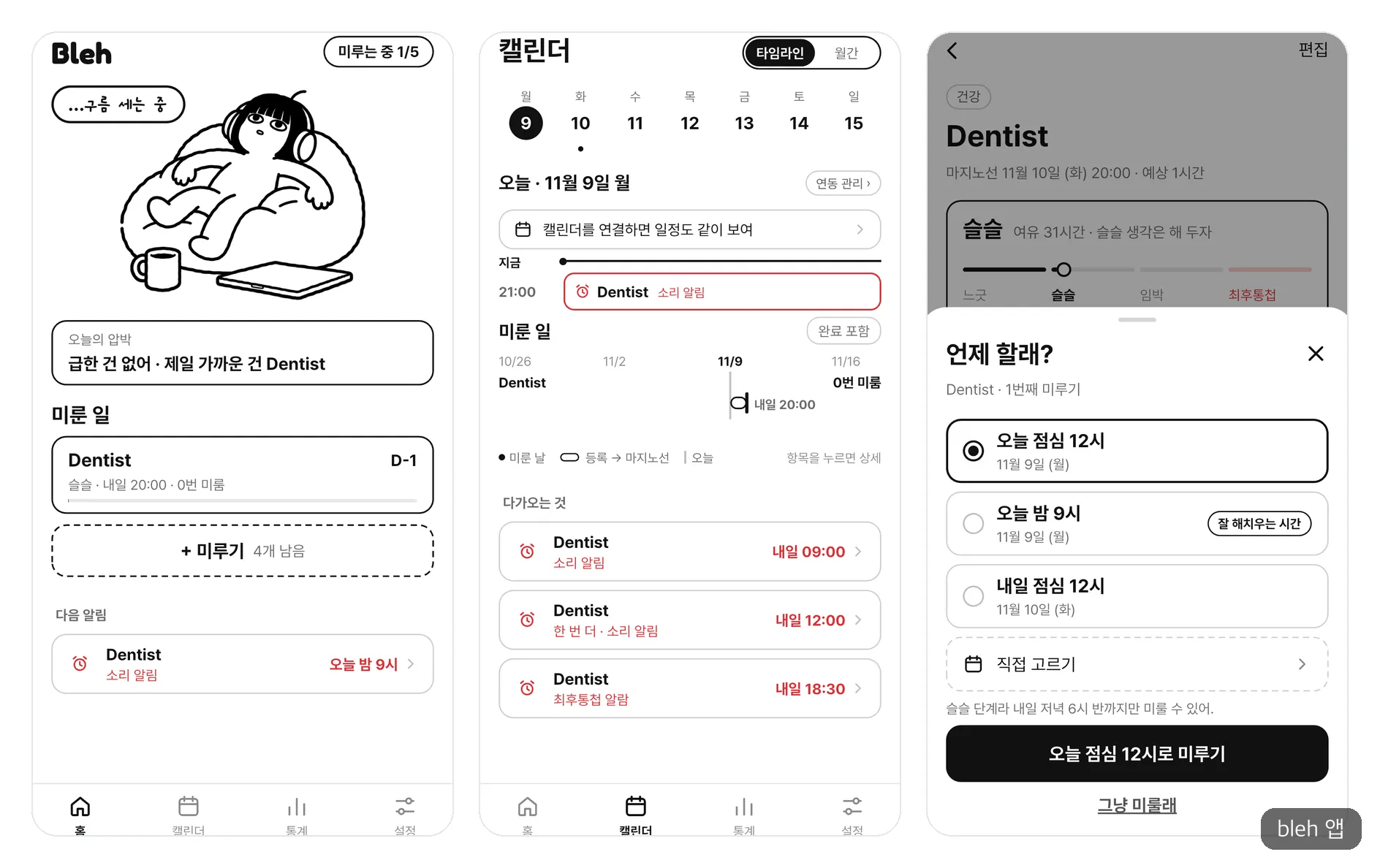
From the left: home after adding a task, the calendar with notification times laid out, and Put Off More.
The home screen, too, shows a single line first rather than a list: “Today’s pressure: nothing urgent.” When you tap “Put it off more,” it draws the line: “It’s the Getting There stage, so you can only put it off until 6:30 p.m. tomorrow.”
Ads aren’t pushed from the start. On the first day after installation, no ad appears even when you save a task, and after that they show up at most three times a day. We set it up so you never watch an ad right after hearing “Okay, I’ll put it off for now.”
There are some drawbacks. The “Putting off 0/5” that always floats over the first screen clashes a little with the message to put things off without worry. The Stats tab is nearly empty until you’ve used the app for a few days, and during this short trial I couldn’t wait until the deadline, so I didn’t get to see the moment the alarm actually rings.
A similar app is Mirujang, which notifies you at a time you set yourself. If you want to set the times yourself, that one is lighter, and if you want to leave it to the app to decide when to wake you, Bleh is the right fit.
If You’re Someone Who Clears Every Notification
Bleh works for people who know what they have to do but hate looking at a list. On the other hand, if even setting a deadline is a chore, this app has nothing to do for you either. For people who habitually clear notifications, nothing may happen until the Final Ultimatum, so it’s better to turn on “Alarm from Imminent.”
As of November 9, 2026, the app has only just come out, so it has no store ratings or reviews yet. Try writing down just one thing you’re putting off, along with its deadline, and you’ll find out whether this approach suits you before that task is done.
Frequently Asked Questions
Is Bleh free?
You can download it for free and put off up to 5 things at once, and ads appear on some screens. Pro gives you unlimited tasks, no ads, detailed analysis, a monthly summary, and premium share cards. According to the US App Store page, it costs $2.99 per month, $19.99 per year, or $39.99 for a lifetime (as of November 2026).
Does the alarm ring on an iPhone even when it’s on silent?
On iOS 26 or later, the Final Ultimatum alarm rings even in silent mode and Focus. The app itself runs on iOS 17 or later, but on versions lower than that, you shouldn’t expect this feature. On Android, it requires 8.0 or later and appears as a full-screen alarm.
Where is what I write saved?
By default, it stays on your phone. If you sign in with Apple or Google, it’s backed up, and signing in is optional. Even if you connect your calendar, event titles never leave your device.
Can I add a task without a deadline?
You can choose “No deadline.” However, because this app wakes you based on the deadline, if it’s something you must take care of, it’s better to enter a date.
Sources 8
- Bleh 공식 소개 페이지
- Bleh: To-Do & Procrastination - App Store
- Bleh: 할 일 미루기 · 투두리스트 - Google Play
- Wake up to the AlarmKit API - WWDC25 - Apple Developer
- Sloth: To Stop Procrastinating, Focus on Emotions - Scientific American
- Busy people are especially good at bouncing back from missed deadlines - BPS Research Digest
- 캐릿 - 투두 메이트
- 미루장 - App Store
AI helped with research and the first draft; the operator tried the subject firsthand, checked and edited this article before publishing. Let us know if you spot a mistake.