
On November 8, 2026, the first snow fell in Seoul. It came 12 days earlier than average and 26 days earlier than last year, and it was the first time in 16 years, since 2010, that Seoul’s first snow had arrived before November 8 (Segye Ilbo report). First Snow Monitor, released the same day, is a Windows and Mac PC app that an EasyTicket developer built through vibe coding. It makes snow fall on your computer screen and pile up on the windows you have open.
The next morning I posted a Reel, and over the following four days the intro page was opened 27 times. The subject matched the season perfectly, so why did the numbers stop there? This piece covers both how the app was made and how far it spread.
What kind of program is First Snow Monitor?
Turn it on and snow falls across your screen, then settles along the top edge of whatever windows you have open. The play starts from there. Press and hold the piled-up snow to make a snowball, and roll it to make it bigger. Stack one snowball on another to get a snowman, or pull back and let go to throw it for a snowball fight.
Shake a window and the snow falls off. Close a window and the snow that had piled on it collapses in a heap. You can push a window aside with a big snowball, or stamp out a line of snow ducks with the snow duck tongs. If you decorate a tree, it twinkles at night. When your snowman is finished, you can save or copy it as a showcase card sized for an Instagram feed (4:5).

One screen of the intro page holds the download, four installation steps, four features and the shortcuts.
It runs on Windows 10 and 11 (64-bit) and macOS 13 or later (Apple silicon and Intel). There is no phone version.
Why piling snow is more fun than falling snow
Programs that make snow fall on your desktop are nothing new. DesktopSnowOK, a free Windows program, released version 7.22 as recently as October 25, 2026, which shows how long-lived these tools are. You can show anywhere from 5 to 2,000 snowflakes, but the snow never covers the windows in front. It only drifts across the background. There is even an option to stop the snow when you move the mouse. The goal is a decoration that doesn’t get in the way of work.
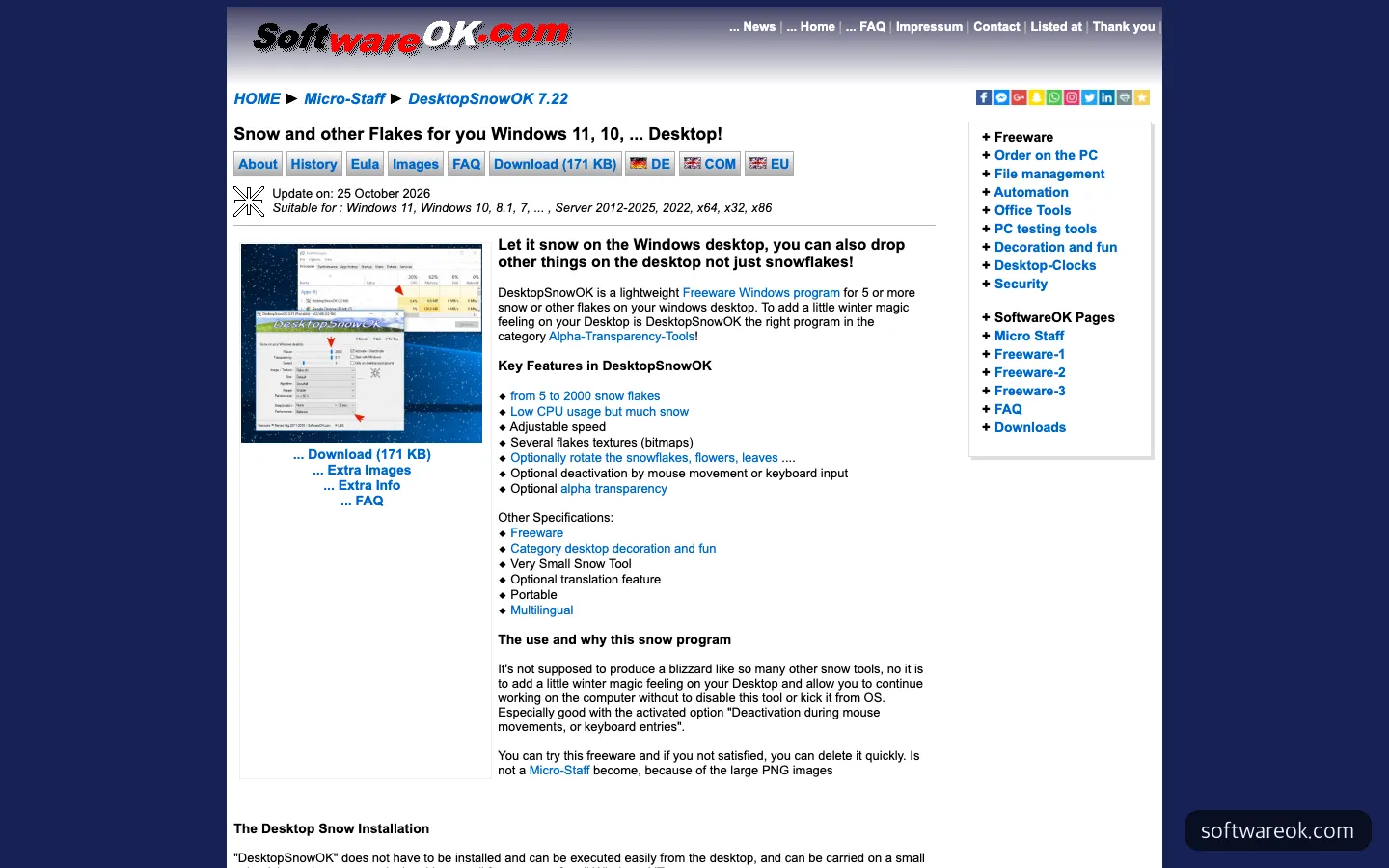
DesktopSnowOK, a free snow program for Windows. You can choose the number and speed of snowflakes, but the snow doesn’t cover windows in front.
Snow piling up on windows isn’t new either. Xsnow, an old Linux program, had options that left snow on top of windows and along the bottom of the screen. Where First Snow Monitor takes a different angle is that you can touch the snow. It isn’t snow to watch but snow to pack and throw. On a first-snow day, what people actually want to do is pack a snowball more than look out the window.
An earlier example that spread widely along similar lines is Desktop Goose. It is a Windows and Mac toy in which a goose steals your mouse and leaves muddy footprints on your screen, and you pay whatever amount you like. Its page shows a video and an animated goose from the very first screen. It knows that a screen toy is understood through a single scene rather than an explanation.
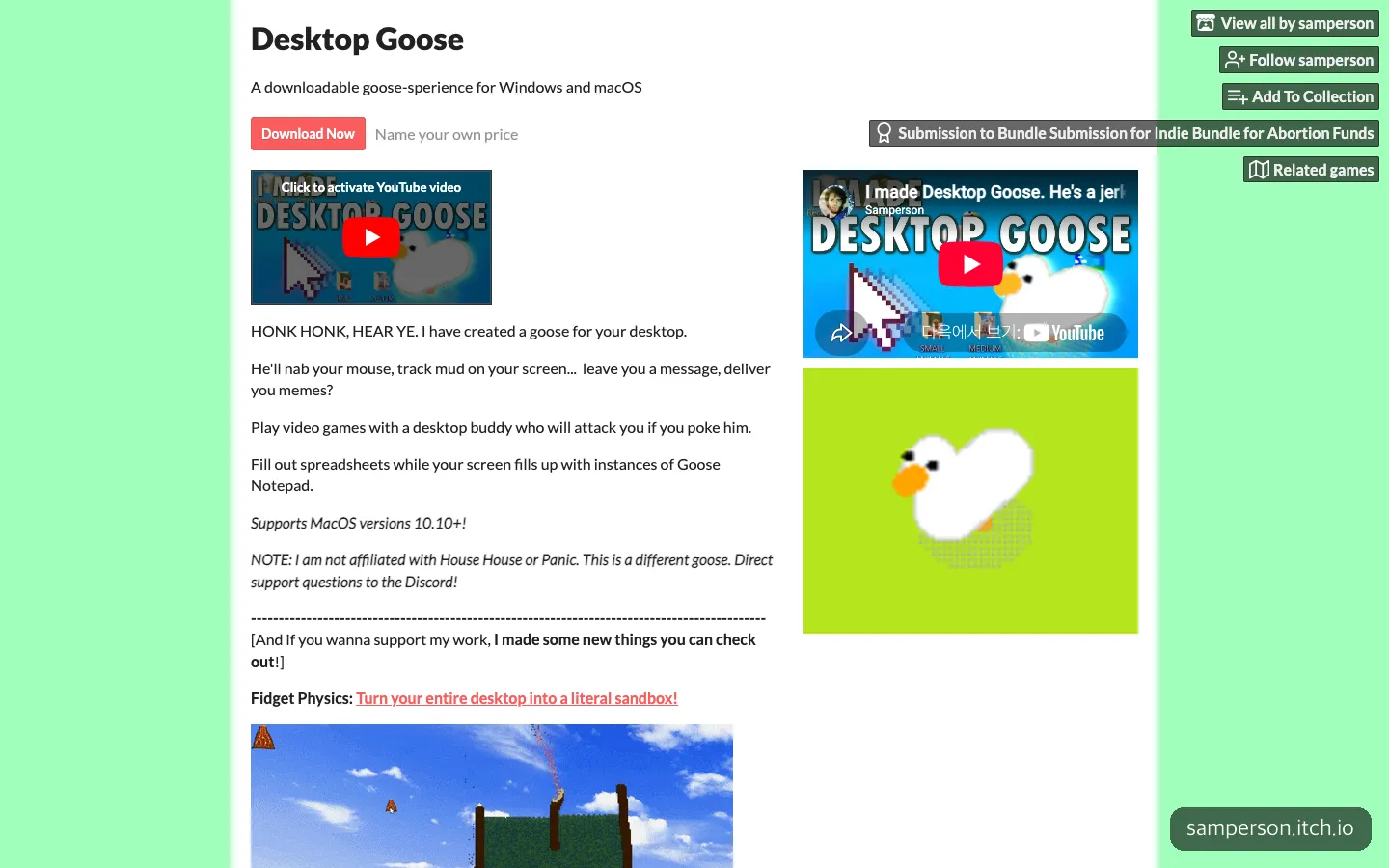
Desktop Goose, which spread widely as a screen toy, shows a video and an animated goose from the first screen of its page.
The same account has already released several PC toys, including an app where pigeons take over your monitor if you stop working, and one for sneaking in some fishing on top of a spreadsheet. First Snow Monitor sits in that line. It adds a seasonal theme to the kind of play where you slack off for a moment on your office computer screen, and its release date happened to coincide with the day Seoul’s first snow was recorded.
The features built for use on a work screen
As much effort went into keeping the work screen from being disturbed as into the play idea. When you build a screen toy through vibe coding, this is the part that blocks you before any feature does.
- Switching between play and work: Snow play starts with Ctrl+Alt+S (⌃⌥S on Mac), and pressing ESC puts the tools down so you can use the screen as it is.
- Hiding in an emergency: Press Ctrl+Alt+H (⌃⌥H on Mac) and everything disappears, snow included.
- A place that stays after you close it: Even if you close the toolbox window, a snowflake icon remains in the Windows tray or the Mac menu bar.
- Permissions only for the features that need them: On Mac, piling snow needs no permission. You only need to turn on the “Accessibility” permission when you push windows with a big snowball.
- Internet only for update checks: The app downloads new versions by itself, and showcase cards are saved only on your own computer.
There are drawbacks too. On Windows, it is a new program without a code signature, so a warning window appears the first time you run it (how to get past it is in the questions below). On Mac, having to turn on a permission separately to use window pushing adds one more step. These hurdles between you and the “download it and snow falls right away” experience are something to reduce in the next version.
The Reel posted the morning after the first snow
The Reel went up at 7:53 a.m. Korean time on November 9. The opening caption on screen read “Not brave enough to go out in the first snow, so I decided to make it snow on my monitor,” and the background music was a Mariah Carey Christmas song. The first line of the caption was “Spent the whole morning making a snowman,” followed by an explanation that snow piles up on your windows and you can throw snowballs, plus a note that anyone who leaves a comment will be sent the link.
Sending a link to anyone who comments is a device this account has used consistently. More comments help the video spread further, and people who receive the link land directly on the intro page. As of November 11, 2026, the results were 893 views, 601 viewers, 4 likes, 7 comments, 5 shares and 1 save.
The 601 viewers are fewer than half of the account’s 1,317 followers. The Reel didn’t spread beyond the followers, and it didn’t even reach all of them.
Set beside the same account’s other Reels
If the account itself had been quiet, 893 views would make sense. But the other Reels the same account posted that same week had very different numbers.
| Posted (Korean time) | Reel content | Views | Shares | Comments |
|---|---|---|---|---|
| Oct 12 | A PC messenger that shoots fireworks onto an unresponsive friend’s screen | 20,916 | 1,005 | 216 |
| Oct 12 | A PC app where pigeons take over your monitor if you don’t work | 11,677 | 760 | 199 |
| Oct 26 | Beating the Monday blues, sneaking in fishing at the office | 437,553 | 12,168 | 5,273 |
| Nov 9 | First Snow Monitor | 893 | 5 | 7 |
| Nov 10 | ”Ugh, lol” (the topic can’t be told from the caption alone) | 160,565 | 6,650 | 4,391 |
| Nov 11 | A world that shrinks 5 cm every time you procrastinate | 23,543 | 552 | 5 |
The most striking column is shares. The Reels that spread widely had shares in the hundreds to the tens of thousands, while First Snow Monitor had five. The way a Reel travels beyond its followers is ultimately a hand sending it to a friend with “you’ve got to see this.”
What made the difference seems to be the tone of the scene and the words. The PC app Reels that spread put situations on the first line that office workers take as their own story right away, such as the Monday blues, not working and sneaking off to slack. The First Snow Monitor caption aimed for a similar tone with “spent the whole morning,” but the opening screen began with a private reason, “not brave enough to go out.” The timing was also a day late. Talk of the first snow is hottest on the day the snow falls, yet the Reel went up the next morning.
23 people reached the site in four days
From November 8 to 11, the intro page was opened 27 times by 23 people. By day, that was 1 on the 8th, 4 on the 9th, 7 on the 10th and 11 on the 11th, rising a little each day.
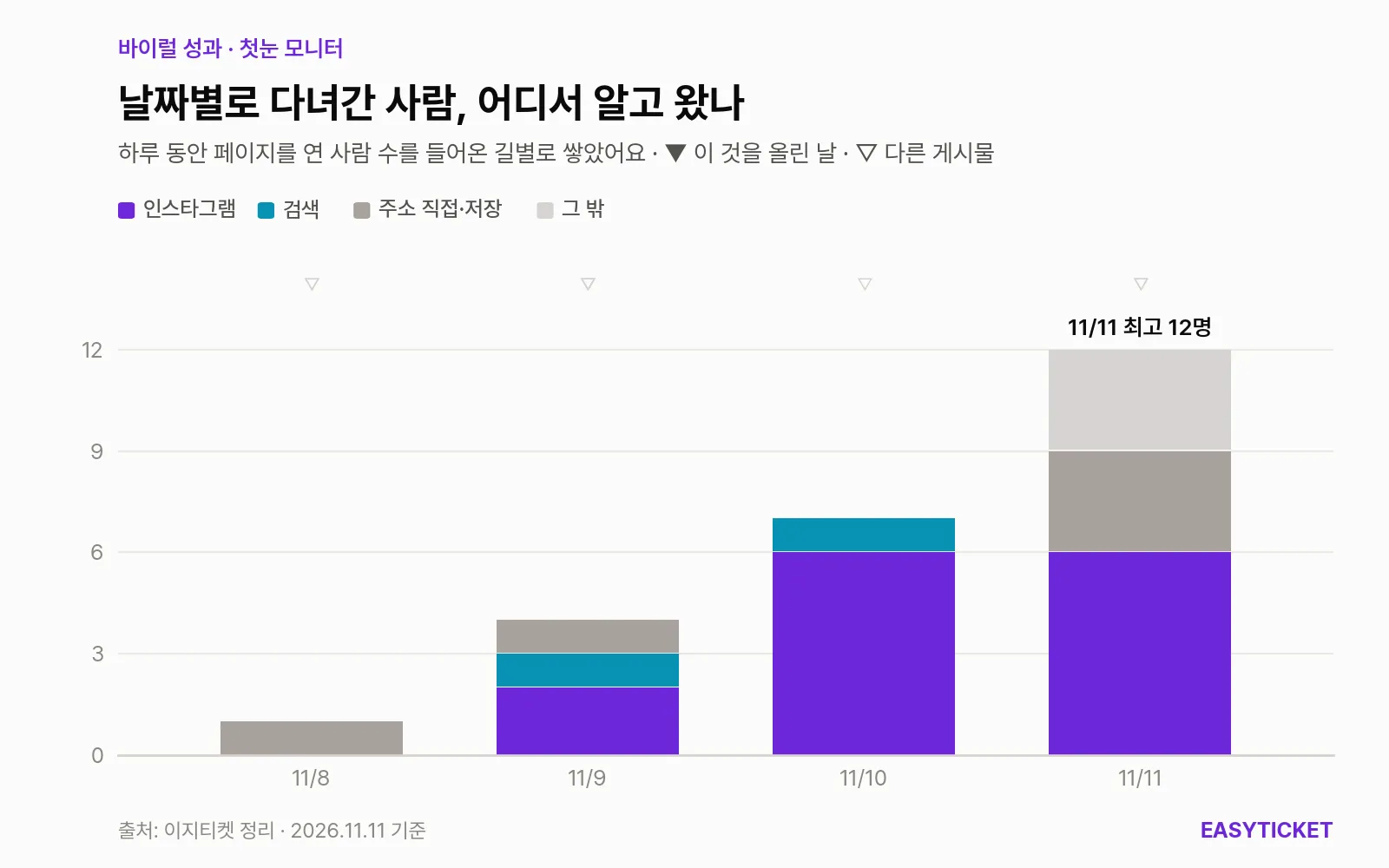
Bars showing where the people who opened the intro page from November 8 to 11 had heard about it. The triangles at the top mark days when the account posted.
In the chart, the day purple (Instagram) first appears is the 9th, when the Reel went up. Two people came from Instagram on the 9th, and six each on the 10th and 11th (for the 11th, counting by route of entry overlaps by one person, so the top of the chart reads 12). Over the four days, the total was 14 from Instagram, 5 who typed the address directly or had it saved, 3 whose source is unknown, and 1 each from Bing and Naver (a Korean search engine).
The Reel and the visits look connected, but it is hard to say so outright. There were 7 comments but 14 people from Instagram, so some likely came through the profile link or other posts. Conversely, even after the Reel with 160,000 views on the 10th, Instagram visits stayed at 6. That means almost nobody who watched the big Reel went on to the profile and found First Snow Monitor.
Two more numbers stand out. Of the 23 visitors, 10 came on a phone. Reels are watched on phones but the app has to be installed on a PC, so those 10 saw the page and still couldn’t download it on the spot. The average time a person stayed on the page was also 10 seconds. I have no number to put in this piece for how many people actually downloaded and installed it.
What to change for the next first snow
Looking at the four-day numbers again, the well-timed theme only opened the door. If I release a seasonal app again, there are four places to change.
- Show the piled snow in the first 3 seconds. I think it’s better to open with snow heaped on a spreadsheet window and a snowball flying off, instead of a caption, just as Desktop Goose finished its explanation with a single goose.
- Post on the day it snows. The first snow is a one-day topic. It’s right to have a video prepared in advance and ready to go on the weather forecast.
- Build a path from phone to PC. If people who arrive on a phone could send the link to their PC or get it later, a few of those 10 could have been saved.
- Use the showcase card as a way to spread. The 4:5 card already exists, so one option left is to turn users’ feeds into a second Reel, for example by featuring snowman cards that people post.
A seasonal idea sets the release date, but in the end it was the first scene that made people press the share button.
Frequently asked questions
Is First Snow Monitor free?
As of November 2026, the intro page shows no price, and the Windows and Mac download buttons are right there.
A warning window appears when I run it on Windows. Is that okay?
Because it is a new program without a code signature, a “Windows protected your PC” window appears the first time you run it. Click “More info,” then click “Run anyway,” and it starts.
Can I use it on a phone?
No. It is a PC app that runs only on Windows 10 and 11 (64-bit) and macOS 13 or later. If you viewed the intro page on your phone, open it again on a computer to download it.
Does my screen or information go outside?
It doesn’t use the internet except to check for updates. Snowman showcase cards are also saved only on your own computer.
Sources 6
AI helped with research and the first draft; the operator tried the subject firsthand, checked and edited this article before publishing. Let us know if you spot a mistake.