
You ask Claude Code to fix a single typo, and the reply opens with “Great question,” then goes on to explain why it made the fix and three other ways you could have done it. Every one of those sentences is tokens, and tokens are money. Caveman is an open-source project Julius Brussee released on GitHub in April 2026, starting as a joke. It is a skill and proxy that makes coding agents such as Claude Code and Codex talk briefly, like a caveman, and also shrinks the tool output and files the agent reads, so you spend fewer tokens (Apache-2.0).
The repository’s tagline says “65% fewer tokens.” But open the measurement document in the same repository and the numbers look very different. This article follows that gap and then judges who the tool is actually useful for.
Why caveman-speak earned more than 110,000 stars
It imitates caveman speech, just as the name says. The core is a set of rules that drops articles, greetings, and filler agreement so the agent answers like “Bug found. Line 3. Fixed.” Hackaday’s April 6, 2026 article described it as a tool that leaves code blocks, technical terms, and error messages untouched and shortens only the prose.
The response was quick. The Hacker News post “Why use many token when few token do trick” got 904 points and 366 comments. As of November 6, 2026, the repository has 117,800 stars and 6,800 forks. In a June 30 article, 404 Media relayed the creator’s claim that developers at OpenAI, NVIDIA, and GitHub use it. That is the creator’s own claim passed along, not something independently confirmed.
It is well past joke territory now. It began as a single prompt rule, but starting with version 4.0.0 on October 13 it gained a CLI you install with one npm command, Auto (routed through Caveman Cloud), which picks a model for each question, and a proxy that trims the files and tool output the agent reads. With 1,944 commits, 129 contributors, and a last commit only hours old, this is a repository that keeps getting attention.
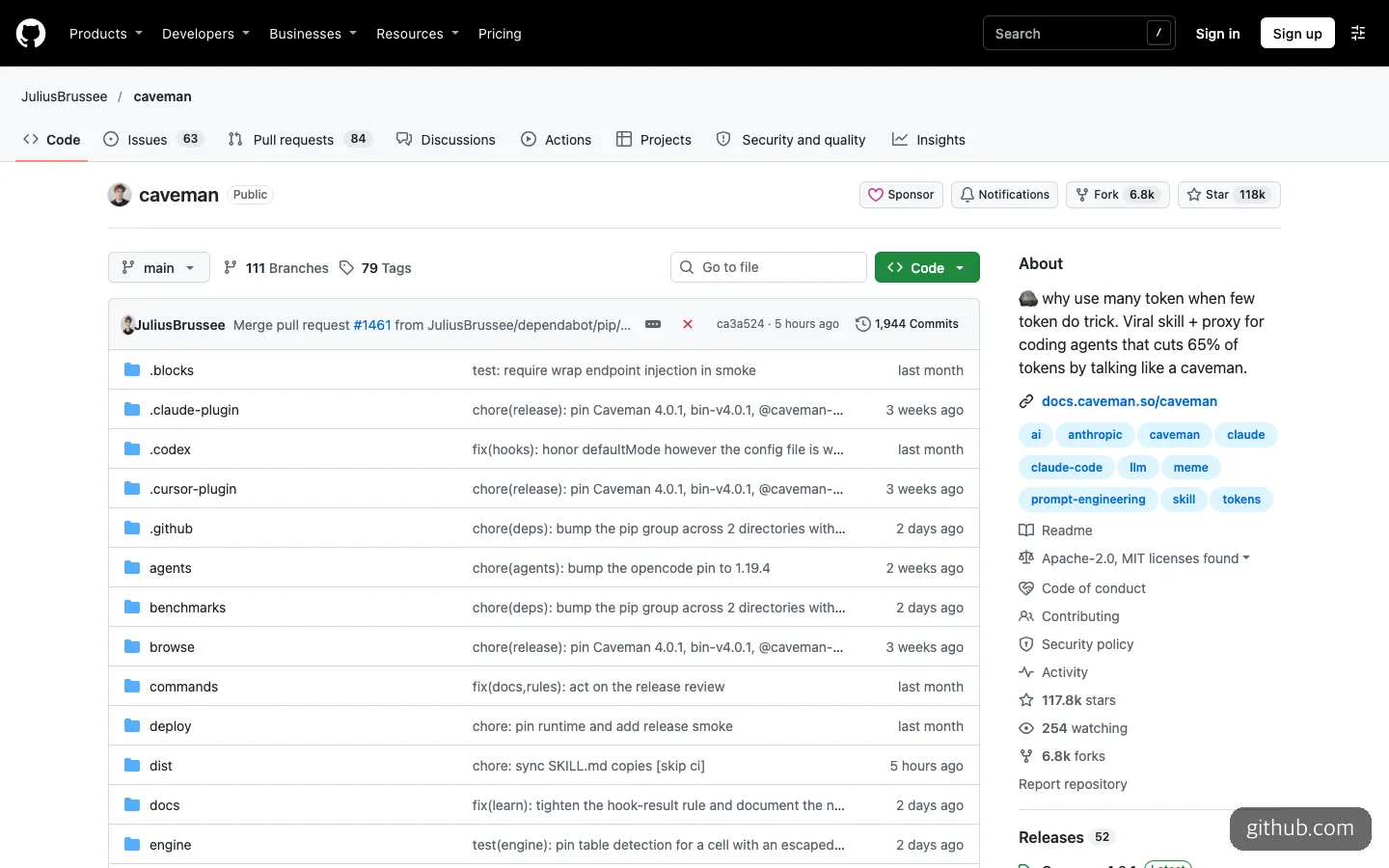
The repository tagline still says “65% of tokens.”
Where does the 65% come from?
The repository has a separate document called HONEST-NUMBERS.md. It opens in a tone like “sometimes it saves, sometimes it costs more, not marketing.” That is a completely different tone from the tagline.
Here is what the document says about the 65%. It was a value that the old stats feature displayed by assuming a fixed 65% output reduction, with no reviewed measurement behind it, and the current stats leave that old estimate out. Going back further, the Hacker News era headline was “about 75%,” and the creator admitted in a comment that it was a number from preliminary tests, not a rigorous benchmark. The same comment also noted that it cannot reduce hidden reasoning tokens, only visible output, and that loading the skill itself takes up context.
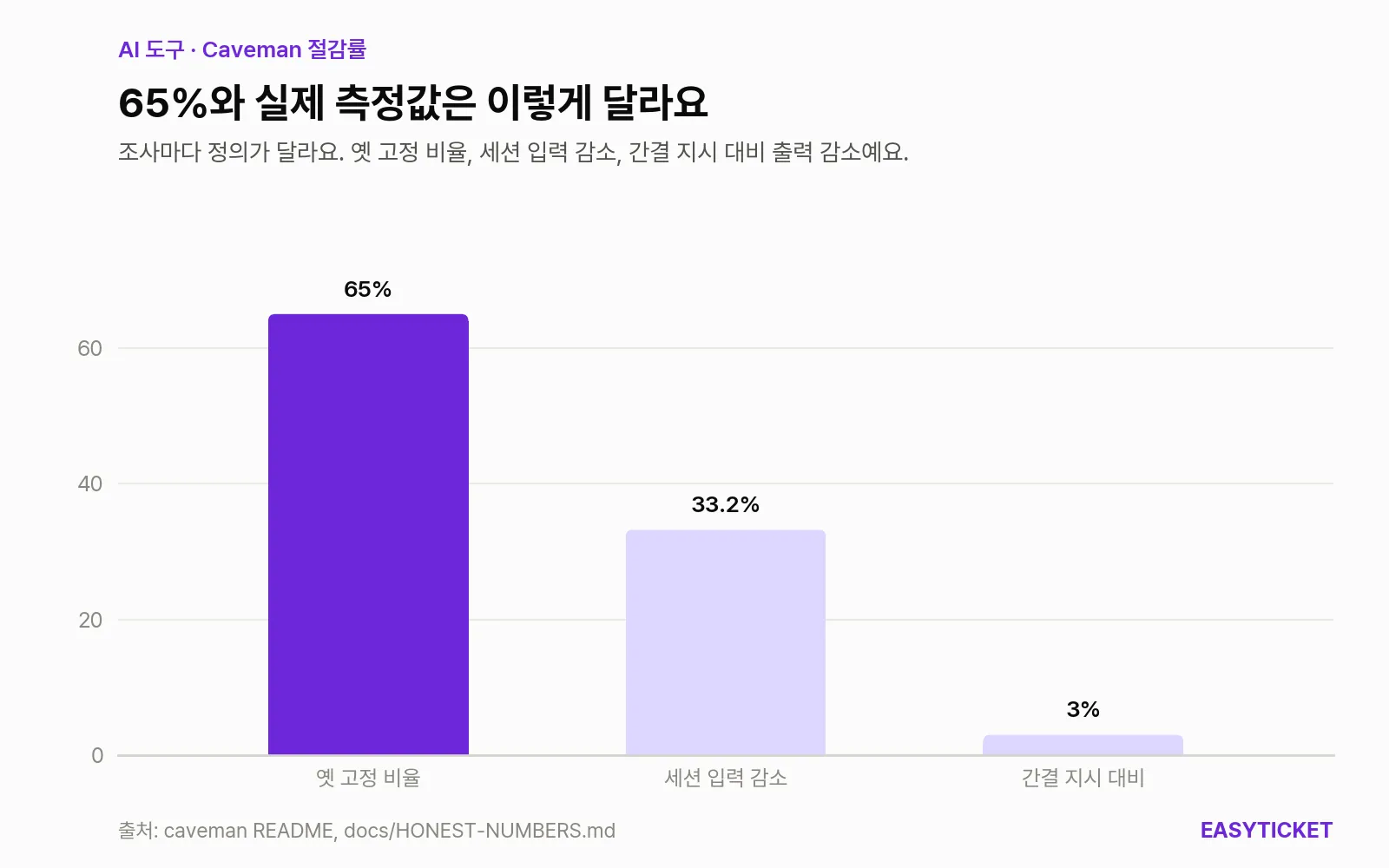
Even for the same “savings rate,” the figure splits into 65%, 33.2%, and 3% depending on what is compared with what.
The 33.2% in the middle of the chart also needs careful reading. The README describes it as “54 Claude Code runs, 33.2% reduction in whole-conversation input tokens,” and adds that it was measured in August 2026 with the old engine. Yet in the HONEST-NUMBERS table, the same 33.2% appears as the input reduction from compressing five memory files with /caveman-compress (22.8 to 49.1% per file). One number, two explanations. That table also states outright that it makes no claim that quality stays the same.
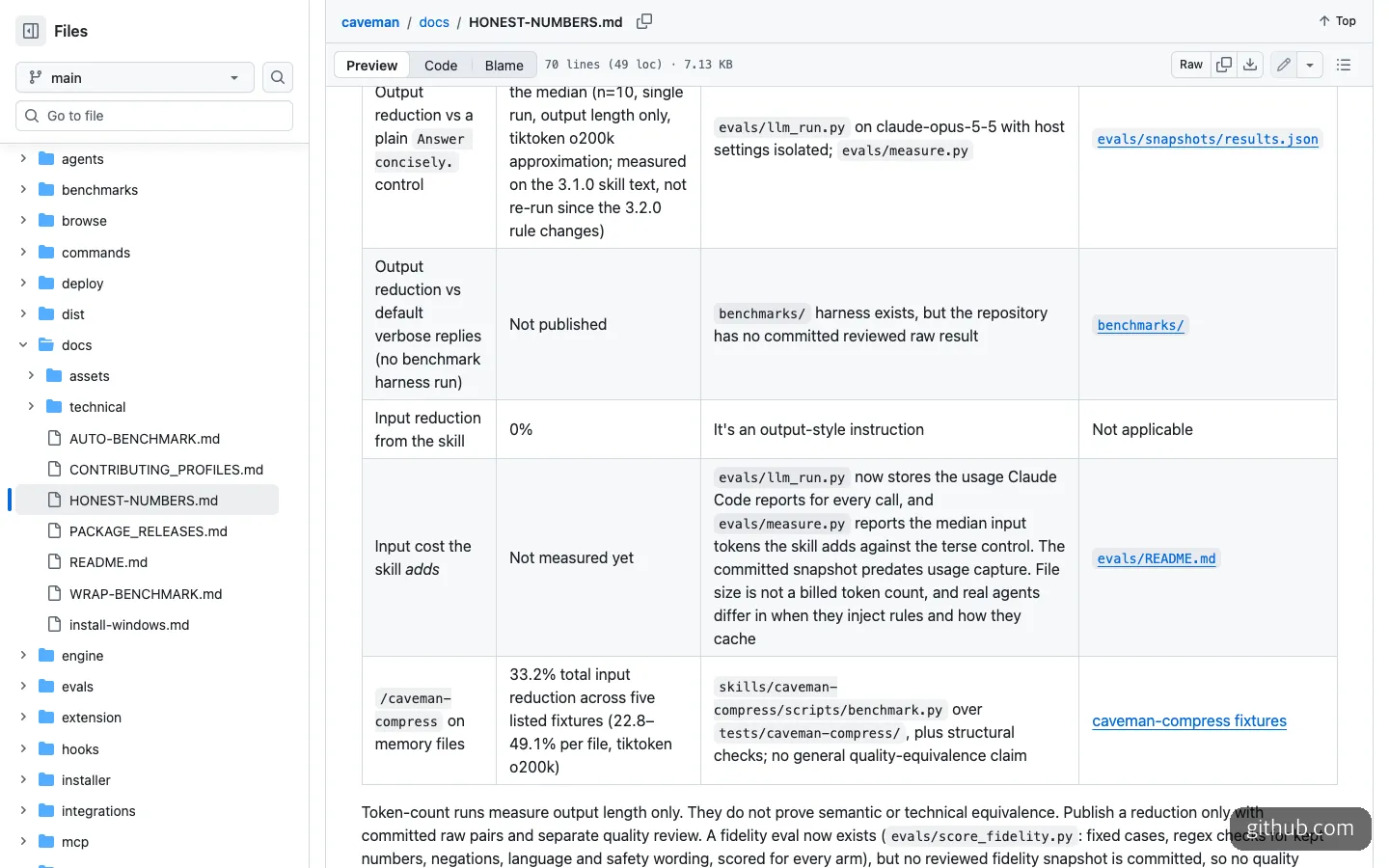
The repository’s measurement document. Savings versus a default answer is “Not published,” and the skill’s input reduction is listed as 0%.
Up against a one-line “answer concisely”
The coldest comparison is not against an answer with no instruction but against an answer with the single line “Answer concisely.” added. Anyone can use that method for free.
In the README’s experiment (claude-opus-5-5, 10 development questions), output was 6,983 tokens with no instruction, 4,334 with the one-line concise instruction, 4,119 with /caveman, and 2,693 with /ultracave. Against no instruction, Caveman’s default mode cuts a little over 40%, but against the one-line concise instruction the difference is only about 200 tokens.
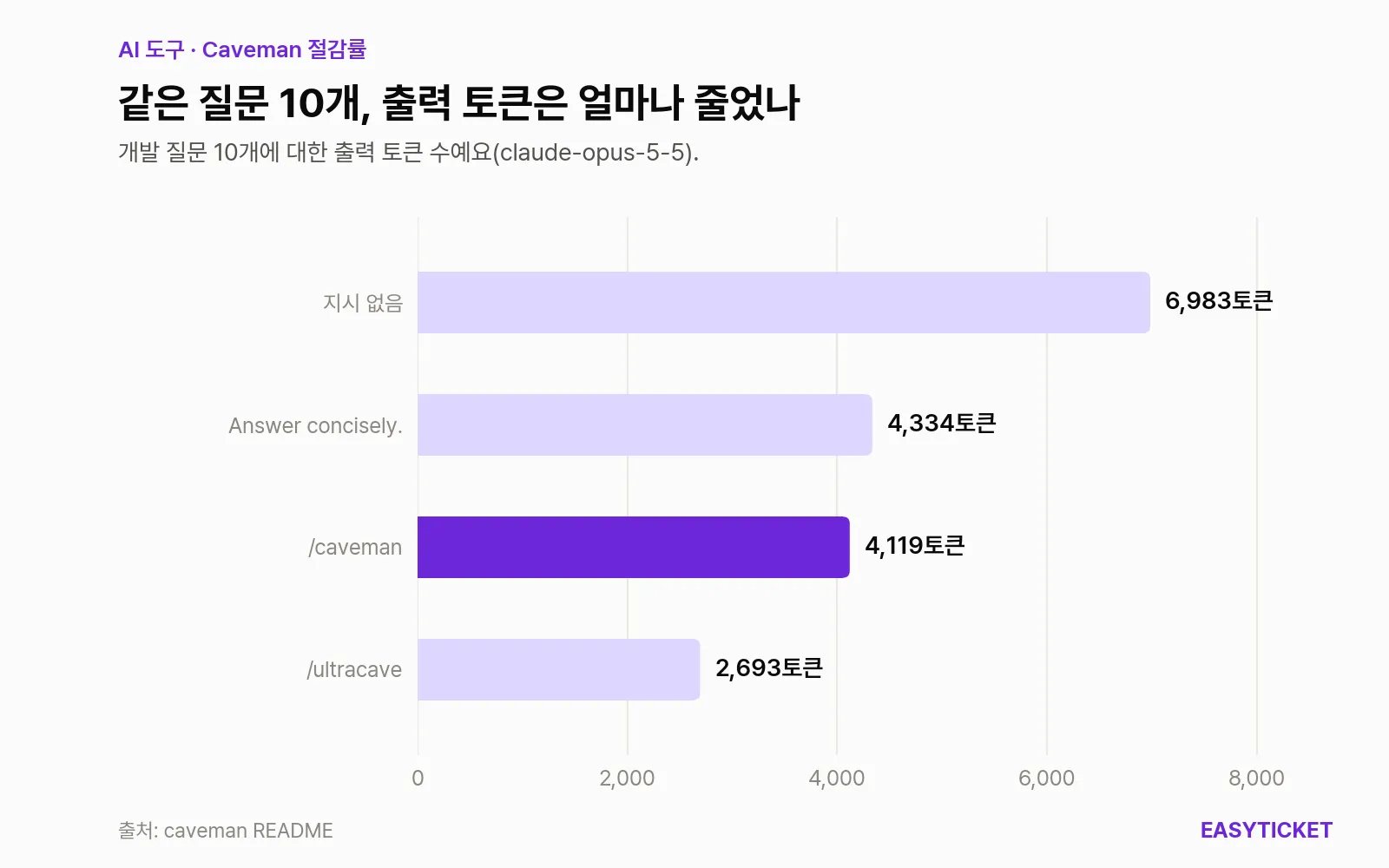
Compared with no instruction the drop is large, but against a one-line “answer concisely” there is almost no difference.
The median that HONEST-NUMBERS measured on the same basis (10 questions, one run, output length only) is smaller. The default caveman cut 3%, megacave 9%, and ultracave 35%. The skill’s own reduction of input is 0%. These figures were measured with the 3.1.0 rules, and the document says they have not been re-measured since the rules changed in 3.2.0.
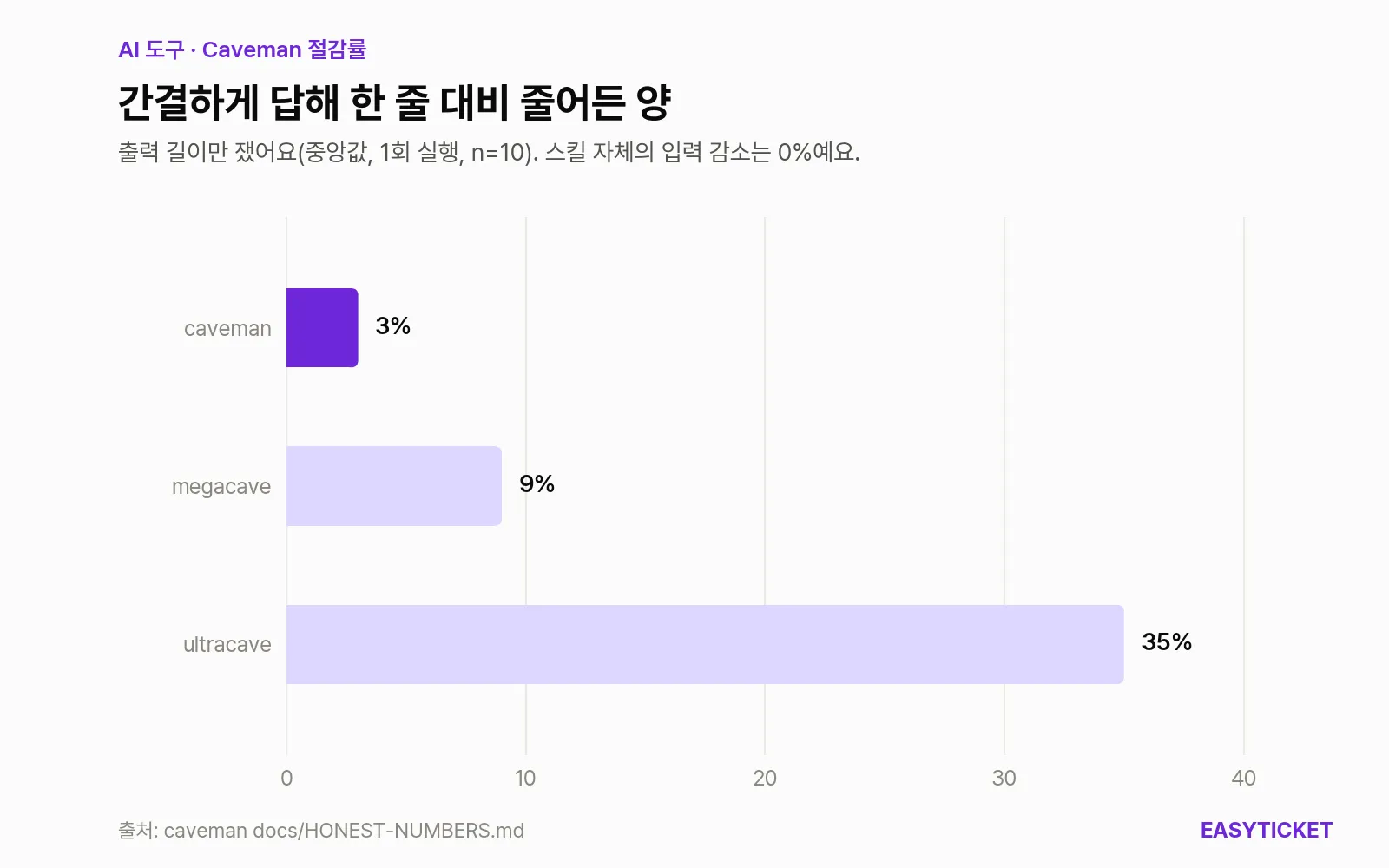
With the one-line concise instruction as the baseline, the default mode cuts 3%, and the strongest, ultracave, cuts 35%.
Even when output shrinks, there is no guarantee the bill does. In an external A/B experiment in the same document (claude-opus-4-8, 300 runs per condition), billed output fell 44.1%, yet total cost actually rose 0.06%. Loading the rules inflated the initially cached context by 1,532 tokens per run. The README also notes that the rules themselves consume about 1,160 input tokens. In one A/B on Cursor, the side with Caveman on used 4.3 million tokens and the side with it off used 1 million. That run was not reproduced, but it is enough of a signal that this is not a tool that always saves.
When is Caveman worth using?
In the end, the fork in the road is what you pay with.
It fits in these cases.
- You pay API fees per token and do a lot of work where answers drag on.
/ultracavein particular cut 35% even against the concise instruction, so it is worth testing. - Memory files like CLAUDE.md have grown, and the amount read each time is a burden. Shrinking the file itself with
/caveman-compressis the feature that has numbers the repository measured directly (22.8 to 49.1% per file). - The agent often reads large logs or tool output. That is the job of the proxy that comes with the CLI, not the skill.
The cases where it does not fit are just as clear. If you pay by request count, as with GitHub Copilot, the README itself says shorter answers save you nothing. And if you are learning by reading explanations, caveman-speak actually gets in the way of understanding. The price of a short answer is lost context.
If you pay per token but are unsure how much you would save, first put the single line “Answer concisely.” in your project instruction file, use it for a few days, and then compare with Caveman. By the repository’s own numbers, the gap between the two is smaller than you might expect.
Installing Caveman and getting started, or handing it to an AI
You need Node.js 22.13 or later (PowerShell 5.1 or later for the Windows install script). An account is required only for the Auto feature, and you can create one for free with caveman login. The commands below are exactly as written in the README.
# 권장: CLI와 프록시까지 한 화면에서 설정
npx @caveman-ai/cli@latest

# 스킬만 (프록시 없음)
npx skills add JuliusBrussee/caveman -g

# 클로드 코드 플러그인으로
claude plugin marketplace add JuliusBrussee/caveman && claude plugin install caveman@caveman

# 제미나이 CLI 확장으로
gemini extensions install https://github.com/JuliusBrussee/caveman

# 지우기
npx -y github:JuliusBrussee/caveman -- --uninstall
If this is your first time, I recommend starting with the second line, which installs only the skill. With the skill alone, everything runs on your own computer and nothing is sent to Caveman. The exception is /caveman-compress, which sends the file to be compressed to the model provider you have configured (for example, Anthropic). After installing, just call one of /caveman, /ultracave, or /megacave in the chat window. Since 3.1.0, the six intensity levels have been consolidated into these three.
If typing commands yourself feels like a burden, you can hand the job to a coding agent. The key is to have it read the README, install only the skill, and state firmly that the CLI, proxy, and Auto are to be left out.
Read the README and install only the skill. Leave out the CLI, proxy, and Auto, and tell me where it was installed.
If you want to measure the effect, pick tasks similar to ones you did last week and have the agent pit the two methods against each other.
Run 5 tasks with the one-line “Answer concisely.” and with /caveman, and compare the tokens in a table.
RTK and the one-line concise instruction, compared
Caveman is not the only way to attack the same problem. The one most often compared is RTK, a tool that compresses shell command output before the agent reads it.
| Caveman skill only | Caveman CLI, proxy, Auto | RTK | One line: “Answer concisely.” | |
|---|---|---|---|---|
| What it trims | The agent’s replies | Replies, files and tool output read, model selection | Shell command output | The agent’s replies |
| Claimed effect | 3 to 35% output reduction vs. concise instruction | Auto: 0.46x the cost of Opus 5.5 xhigh (experiment half complete) | 60 to 90% on common dev commands | Baseline |
| License | Apache-2.0 | Apache-2.0 (Cloud is a service) | CLI Apache-2.0, engine and proxy BUSL-1.1 | Not applicable |
| Usage telemetry | Not sent | On by default | Off by default | None |
| Stars (as of November 6, 2026) | About 117,800 | Same repository | About 85,700 | Not applicable |
As the table shows, the Caveman skill and the one-line concise instruction do the same job. If your worry is tool output eating tokens, RTK fits the problem more precisely, and its telemetry is off by default. On Auto’s 0.46x figure, the README itself says it ran only half of the 85 tasks and cannot distinguish the score gap (0.5 points, margin of error ±7), so for now it is best treated as a reference only.
What to turn off before installing, and the state of maintenance
If you plan to install the CLI, SECURITY.md is worth reading first. It is a 401-line document, and three points matter most.
First, CLI usage telemetry is on by default. It collects the IP address, install ID, operating system, time zone, command name, token counts, and so on, and says it does not collect prompt or answer text, file paths, or credentials. IPs are deleted after 90 days and records after 13 months, but according to the document, request logs on the database service side are excluded from the 90-day cleanup. To turn it off you need caveman telemetry off or DO_NOT_TRACK=1, and CAVEMAN_OFFLINE=1 alone does not turn it off.
Second, when Auto routing is on, each time you ask a question your most recent question (the last 128 KiB), the question before it, and the tail of the agent’s previous answer go to Caveman Cloud. Contents of CLAUDE.md or files attached with @ can be mixed in, and on the free plan they may be retained. If you handle company code, it is safer to turn it off with caveman off routing.
Third, there were mistakes in this area up until last month. PR #1198, merged on October 12, fixed an issue where turning on routing while logged in sent your recent questions to the Cloud without notice, and added a notice. PR #1245, opened on October 10, fixed a bug where v4 ignored the telemetry setting you had turned off in the old CLI and kept sending data. That same PR also has a note saying that during pre-release checks the Cloud kept returning 503 errors, so Auto and login could not be tested end to end.
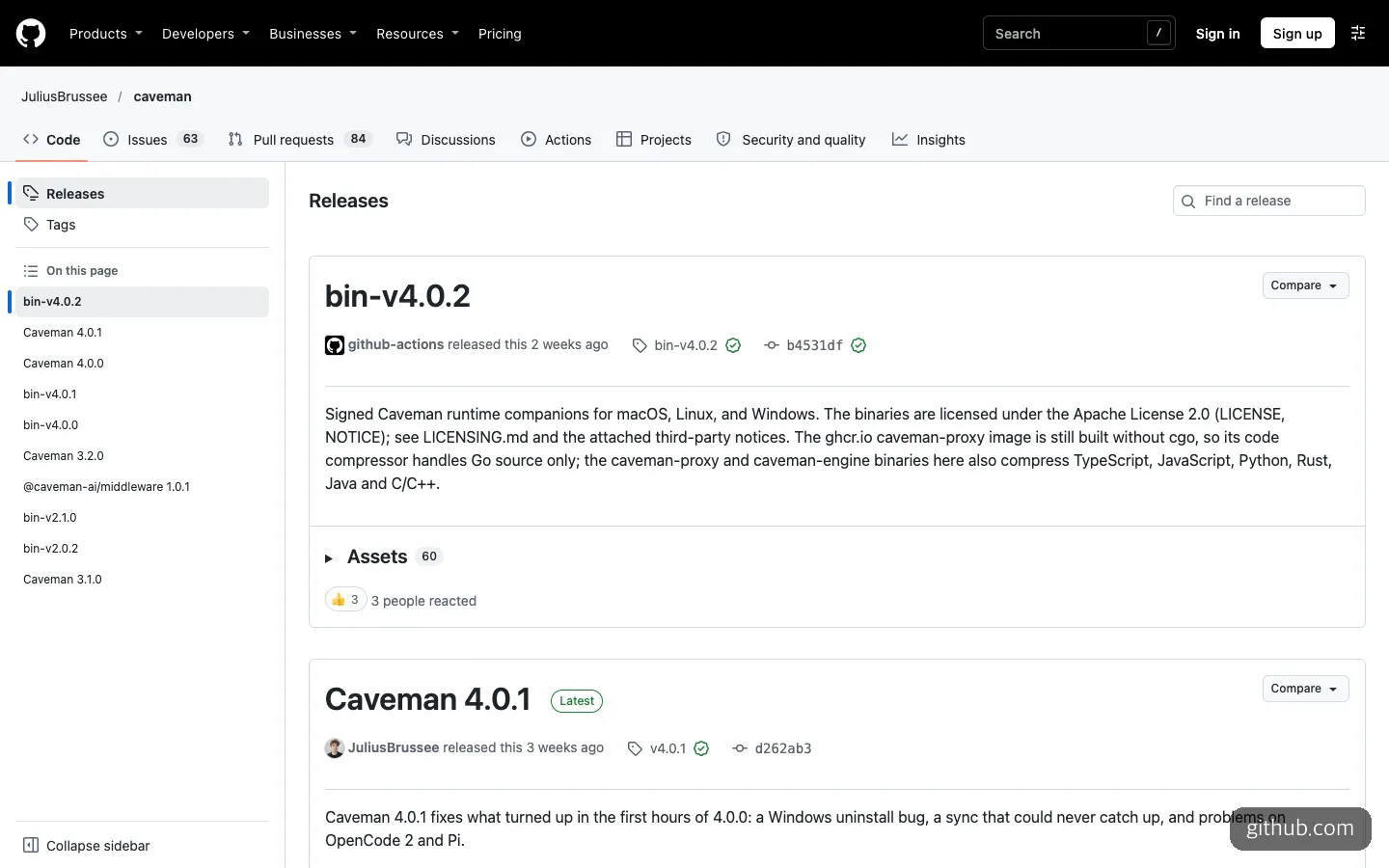
The releases page. The description of the top executable says the container version’s code compressor handles only Go source.
The release cadence is also fast and rough. 4.0.0 and 4.0.1 came out on the same day (October 13), and 4.0.1 still has a known issue where caveman sync returns “Request rejected.” According to the description of bin-v4.0.2, released on October 23, the container image’s code compressor handles only Go source, and TypeScript, Python, and others are compressed only by the separate executable. Security fixes go only into the latest stable release, so this is a tool you need to update often once installed. On licensing, the LICENSE file is Apache-2.0 and the repository also contains an MIT file. The “Caveman” name and the rock logo are the creator’s trademarks, so you cannot fork it and release it under the same name.
If you pay per token and your worry is long answers, install only the skill and try /ultracave first. It is not too late to bring in the CLI and Auto once you like those numbers, with telemetry and routing turned off.
Frequently asked questions
Is Caveman free?
The skill and CLI are open source and free. Using Auto requires an account, which you can create for free. A paid plan is mentioned, but as of November 6, 2026 the README lists no price.
Can I use it with tools other than Claude Code?
Yes. The README has install commands for a Claude Code plugin and a Gemini CLI extension, and the repository also has folders for Codex and Cursor. Starting with 4.0.0, caveman-auto appears in the model selection list of Claude Code and OpenCode with a 1-million-token context.
Does code quality drop when answers get shorter?
It is designed to leave code blocks, technical terms, and error messages as they are. However, the repository’s measurement document states clearly that it only counted tokens and is not proof that the answers are the same in meaning or technically. Quality comparison results have not been published yet.
How do I remove it if I don’t like it?
You can remove it with the single line from the README, npx -y github:JuliusBrussee/caveman -- --uninstall. You can also ask your coding agent to run that command and check whether any leftover configuration files remain.
Sources 8
- JuliusBrussee/caveman (GitHub)
- caveman docs/HONEST-NUMBERS.md
- caveman SECURITY.md
- caveman Releases
- Hacker News: Caveman: Why use many token when few token do trick
- So Expensive, A Caveman Can Do It (Hackaday)
- Companies Are Making Claude and Codex Talk Like Cavemen to Stop AI's Soaring Costs (404 Media)
- rtk-ai/rtk (GitHub)
AI helped with research and the first draft; the operator tried the subject firsthand, checked and edited this article before publishing. Let us know if you spot a mistake.