
If you have ever told Claude Code, “Just make the title text a little bigger,” and then sat staring blankly until the render finished, you will see right away why this tool exists. raea (Render Anything Engine) is a render engine built by Shane Murphy, whose first stable release, 0.1.1, came out on November 12, 2026. It takes videos, motion graphics, 3D and games that AI has written in React and TypeScript and draws them directly on your computer’s GPU, with no browser. It also ships with a Claude Code plugin, so it was clearly built from the start for people who tell an AI what to do rather than writing the code themselves.
A video engine that skips the browser
Tools that let AI make videos with code already exist. Remotion renders a React screen in Chromium and outputs it as video, and HyperFrames, from HeyGen, shoots an HTML page frame by frame in headless Chrome and stitches the frames together with FFmpeg. Both are, in the end, capturing a browser screen.
raea skips that step. Its core is written in Rust and the Bevy game engine, so its own engine draws each frame directly on the GPU. That is why the official docs describe it this way: “the same file renders as an MP4, plays in real time as a game, and renders as a single still frame.” You work with video and games as one file.
The commands follow that design. render produces a video, play runs it in real time, check inspects the result, cut trims a video based on what is said in it, and export-game exports a standalone game. The one worth a closer look is check. It catches clipped text, low contrast, content outside the safe area, frozen frames and odd audio levels before a person ever looks. According to the README, the design lets the AI render a single frame, inspect it itself and fix problems without a human.
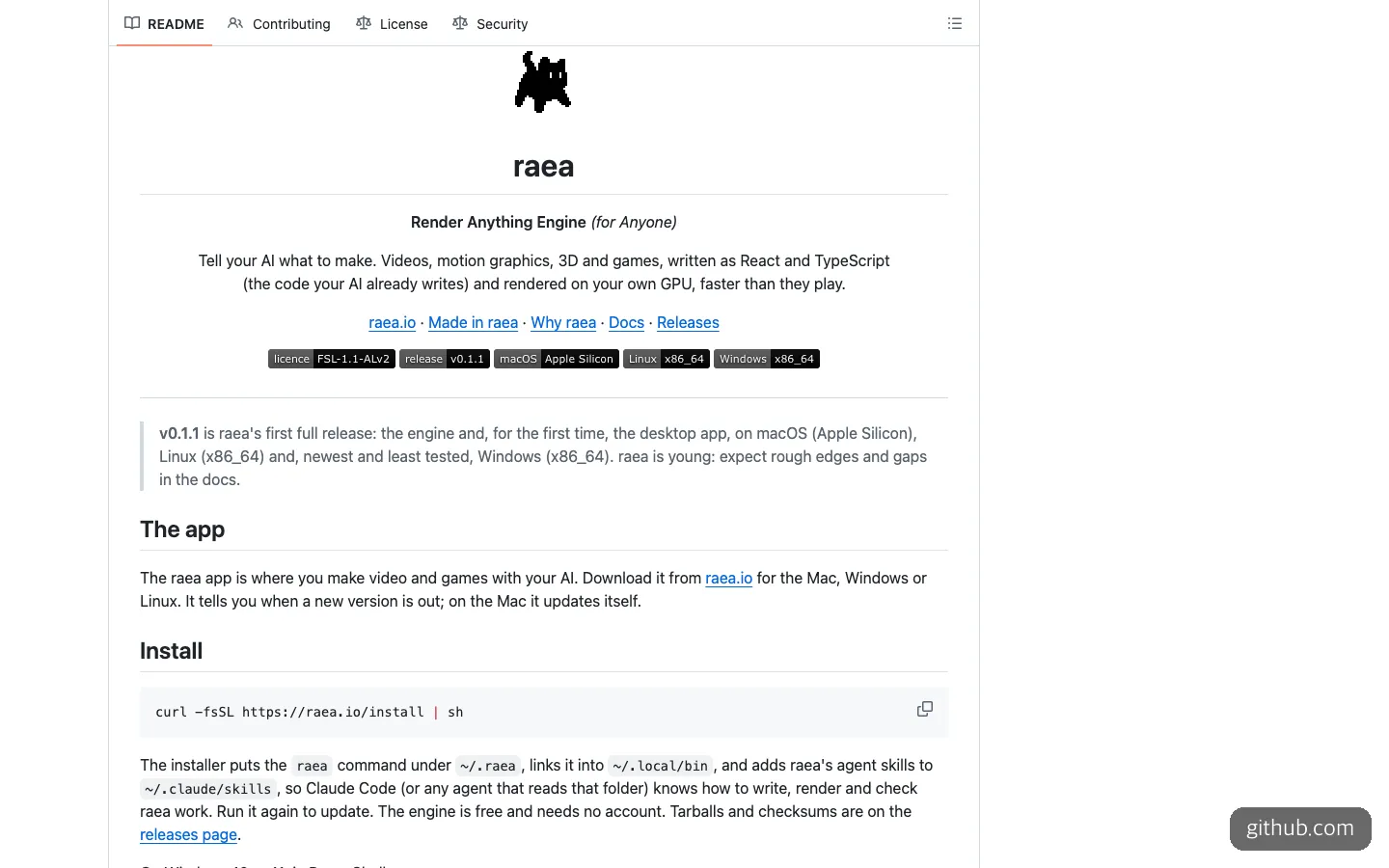
At the very top of the README, a warning that this is still a young tool appears right next to the license badge.
Nearly 2,000 stars in nine days, but still young
It took off fast. According to Trendshift, raea gained 1,980 GitHub stars over the nine days from November 4 to 12, 2026, including 852 on November 9 alone. That day it ranked 14th overall and 3rd among Rust projects. It was mentioned on Hacker News on November 5 and covered in Korea by GeekNews, a Korean developer news site, on November 10.
By scale, though, it is still a newborn tool. As of November 12, 2026, raea has 2.2K stars, while Remotion has about 72,600 and HyperFrames has 83,100. A tool that many people have already used and debugged is bound to carry more weight than one that shipped five rc versions in four days.
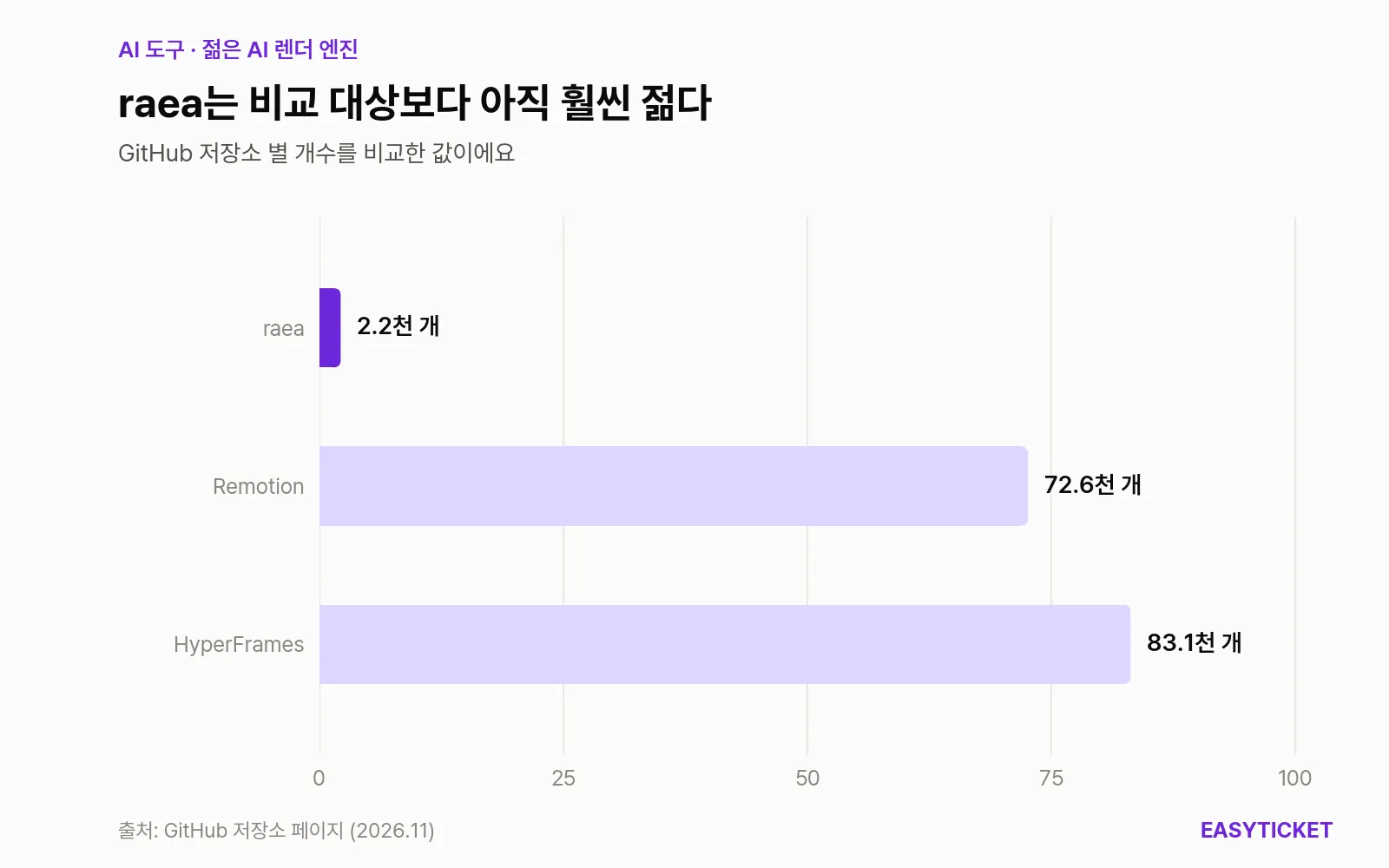
By GitHub stars, raea is about one-thirtieth the size of the two tools it is compared with.
When does raea make sense?
It fits well in these cases.
- When you refine a video through many rounds with an AI. If every fix means waiting on a render, the shorter each pass takes, the more changes you can try in the same time. That is exactly the advantage raea promotes.
- When you want to make a video and a game at once. For example, if you want a short game trailer and the playable game itself from the same code, raea is the tool that officially advertises that today.
- When you turn out vertical video such as Shorts and Reels in code. The very first example is a 1080x1920 vertical video, and
checklooks separately at clipped text and the safe area. - When 3D scenes are involved. Because it is built on a game engine, there is a dedicated 3D guide (I only checked the table of contents).
The cases where it does not fit are just as clear. If you have a deadline, keep Remotion or HyperFrames as your main tool. raea’s first stable release is less than a day old, and the README itself tells you to expect rough edges and gaps in the docs. If you only use Windows, it is fine to wait a bit longer. The project states that Windows support arrived last and has the least testing.
How do you use raea?
The requirements are fewer than you might expect. You need one of the following: a Mac (Apple silicon), Linux (x86_64) or Windows 10 or 11 (x86_64), plus an AI coding tool such as Claude Code or Codex. On Windows you also need the Visual C++ Redistributable and a GPU driver that supports DirectX 12 or Vulkan. The engine is free and needs no account. The raea gen step, which has AI generate assets for you, does require you to enter an API key for your own AI service.
The order the official docs recommend is: download the app, (optionally) install the command-line tool, and then paste a setup sentence to your AI in your working folder. The docs give the command-line install and the Claude Code plugin install like this.
# macOS (Apple silicon) · Linux
curl -fsSL https://raea.io/install | sh

# Windows PowerShell
irm https://raea.io/install.ps1 | iex

# Verify the install
raea --version
/plugin marketplace add shinyobjectz/raea
/plugin install raea@raeaFor tools other than Claude Code, you just swap in the name, as in raea skills install --agent codex (the docs’ examples are codex, kimi and gemini).
You can actually hand these commands to the AI too. The sentence the official site tells you to paste as-is is this.
Install raea from https://raea.io/install and show me what it can make.An AI that receives this sentence checks whether raea is installed, reads the raea skill and the docs summary file, and then asks what you want to make. From there, just say what you want in specific terms. If you put the docs’ working sequence (write, check a few frames, inspect, render) straight into your request, you waste less effort.
Make me a 3-second vertical video with raea (1080x1920). On a black background, the text "This week's new menu" should fade in slowly.
First, extract frames 0, 30 and 89 as images and show them to me, check for clipped text and the safe area with raea check --quick, and then render it as an MP4.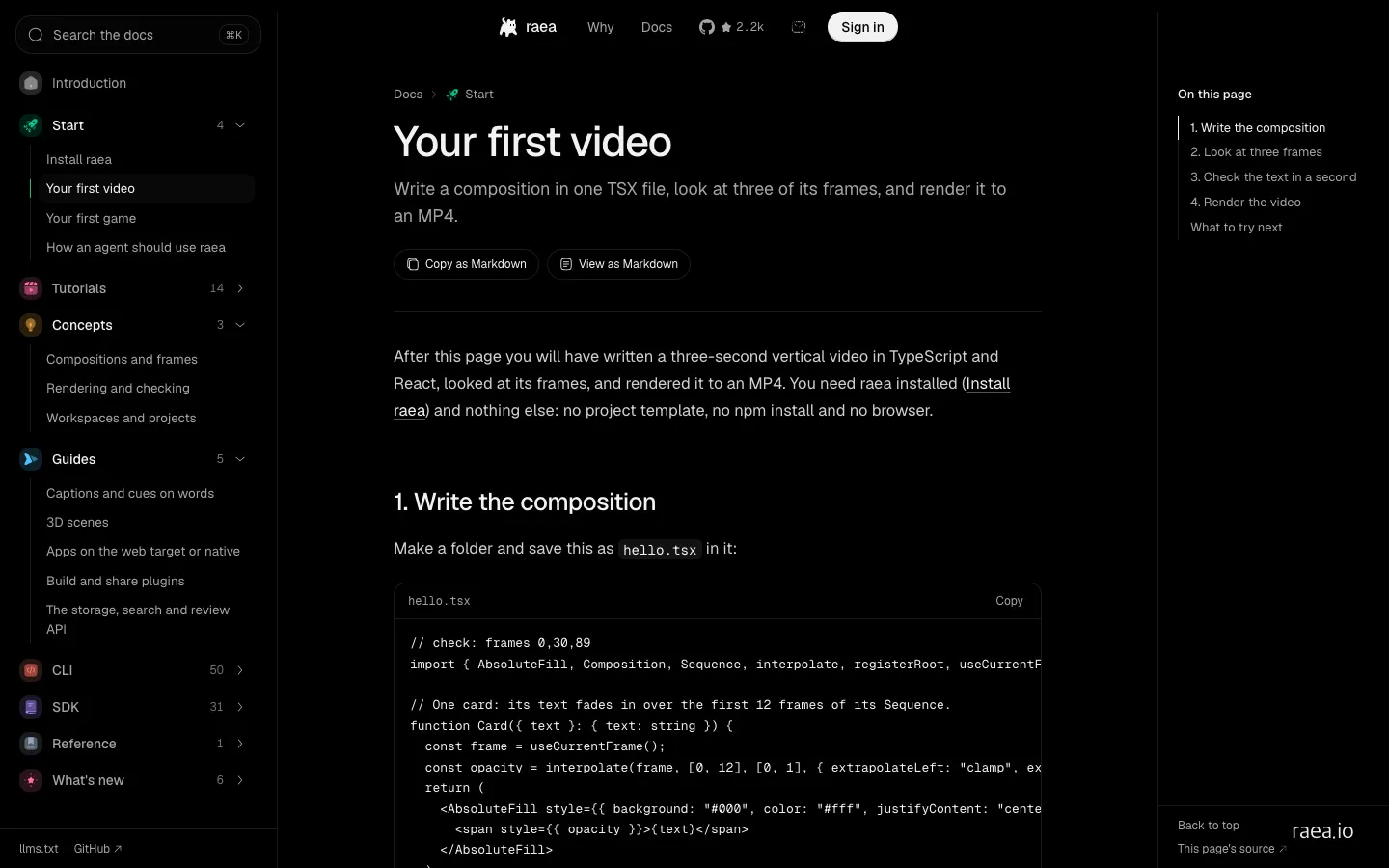
The first-video example starts from a single hello.tsx file, and the page says no npm install or browser is needed.
Reading through the docs, the first example is quite light. You put just one hello.tsx in a folder and start, with no project scaffolding and no npm install. The names used in the code (AbsoluteFill, Sequence, interpolate, useCurrentFrame) are the same as in Remotion, so an AI that has seen Remotion code should pick up the structure quickly. The whole documentation is also available as Markdown, and adding .md to the end of a URL gives you the raw source. The docs are, in effect, written to be read by an AI before a person. One drawback is that the site and repository front pages focus on the desktop app, so anyone who wants to use only the command line has to dig into the README and deeper docs to find what they need.
How is it different from Remotion and HyperFrames?
| Item | raea | Remotion | HyperFrames |
|---|---|---|---|
| How it draws | Its own engine, directly on the GPU | Renders React in Chromium | Captures HTML in headless Chrome |
| What it makes | Video, real-time games, 3D | Video | Video (MP4) |
| License | FSL-1.1-ALv2 (becomes Apache 2.0 after 2 years) | Free for individuals and companies of 3 or fewer; paid beyond that | Apache 2.0 |
| GitHub stars (Nov. 12, 2026) | 2.2K | about 72.6K | 83.1K |
| Claude Code integration | Plugin and skill | Official skill and plugin | Plugin |
| What you need | One installer | A Node.js project | Node.js 22 or later, FFmpeg |
Speed is what raea promotes most heavily. In the official site’s self-measured chart, rendering the same six React scenes took raea 7.2 seconds. When I looked at the page, Remotion and HyperFrames both showed 10.3 seconds, but I could not confirm whether the chart was still filling in as an animation. The measurement conditions are 720p, 30 fps, one M5 Pro Mac, and the median of three runs. It is a number the makers measured on a single machine of their own, so it is hard to assume you will see the same gap on your computer.
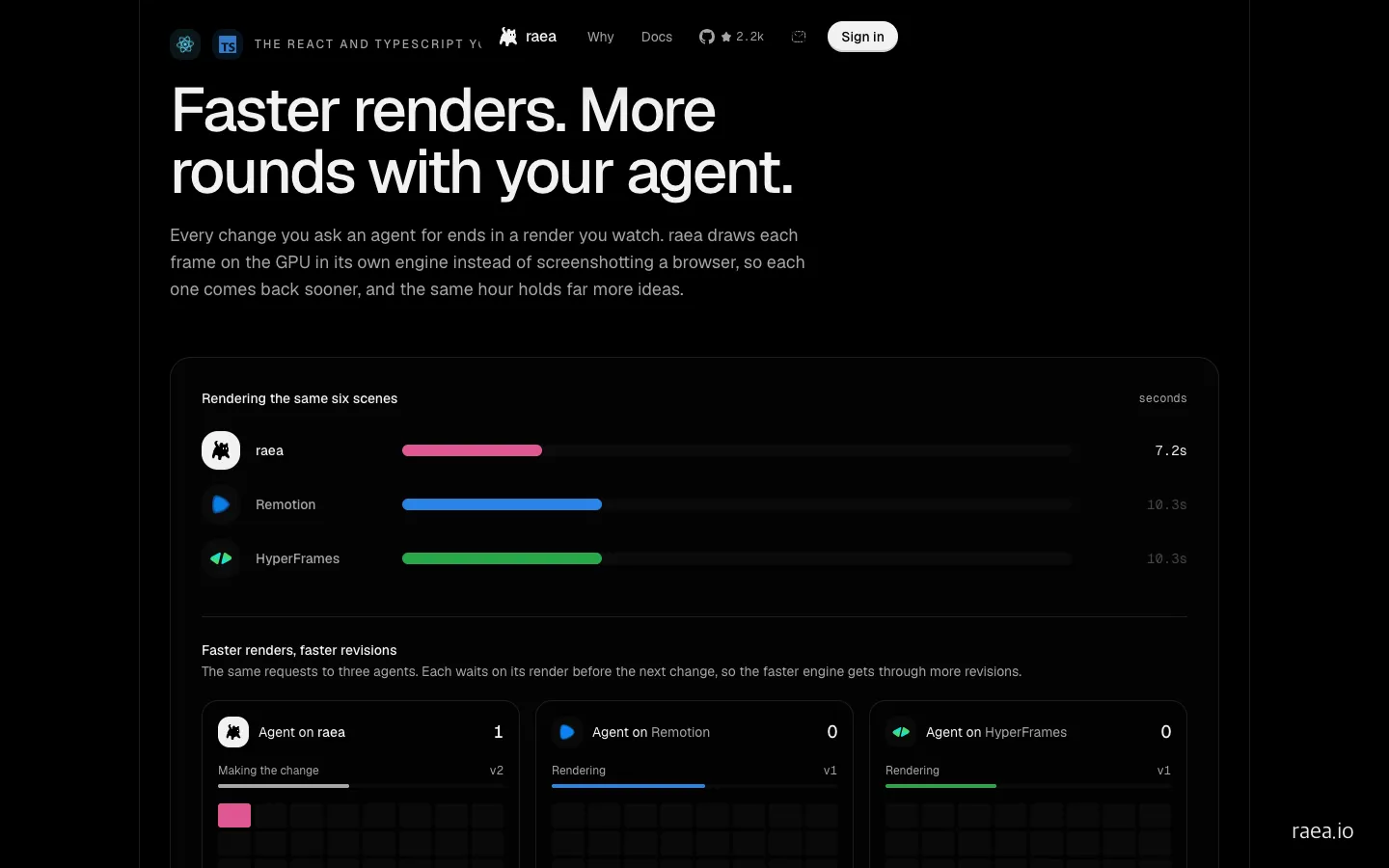
The official site’s self-measured chart. It compares the time each of the three tools took to render the same six React scenes.
In short, the decision is simple. If you need a tool you can rely on right now, pick HyperFrames (the less restrictive license) or Remotion (the most polished ecosystem). If you want to cut render waiting time or you are ambitious enough to want games too, raea is worth keeping alongside as something to try out.
Four things to know before installing
First, the license. raea uses FSL-1.1-ALv2. You can use it for any purpose except building a commercial product or service that competes with raea, and each version converts to Apache 2.0 two years after release. Keep in mind that the code is public but it is not open source by the OSI definition, and that it becomes a problem if you plan to wrap raea in a video-rendering service and sell it.
Second, the installation method. You run a script downloaded with curl | sh directly, and it places the executable in your home folder and also writes files into the Claude Code skills folder (~/.claude/skills). Because that location affects how your AI tool behaves, it is safer to open the script and read it before installing, or to ask an AI to read it and explain it to you. On the plus side, the project states that it sends no telemetry or crash reports on its own and that RAEA_OFFLINE=1 blocks the network entirely, which is reassuring.
Third, the state of maintenance. Commits arrive every few hours, so the project is clearly active, but the body of the 0.1.1 release is a single line, “Notes soon,” so there was no way to tell what had changed. The installers are also large, from 250MB to a little over 400MB depending on the operating system. That suggests a period in which the docs and the actual files can fall out of step.
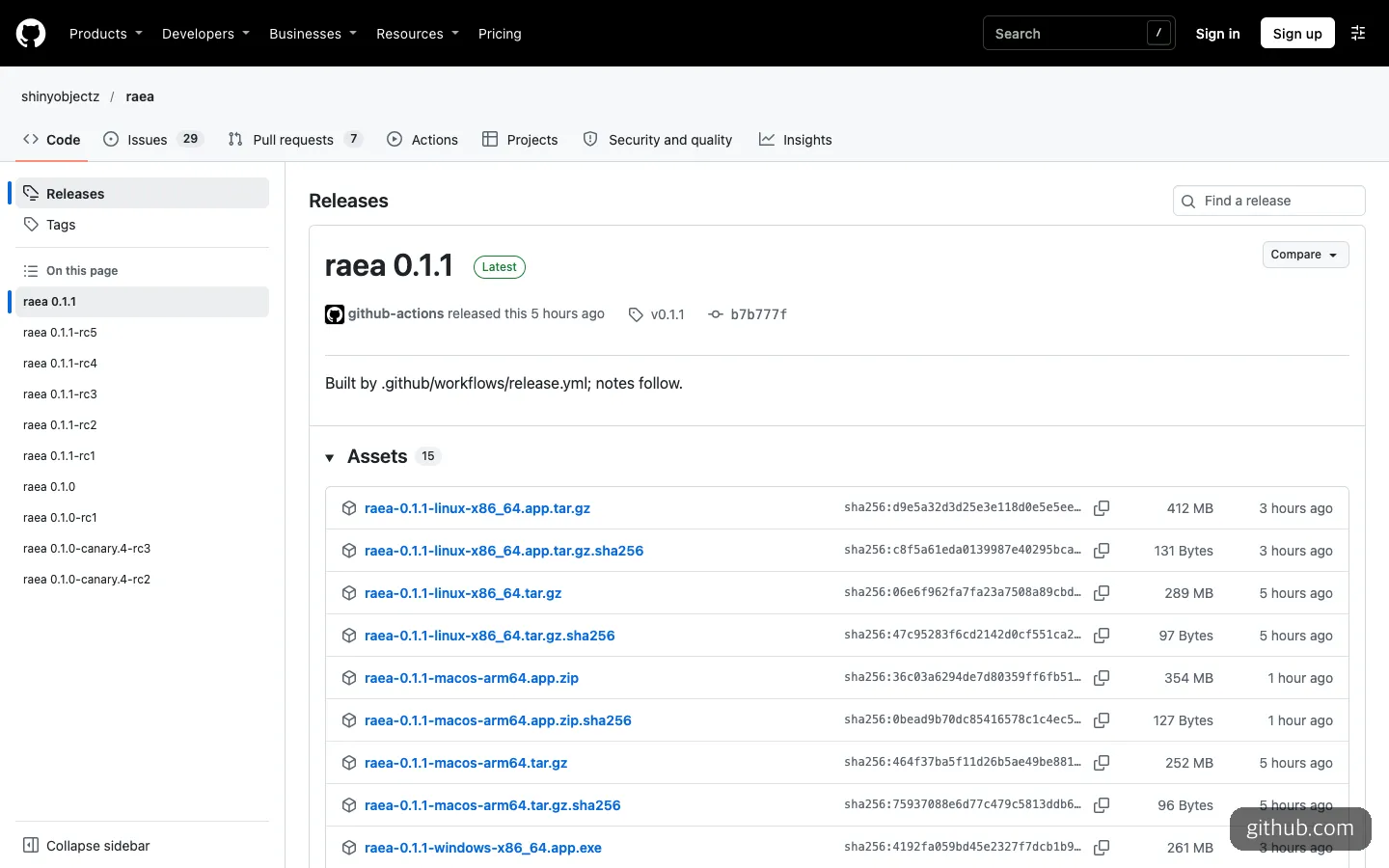
The 0.1.1 release body is just one line, and the installers run from 250MB to a little over 400MB per operating system.
Fourth, the story on accounts differs a little from page to page. The README and the site say the engine needs no account, but one part of the docs says the app connects to a raea account when you first open it. It appears that using only the command-line tool works without an account, but you will be less surprised if you assume the desktop app may ask you to connect. The minimum GPU requirements are not listed yet either.
Frequently asked questions
Is raea free?
The engine, the desktop app and rendering are free, with no per-render fee. For the AI model, you use your own, whether Claude, ChatGPT, Kimi or a local model. As of November 2026, two paid plans are announced: Pro (planned at $25 a month, $15 for founding members), which bundles storage sync and social posting, and Team (planned at $149 a month) for up to 5 people. Some features are still in preparation.
Can I post videos made with raea on YouTube and earn money from them?
What the license prohibits is building a commercial product or service that competes with raea. Posting the videos you make appears to fall outside that scope, but if you plan to use it heavily at a company level, it is worth reading the full license text once.
Can I use it without knowing any coding?
It is built on the assumption that you hand everything from installation to rendering to an AI coding tool, so the barrier to getting started is low. But it is an early version with rough edges still left, so you will need enough patience to paste an error message into the AI as is and ask it to fix the problem.
If you have resented the time spent waiting on renders, starting one weekend side project with raea is just about the right distance to keep from it right now.
Sources 8
AI helped with research and the first draft; the operator tried the subject firsthand, checked and edited this article before publishing. Let us know if you spot a mistake.