
Ask Claude Code to “build me a dashboard,” and nine times out of ten you get a similar-looking screen. A purple gradient, a soft glow, an emoji next to the heading, a welcome message with an exclamation point. unslop is a skill for Claude Code and Codex that designer Damir Sokolovsky released on October 28, 2026. It diagnoses screens with this AI look first, then fixes them into a properly designed interface over nine passes. The key point is that it is a tool for touching up screens you have already built, not for building new ones.
What does unslop fix, and in what order?
The README sums up what unslop does like this: it first finds the “slop” (the telltale marks of AI-made output) on the screen, settles on a direction that fits the product, and then fixes things one pass at a time, the way a designer hands over a list of revisions. What it looks for includes purple gradients, glows, emoji labels, shouting copy, and uneven spacing.
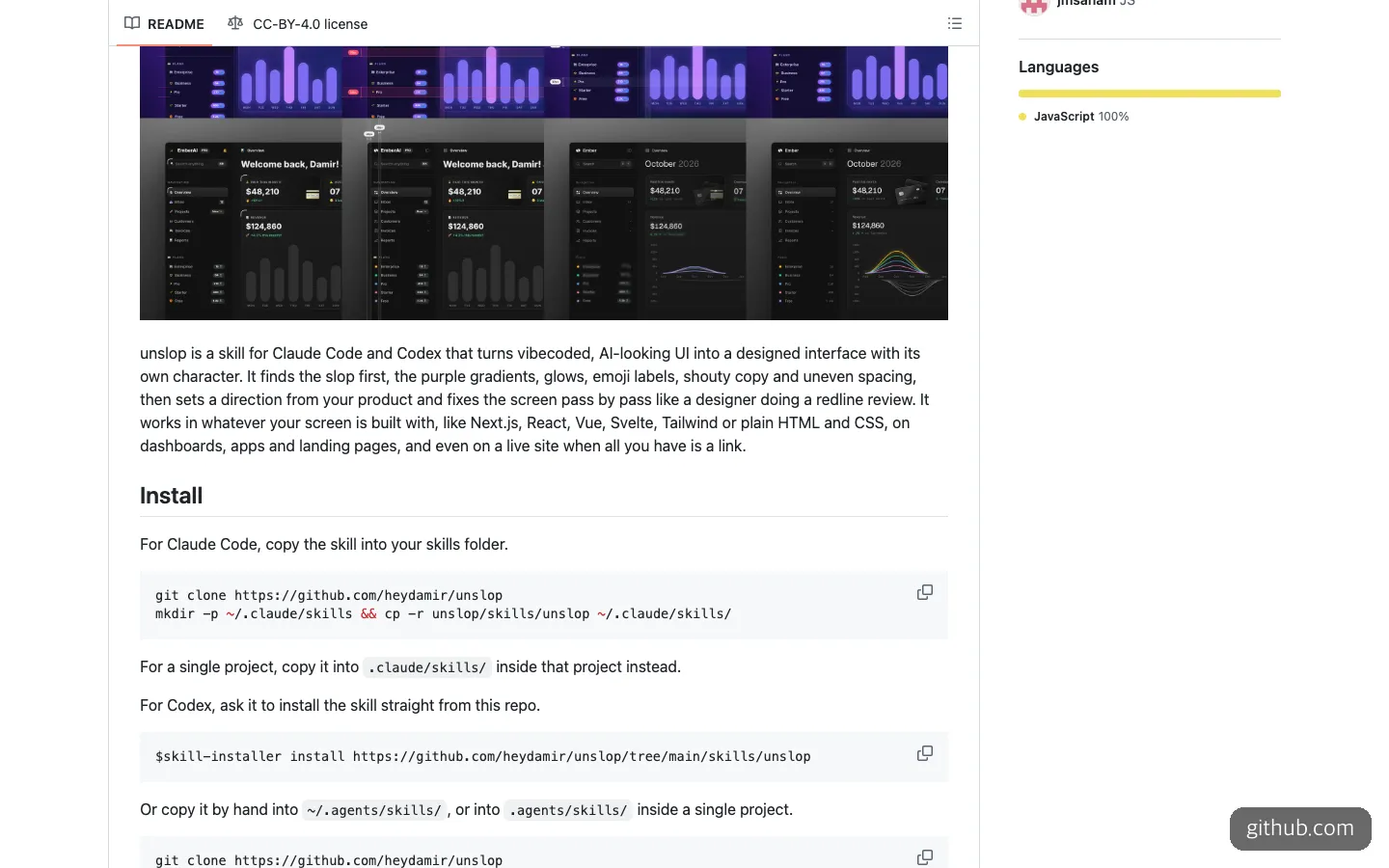
The README example, in which a dashboard covered in purple gradients and glows turns into a calm screen pass by pass, along with the install commands.
The order of fixes is spacing, color, icons, copy, type, layout, details, visuals, and motion. The order has reasons written down. Spacing comes first because once the rhythm is right, everything else looks different. Copy comes before type because the length of a heading decides the font size and its placement. Visuals and motion come last because they are layered on top of a screen that already works.
The rules are specific, too. A 4px spacing grid, one step of neutral color and a single accent color, font weights of 400 and 500 (600 at most), tabular numerals so digits line up, and one icon set at one size. The banned list includes gradient text, colored shadows, looping animations, hover scaling, and exclamation points. What’s interesting is that it also warns against swapping one trend for another, such as glassmorphism or bento grids. And it states firmly that it won’t touch features, content, or section order.
According to the README, it works with Next.js, React, Vue, Svelte, Tailwind, and plain HTML/CSS, and it can even work from just a site URL with no code.
Why it earned 9,800 stars in a week
As of November 6, 2026, the repository has 9.8k GitHub stars and 513 forks. That is a lot of attention for a repository with only 12 commits. According to Trendshift, it gained 2,216 stars on October 31 alone, and that day it ranked first among JavaScript repositories and fourth overall for daily growth.
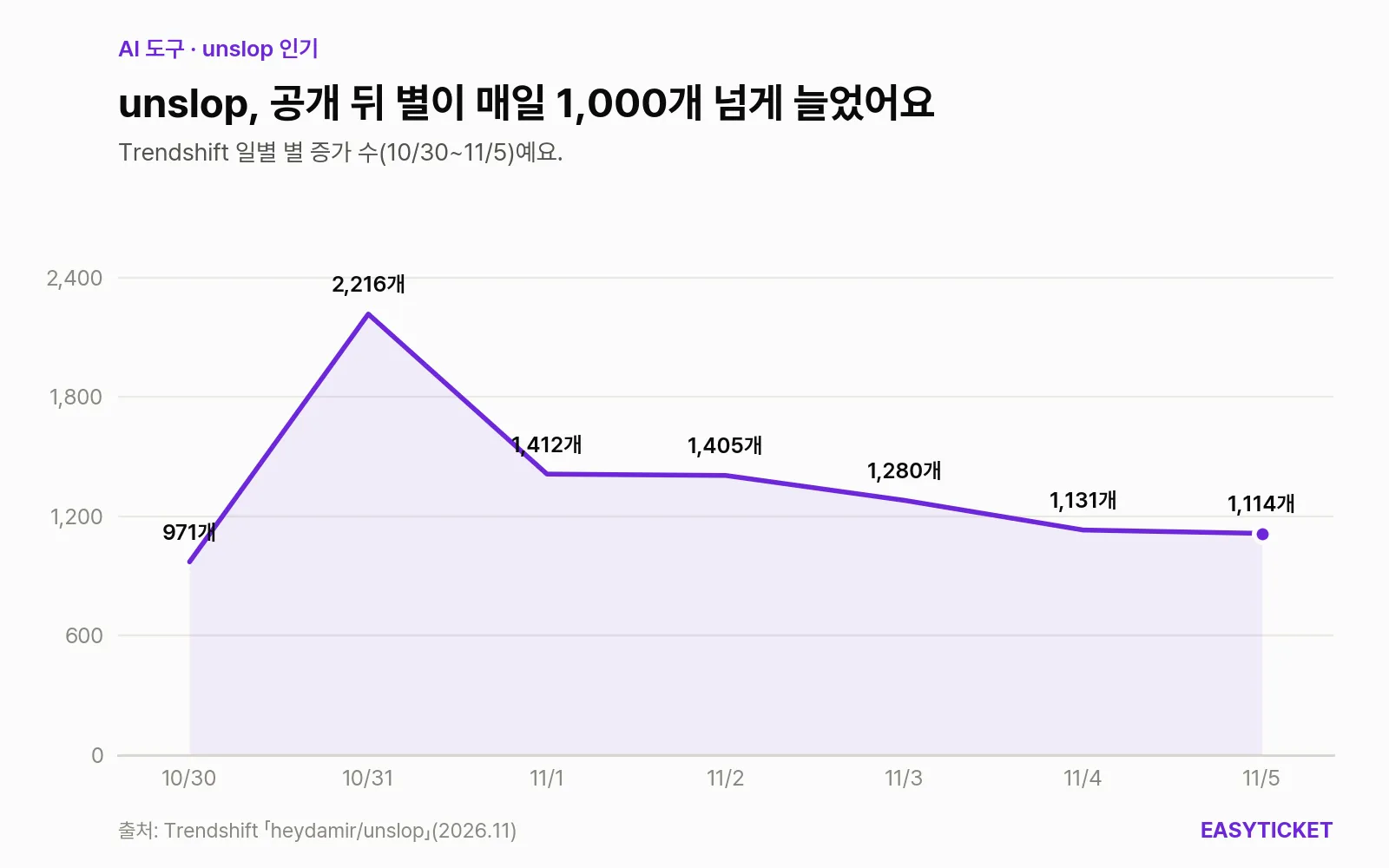
Right after launch, daily gains peaked at 2,216 stars on October 31, and the repository kept adding more than 1,100 stars a day after that.
What’s worth noticing in the graph is not the peak but what came after. Through November 5, the daily gain never fell below 1,100. That means it did not fizzle out as a passing fad. People keep coming, which also suggests that many others had felt the same frustration that “screens made by AI all look the same.” The repository has grown in the meantime, too. On October 29 the direction-setting step and the nine passes were added, and on November 1 a one-line Codex install arrived.
When is unslop a good fit?
EasyTicket sees unslop as a tool for “screens that are finished but somehow look cheap.” These are the situations where it fits well.
- Polishing a vibe-coded dashboard or landing page just before launch. It fixes only the surface and leaves the features alone, so there is little risk of rewriting code that already works.
- When you can’t put into words what is wrong. The audit step writes one line per symptom, including where on the screen it appears. Even if you don’t apply any fixes, the diagnostic table is useful on its own.
- When you have no code, only a site URL. It downloads the page and edits a copy, so you can get an improvement proposal as code for a site that was built by an outside contractor. Note that the result is a redesigned copy, not a direct edit of the live site.
- When you wonder whether your design is already fine. If there is no slop, it is set up to say honestly that the design is fine and suggest only two or three small improvements.
The cases where it doesn’t fit are just as clear. If you are building a screen from scratch, this skill has little to do. And be careful if a screen has to follow your company’s design system tokens strictly. There is a “refine mode” that keeps an existing brand’s palette and fonts, but the documentation has no setting that makes it follow design system tokens.
Installing unslop and how to ask the AI
You need either Claude Code or Codex. The skill itself is free, but you pay separately for using those two tools. For Claude Code, you copy it into the skills folder with the commands from the README.
git clone https://github.com/heydamir/unslop
mkdir -p ~/.claude/skills && cp -r unslop/skills/unslop ~/.claude/skills/
To use it in only one project, put it inside that project’s .claude/skills/ folder. For Codex, one line is all it takes.
$skill-installer install https://github.com/heydamir/unslop/tree/main/skills/unslopThere are optional extras, too. To work from a site URL or make before-and-after videos, you need Playwright and Chromium (npm install -D playwright, npx playwright install chromium), and for videos you also need ffmpeg. To generate new hero images, you have to connect an image service such as fal or Replicate through MCP, and it reportedly shows you the prompt and asks every time before a paid generation.
You call it with /unslop in Claude Code and $unslop in Codex. You can also keep going in plain language. The request EasyTicket recommends is one that sets the scope first. After /unslop, point to the screen to fix, say to leave the features, copy content, and section order as they are, and add that it should show the audit results and the five lines of direction first and wait for your answer.
If your brand colors are already set, add one more thing. Ask it to use only the values in tailwind.config for colors and fonts, and to work in a refine scope that fixes only what the audit found.
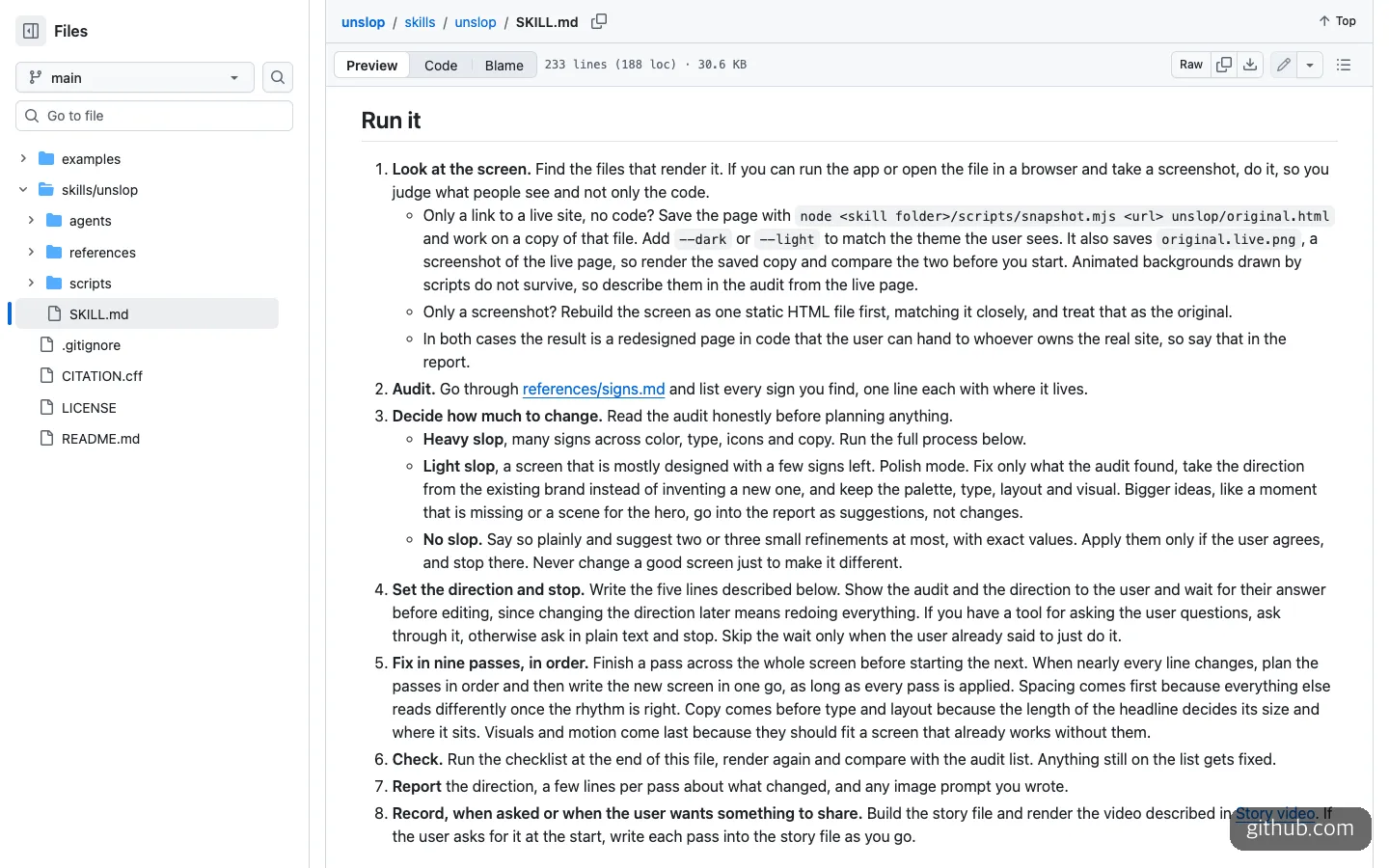
The workflow in SKILL.md. Item 4 says it stops after setting the direction and waits for the user’s answer.
The most useful step here is step 4. It writes out the direction in five lines (product, personality, world, moment, and signature) and then stops. If the direction changes later, everything has to be redone, so it asks first. That is why it’s best not to say “just do it all.” Saying that makes it skip this waiting step.
How is it different from Impeccable and frontend-design?
unslop is not the only skill that catches AI slop. The two most often compared with it are Impeccable and Anthropic’s official frontend-design skill.
| unslop | Impeccable | frontend-design | |
|---|---|---|---|
| Typically used | Fixing a screen you already built | Refining and reviewing as you build | Setting direction when building something new |
| Approach | Audit, direction approval, 9-pass fixes | 24 commands and a rule-based slop detector | Plans palette, fonts, and layout from the topic and audience |
| Supported tools | Claude Code, Codex | 19, including Claude Code, Cursor, and Codex CLI | Claude |
| License | CC BY 4.0 | Apache 2.0 | Official Anthropic skill |
| Scale (Nov. 6, 2026) | 9.8k stars, 0 releases, 4 contributors | About 104k stars, 93 releases, 61 contributors | Official repository |
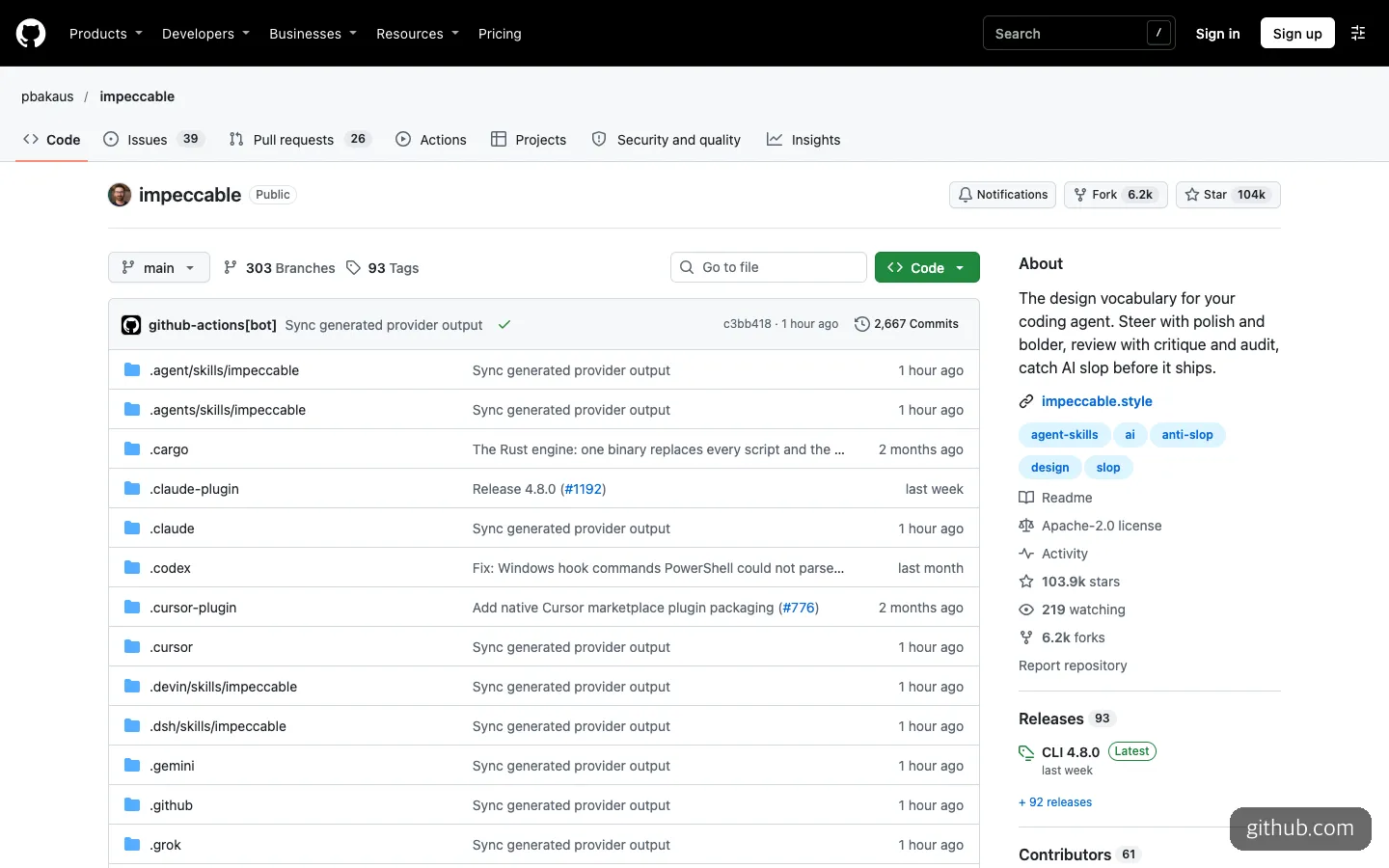
The Impeccable repository, for comparison. The gap in releases and contributors compared with unslop is large.
The way to choose is simple. If you use Cursor, or want to tune the design with several commands throughout your work, Impeccable is the better fit. It supports more tools and is versioned steadily. If you want to clean up one finished screen in a set order, all at once, unslop is less hassle. The two are less rivals than partners: you can start with frontend-design and finish with unslop.
What to know before you use it
This time I only read the repository and documentation. I did not install or run it. So I can’t say anything about output quality beyond the before-and-after images in the README. With that in mind, there are four things to watch for.
First, it is still a young project. The first commit was on October 28, and there is not a single version tag or release. That means the rules could change at any time.
Second, it is a checklist that carries one person’s taste. An analysis on DEV Community pointed out that unslop should be seen as a review checklist, not as “proof of better design.” There is no usability testing or comparative evaluation. It’s also wise to keep in mind that results may converge on a similar calm, dark tone.
Third, the license. It is CC BY 4.0, not the MIT or Apache licenses common for code. You can use it commercially, but if you modify and distribute it, you must keep the creator’s name and a link to the repository. The creator’s credit is added automatically to the before-and-after videos.
Fourth, security. The scripts inside the skill folder (snapshots and video generation) run on your own computer. With a skill made by someone else, get in the habit of opening the scripts folder and looking through it before you install.
One more note: there is another project with the same name. It is a text tool that strips out AI-sounding prose, and it is separate from this skill that fixes screens. The creator has also opened a separate paid service that fixes one screen within three days. If the skill falls short, there is a path to hand the job to a person.
Frequently asked questions
Is unslop free?
You can download and use the skill itself for free. However, you pay for Claude Code or Codex, and if you generate hero images, the connected image service charges separately. It asks first every time before a paid generation.
Can I use it in Cursor?
The README lists two supported tools: Claude Code and Codex. If you want to do something similar in Cursor, Impeccable, which officially supports Cursor, is a better fit.
Won’t it ruin a screen that is already pretty good?
According to the documentation, no. If it judges that there is no slop, it says the screen is fine, suggests only two or three small improvements, and applies them only if the user agrees. There is also a rule against changing a good screen just to make it look different.
Sources 8
AI helped with research and the first draft; the operator tried the subject firsthand, checked and edited this article before publishing. Let us know if you spot a mistake.