
At around 8:50 a.m. on Monday, October 26, 2026, a short video went up on Instagram. It showed, just as it happened, someone secretly playing a fishing game in a small window in the corner of an office monitor. The only caption was one line: “Beat the Monday blues: secretly fishing at the office.” Five days later, on October 31, the reel had been played more than 416,000 times.
The game in the video, Salary Slacker Fishing (월급루팡 낚시터), is a Windows and Mac PC app that an EasyTicket developer built through vibe coding. It was released on October 18, 2026. While a spreadsheet stays open, you catch fish with a single Ctrl key in a transparent fishing spot that floats at the top of your monitor. This article follows why we planned the app, what we built it with, and why this one video took off after so many others sank without a trace.
Why a Game You Play in Secret at Work
It started with a channel, not an app. After releasing the STASH app in the store, we decided we needed the power to promote whatever we built next, so we began growing an Instagram account. We had made and posted several web apps and PC apps, but none of them spread widely.
Then, scrolling through Instagram, we came across a post about a way to secretly play a baseball game at work. That was when we thought, this looks fun, let’s make several PC apps. We built Minimi Plaza, which shoots fireworks onto a friend’s screen during a meeting, and Pigeon Monitor, where a pigeon visits your monitor if you stop working. Salary Slacker Fishing came next.
The theme of doing something “in secret at work” was already close to proven. The Korean term wolgeup rupang (월급루팡, literally “salary Lupin,” after the gentleman thief) refers to an employee who collects a paycheck without doing any work. In a 2011 survey by Incruit, a Korean job portal, 83.3% of office workers said their company has one. Secret games are not new either. According to Gamemeca, a Korean gaming outlet, Mollae Matgo, released in 2005, hid a game of Go-Stop (a Korean card game) in the Windows taskbar, and its main players were office workers in their 20s and 30s. In May 2026, Wikitree reported, a stock price site styled like an Excel document became a hot topic among office workers.
People complain about slackers and love them at the same time. Everyone has imagined pretending to work while doing something else. So we decided to make “not getting caught while playing in secret” the game itself.
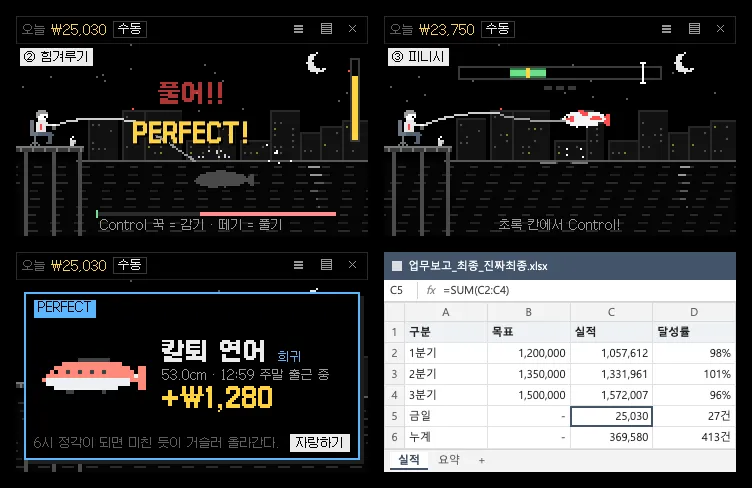
A collection of screens from the development period: the tug-of-war, the finish, the On-Time Exit Salmon capture card, and the disguise screen made to look like Excel. The disguise screen was later replaced by a sticky note.
The Touches That Make Pretending to Work Fun
The conditions we set first were short. It had to be a small desktop game played in a corner of the screen, in black pixel art, with a default key that does no harm if pressed by accident while working. On top of that, we added features one by one that make you think, “I’d want to screenshot this and send it to someone.”
- 50 fish with office wordplay: Company Dinner Catfish, On-Time Exit Salmon, Monday Blues Flatfish, Day Off Mackerel, Fragile Mind Sunfish, Resignation Carp, Eternal Section Chief Coelacanth. The Salary Negotiation Whale is “extremely tiny.”
- Catch-time tags: The card is stamped with when you caught the fish, such as “Caught at 14:32, post-lunch drowsiness hour.”
- Slacker ranks and hourly-wage conversion: You climb from Intern to Legendary Slacker, and the app converts your earnings using the 2026 minimum hourly wage of 10,320 won.
- Today’s market price: Each day, the value of one species doubles.
- Brag images: Caught-fish cards, the Slacker Report of the Day, and the fish collection can be saved in Instagram’s vertical ratio (1080×1350).
- Disguise key: One press turns the fishing spot into a yellow sticky note you can actually write on.
The feel of the catch was also a focus. It has three stages: press right when a fish bites (within 0.25 seconds is PERFECT), hold to reel in and release to let out line in a tug-of-war, then press in the green zone to finish. There is an auto-fishing mode, but its success rate is low, and legendary fish cannot be caught automatically at all. We tuned the difficulty with a bot that reacts 0.28 seconds late, like a person, and with that bot common fish are caught 96% of the time and legendary fish 5% of the time. Fish worth bragging about have to be truly rare for sharing a card to feel worthwhile.
There is a reason the default key is the left Ctrl. Pressing Shift five times opens the Sticky Keys window, and on a Korean keyboard the right Alt is the Korean/English toggle and the right Ctrl is the Hanja key. We picked a key that leaves no trace if you press it by mistake while working.
What We Built It With, and the Transparent Window That Gave Us the Most Trouble
We built it by describing what we wanted to an AI coding agent (Claude) in plain language, trying it out, and asking for fixes again. The foundation is Electron 44 with TypeScript and React. Because this approach builds desktop apps with web technology, we could ship for Mac and Windows at once.
- There are no image files at all. Pixel art is written as strings and drawn in code.
- Sound effects are 8-bit sounds synthesized on the spot with WebAudio.
- Because the app has to notice Ctrl while you use other programs, it reads the key state 60 times a second with a library called koffi. It does not intercept keys, so the key you press goes to Excel as usual.
- The font is a capture of a public pixel font.

The Salary Slacker Fishing icon. It captures the moment of a bite, with an exclamation mark above the float, in black pixels.
The big change in direction came while we were building it. At first it was a single-window game, but we changed it into a program that always floats at the top of the monitor so you can fish while doing other work. When we tried the first version, the problem was that the fishing spot stood out too much. So we made it semi-transparent so the screen behind shows through and only what is essential is visible, and we replaced the Excel-style disguise screen with a sticky note that really works (multiple notes, plus an in-app trash and restore).
The place we struggled with longest was this transparent fishing spot. Even though it was transparent, a border kept showing. We removed the rounded corners and border line, took out the black outline of the art, and erased the white background behind the text, yet it remained. The culprit was a 1px gray line drawn separately to shape the landscape, and we only removed it in v0.2.2. Making clicks pass through to the window behind when you press empty sky also took a lot of work. As the Electron documentation notes, transparent areas block clicks by default, so you have to set the window separately to ignore the mouse.
Here is how it looks now. Only the angler, float, ripple line, gauge, and today’s earnings float faintly, and they become sharp only when you hover over them or are in the middle of fishing. The line color switches automatically to white if your computer is in dark mode and to black otherwise.
How to Use Salary Slacker Fishing
Download the Mac or Windows file from the intro page and install it, and a small fishing spot appears in a corner of your screen. Hold the left Ctrl (Control on a Mac) and release to cast, and when the float sinks, press again to reel in. It runs on macOS 13 or later (Apple silicon and Intel) and on 64-bit Windows 10 and 11.
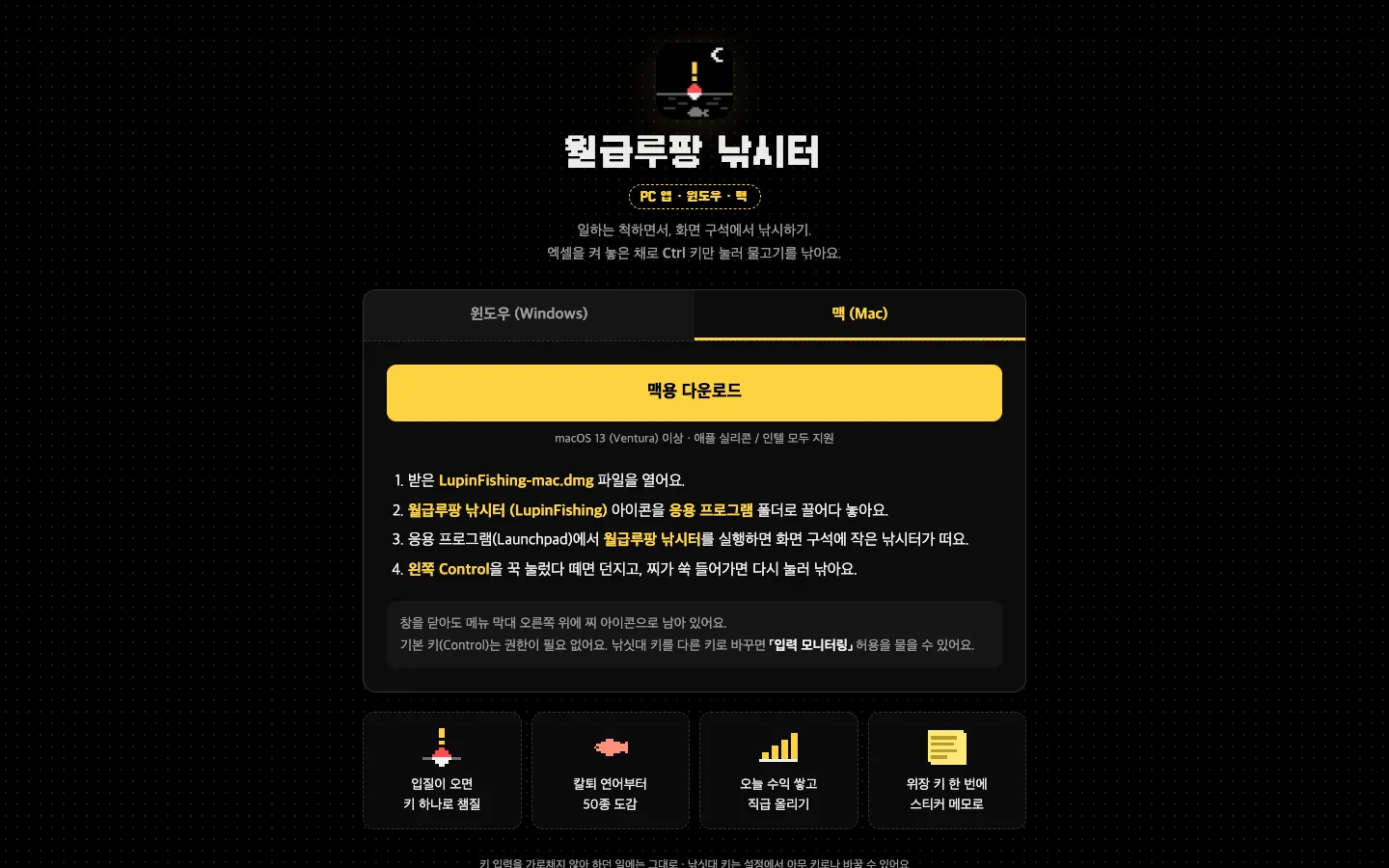
The intro page opened on a computer. Below the download button come four lines of installation steps and four feature cards.
The downsides are clear too. The Windows installer is not code-signed, so a “Windows protected your PC” window appears the first time you run it. You have to click “More info” and then “Run anyway” to install, and it is a scary window for someone seeing it for the first time. That is why the intro page previews this window, with pictures included.
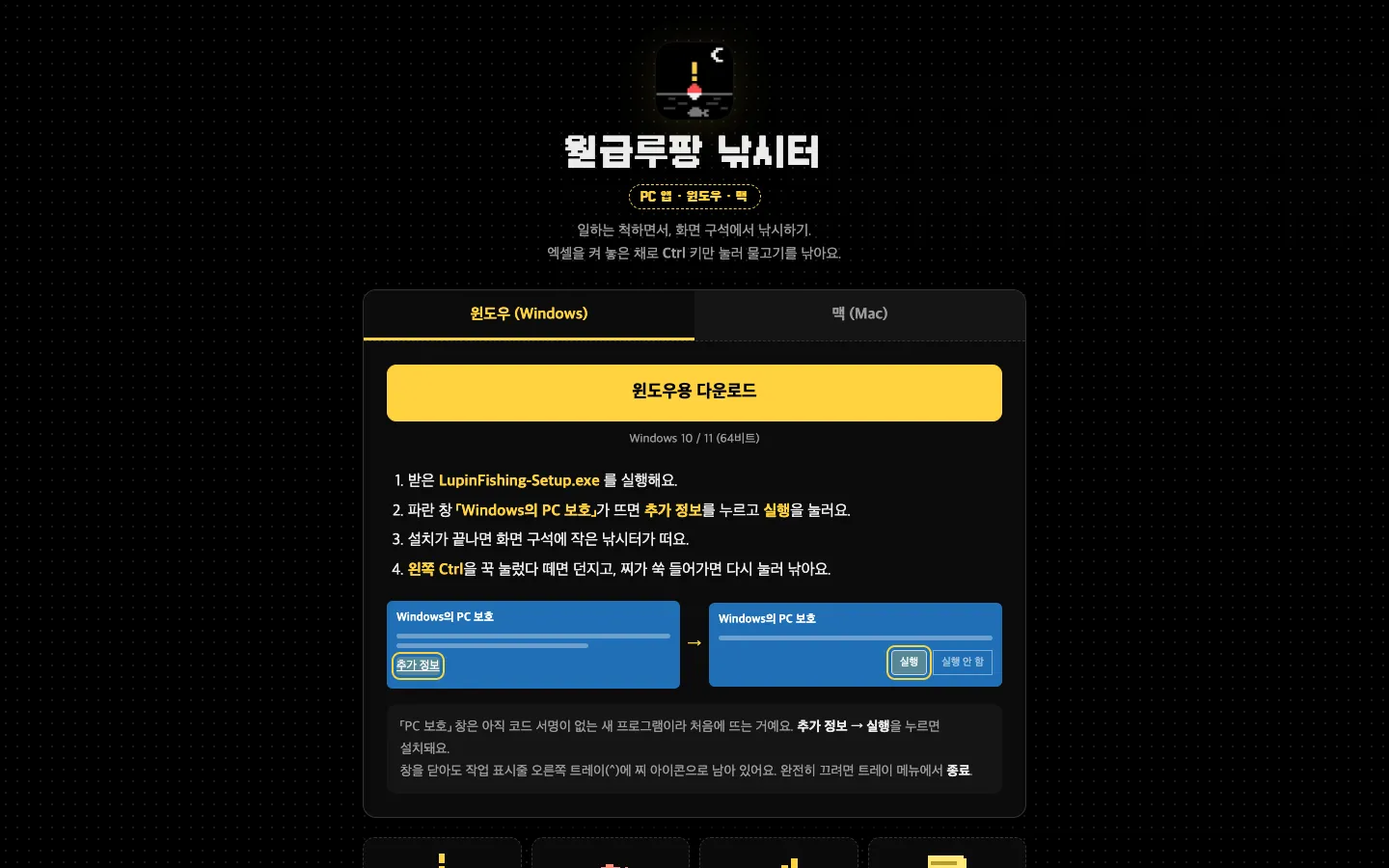
The Windows tab first shows, in pictures, how to get past the PC protection window that appears on first launch.
A bigger wall is the phone. People watch reels on their phones, but the app can only be installed on a PC. Of the 5,811 people who visited the intro page from October 18 to 31, 2,928 were on phones and 2,880 on computers, about half and half. So when the page is opened on a phone, a “This is a PC program” box and a copy-link button appear at the top first, along with a note that you can paste the link into KakaoTalk’s “Chat with Me” (a chat with yourself) and open it right away in KakaoTalk on your PC. Even so, it takes one more step for someone who saw it on a phone to open it again on a computer after getting to work. We think this is where the app leaks the most users.

Opened on a phone, the page shows the PC-only notice and a copy-link button at the top.
A similar game is Cornerpond on Steam. Released in April 2025, it is an idle fishing game that sits in a corner of your screen, on the cute side, where the character fishes on its own. Salary Slacker Fishing is also “corner fishing,” but it puts the three-stage feel, the disguise note, and the office wordplay up front. If you want a toy you can leave running at a leisurely pace, Cornerpond fits. If you want to feel the catch while watching out for your boss, Salary Slacker Fishing fits.
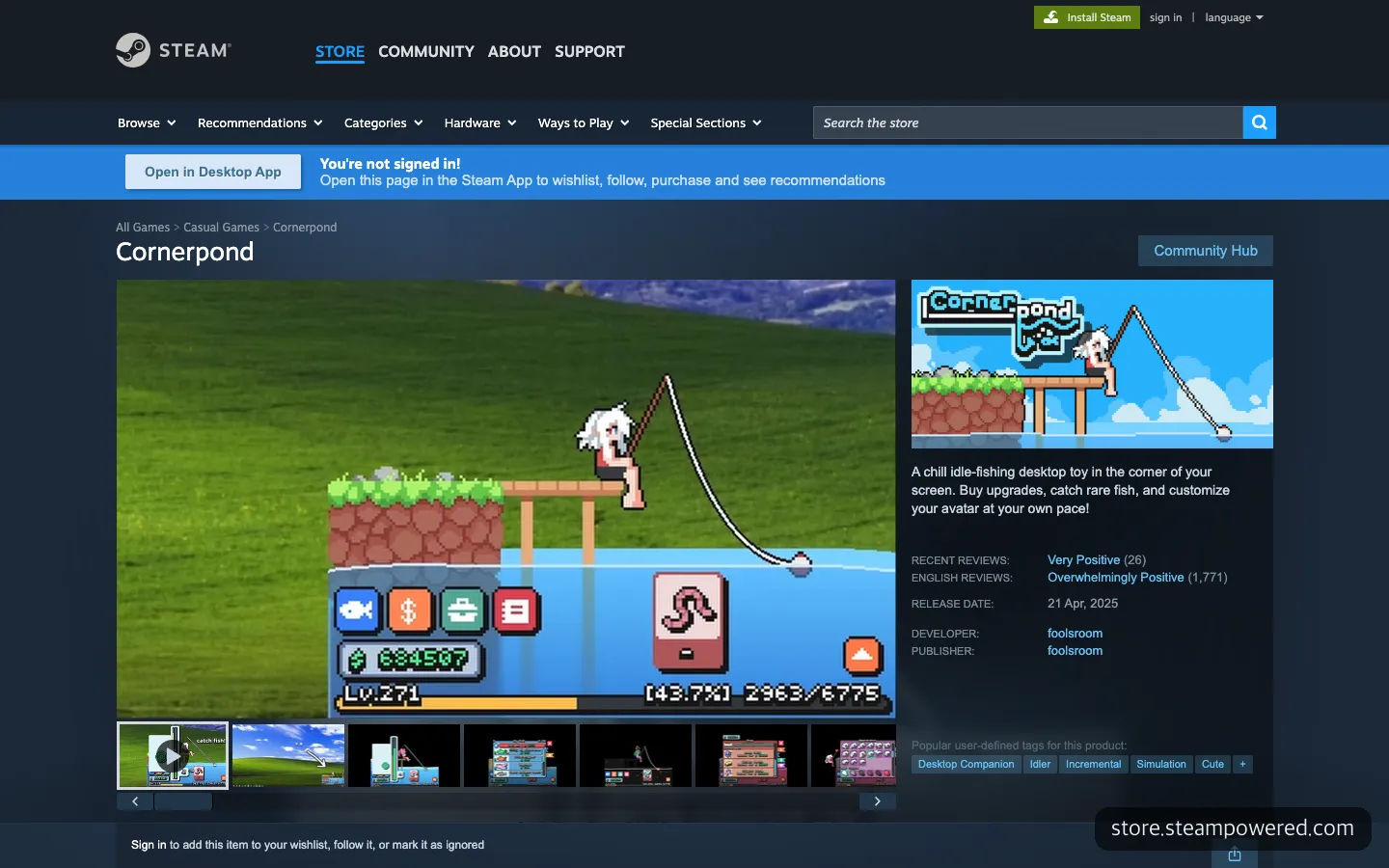
The Steam page for Cornerpond, a similar corner fishing game. It is an idle game you leave on your desktop while the character fishes on its own.
The Polished Videos Failed, and the Casual One Took Off
The app’s release did not make it spread. The first fishing-spot reel, posted at midday on Monday, October 19, was “I caught a Salary Negotiation Whale and it’s 3.2cm,” and it stalled at 6,846 views. Our reels around that time were all like that. Even after polishing the concept and putting effort into the videos, no response came, and it was starting to get annoying.
So a week later, on Monday morning, we just filmed it. Someone secretly playing a game in a small window at an actual office. We added one caption, only cut the footage, and posted it. The first frame of the video showed “Beat the Monday blues / Secretly fishing at the office” in big letters on two lines. The post text only said, let’s secretly fish on a Monday when you don’t want to work, and that if you leave any comment, we’ll send you the link.
Set next to other videos from the same account, the gap is striking (figures as of October 31, 2026).
| Posted | Video | Plays | Shares |
|---|---|---|---|
| Oct. 12 | Minimi Plaza, shooting fireworks at a friend in a meeting | 19,412 | No data |
| Oct. 12 | Pigeon Monitor, a pigeon visits if you stop working | 10,407 | No data |
| Oct. 19 (Mon.), midday | First fishing-spot reel, Salary Negotiation Whale at 3.2cm | 6,846 | 105 |
| Oct. 26 (Mon.), morning | Beat the Monday blues, secretly fishing at the office | 416,406 | 11,120 |
| Oct. 30 (Fri.), afternoon | Secretly at work on a Friday afternoon | 2,104 | No data |
It was a first for the account. This one reel added about 600 followers, and as of October 31 the account has 623. The intro page was opened 3,216 times that day alone, with 2,760 visitors. In the first seven days after release, it had been opened only 66 times in total, so it nearly shot up from the floor.
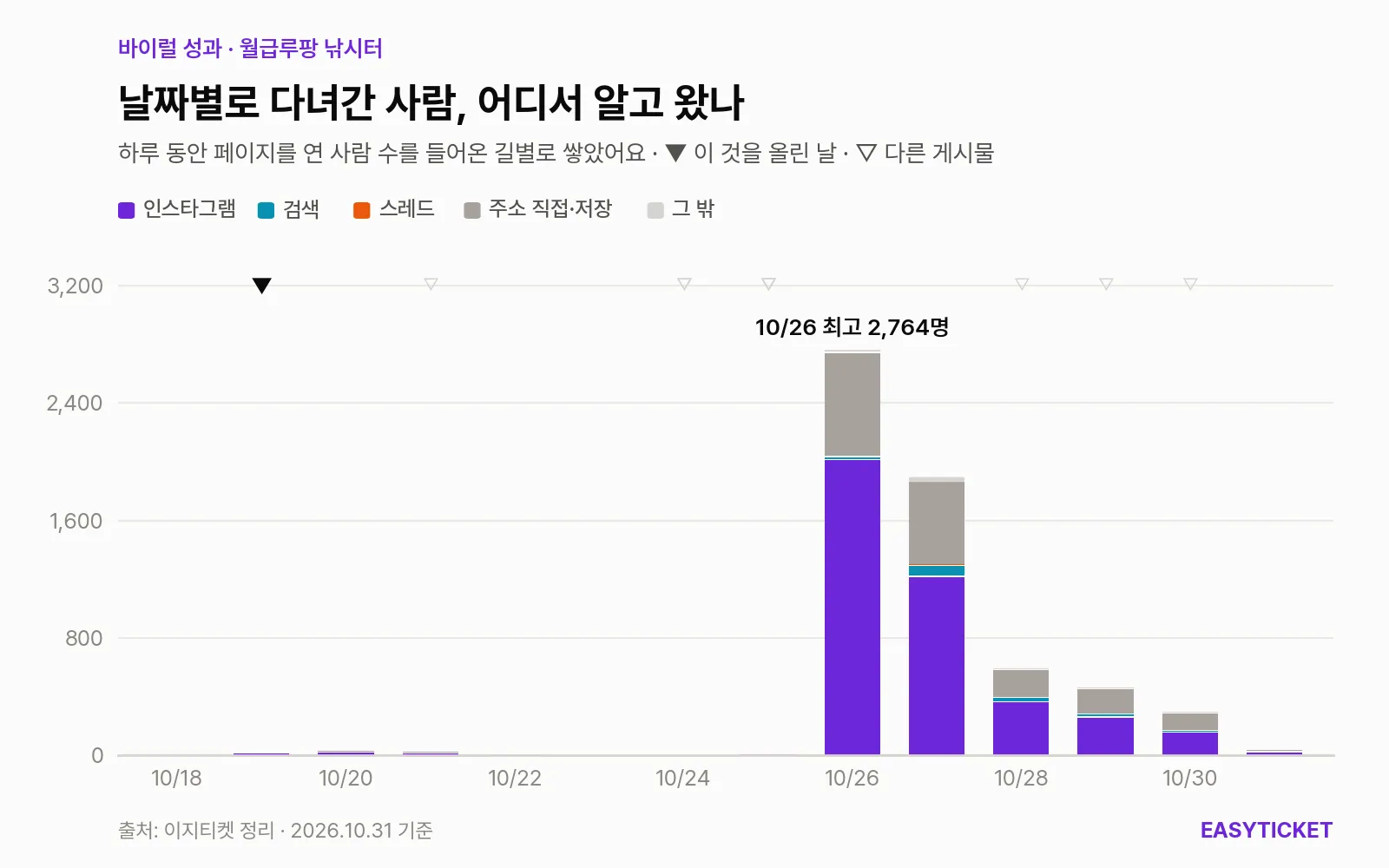
Daily visitors to the intro page and where they heard about it. Before October 26, the bars are barely visible.
What the graph shows is that a single reel pulled up the whole page. Over the two weeks, the largest group came through Instagram at 3,735 people, followed by 1,691 who typed the address directly or had saved it. Many of the people who copied the link on a phone and moved it to a PC were probably mixed in here. Seventeen people also came through Microsoft Teams, which means they passed the link to coworkers over the company messenger. Considering what the app is, that may be the most honest number.
What Made 410,000 Views Was the Situation, Not the Subject
The subject was the same as the first reel. Same app, same Monday. What differed was the situation. Right before 9 a.m. on a Monday, just after arriving and sitting down, a real office monitor, and the phrase “beat the Monday blues.” Viewers were in that very mood at that very hour, so the video became “my story right now” instead of someone else’s. We think that is also why the 11,120 shares are about six times the 1,891 likes. It was a video you wanted to send to the coworker at the next desk, not just laugh at and move on.
Polished editing may even have been a hindrance. When something looks like a well-made ad, people skip it. A video with a shaky phone screen and just one caption looked like someone really doing it in secret.
Still, it is too early to say this approach is the answer. A video posted the same way on a Friday afternoon got only 2,104 views. The 4,737 comments also owed a lot to the “leave any comment and we’ll send you the link” device, and most were a single word like “fishing.” So you can’t read the size of the response as the size of the fun.
Even so, a direction showed itself. A good subject alone is not enough; you have to catch the moment when viewers relate and feel interest. This time, that was one line of caption on a Monday morning. For the next video, we plan to decide not only what to show but when, and in whose mood, to show it.
Frequently Asked Questions
Can I play it on my phone?
No. It is a PC app that runs only on Windows and Mac. If you open the intro page on a phone, a button to copy the link appears, so you can paste it into KakaoTalk’s “Chat with Me” and open it later on your computer.
Will it go unnoticed on a work computer?
Normally it stays faded and semi-transparent, and pressing the disguise key turns it into a sticky note. It does not intercept key presses, so pressing Ctrl does not affect whatever you were working on. Still, installation rules differ by company, so it is best to check those first.
Can I change the fishing rod key?
You can change it to any key in the settings. On a Mac, using the default key (Control) needs no permission, but changing to another key prompts you to allow “Input Monitoring.”
Can I build a PC app like this myself?
If you know how to build web screens, you can get started with Electron. This app was also built by describing what we wanted to an AI coding agent in plain language and fixing it as we tried it. However, the transparent window and receiving keys on top of other programs run into walls that differ by operating system, so leave plenty of time to launch it yourself and fix things.
Sources 8
AI helped with research and the first draft; the operator tried the subject firsthand, checked and edited this article before publishing. Let us know if you spot a mistake.