
Sneakers stomp the ground, a face snaps its eyes open, and a character with a clenched fist sprints across the screen. In this 30-second vertical video, every moving character is a GIF made by ChatGPT. I took eight character GIFs from ChatGPT Images 2.6, released on November 4, 2026, and built a motion graphic with a HyperFrames-based video tool. The GIFs worked well as raw material, but unpacking their frames beat dropping them in as is.
The new feature turns a written prompt or an uploaded photo into a looping GIF. It is rolling out in stages to ChatGPT on the web, desktop, and mobile. Until now, putting a moving character into a motion graphic meant drawing it in SVG and rigging the joints, or shooting video, removing the background, and editing it. Here is how far one GIF can stand in for all that, based on a video I actually made.
What changed in Images 2.6
The OpenAI developer community announcement leads with two new features: GIFs and reference images. The GIF feature turns a prompt or an image into an animation, lets you adjust playback speed, edit frames one by one, and share the result as a looping file. According to TestingCatalog, the use cases OpenAI listed were characters, mascots, product photos, sketches, reactions, and storyboards.
Reference images let you save a photo of yourself, a pet, or a character and call it up again in new images. For animating the same character across several scenes, this matters more. The eight GIFs in this video had to show the same character for the cuts to connect. The update also adds markup editing, where you mark up an image to fix it, and SVG export. In the API, it adds gpt-image-2.6-flare for fast generation and gpt-image-2.6-sunburst for high quality.
TNW pointed out that ChatGPT had no way to make a GIF in one step before this, and that the feature arrived only a few months after OpenAI shut down its video app Sora in March 2026. The video app is gone, but moving output has found its way back in through images.
I built a 30-second video
The video is 30 seconds at Instagram Reels size (1080×1920). The first 7.5 seconds are a showcase that rapid-fires sneakers, a face, a fist, a full body, and a sprint at about one second each. Then the screen freezes, a caption reads “Every bit of this character’s motion is a ChatGPT GIF,” and cards walk through the update and the making process.
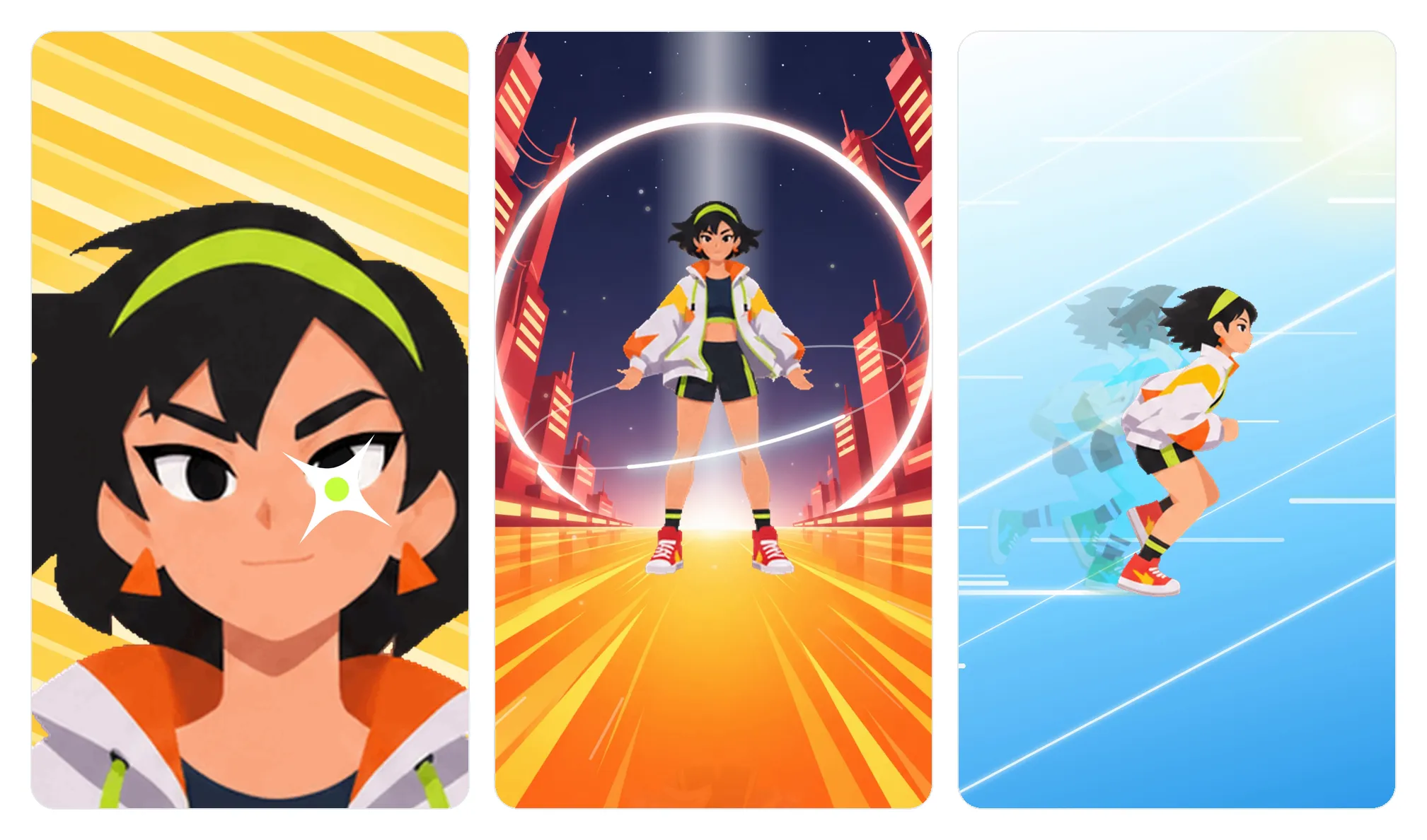
From the left: the face, full-body, and sprint cuts. The characters are all ChatGPT GIFs, while the backgrounds and effects were drawn separately in the video tool.
I got one character GIF per action from ChatGPT: a confidently smiling face, a clenched fist, a full body with a jacket fluttering in the wind, a run, and sneakers dashing off. The navy sky and red city stage behind the full-body cut are still images drawn with GPT image generation. Only the effects, such as speed lines, light beams, flashes, and rings, were made directly in the video tool.
What the GIFs from ChatGPT look like
Open the files and the numbers are fairly consistent. All eight had 16 frames, and they were roughly square at 309 to 317 pixels. Seven of the eight had transparent backgrounds, so there was no need to cut out the subject separately. Each file ran 180 to 350KB. Frame duration varied by action: 80 to 90ms per frame for running, and 130 to 140ms for the face and fist.
| Item | 8 GIFs from ChatGPT | Image API docs |
|---|---|---|
| Frame count | All 16 | 2 to 64, default 9 |
| Frame duration | 80 to 140ms each | 20 to 2000ms each, default 200ms |
| Size | About 315 pixel square | auto or a multiple of 16 |
At 16 frames and 100ms each, you get a 1.6-second looping motion. For a one-shot action like clenching a fist, the hand is fully closed by the first six frames, and the rest is filled with the impact mark flashing while the fist stays clenched. In a motion graphic, that one action nearly fills a whole cut.
Size is the weak spot. Stretching 315 pixels to fill a 1080-wide screen means enlarging it more than three times, and the lines turn muddy. For the sneaker close-up, I swapped in a version of the GIF that I had enlarged four times and cleaned up the lines. For the other big cuts, I covered the softness with fast motion, speed lines, and flashes so the lower sharpness didn’t show.
Why I didn’t use the GIFs as is
An HTML video tool like HyperFrames builds video by jumping to any point on the timeline and capturing one frame at a time. A GIF, though, loops on its own beat, so if you just place it on screen, you can’t control which frame appears at each capture. That is why I never used a GIF directly in this video.
Instead, I unpacked each GIF into 16 frames, pasted them into one 4×4 grid (a sprite sheet), and showed the next cell at set times on the timeline. This lets the same GIF run at a different speed in each cut. The full-body cut runs at a relaxed 9 frames per second, the fist at a brisk 12 to 16, and the “playback speed” card shows the same run at 11 frames per second, then at 22, so you can see the speed change.
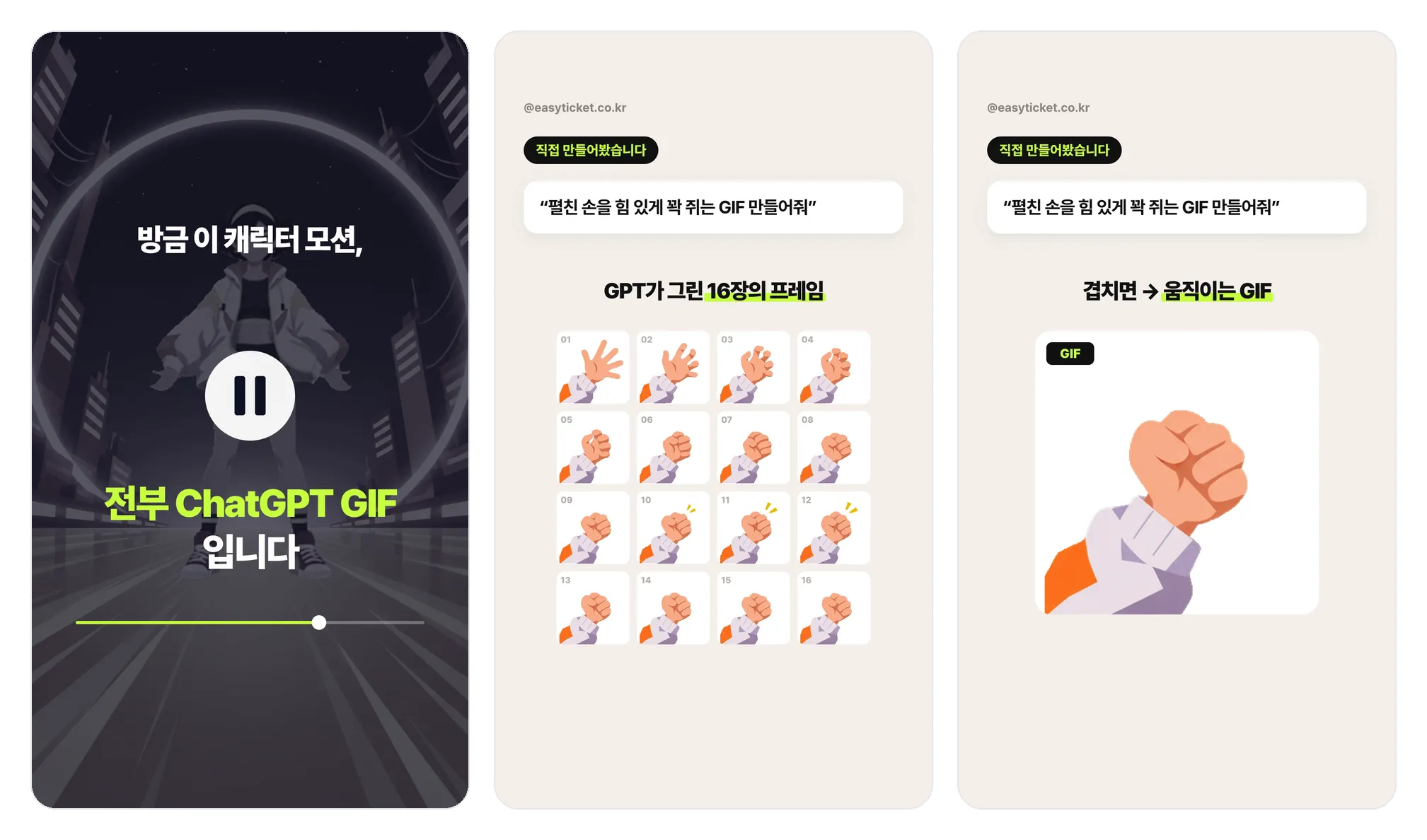
From the left: the reveal scene, the 16 frames of the fist GIF laid out, and the frames overlapped so they move again.
Unpacking the frames also showed me what to fix. The first run GIF I got had an unnatural stride, so I swapped in another, and even that one had awkward poses in the first three frames, so I started from the fourth. For the side-to-side wobble of the body while running, I locked the head and torso to one position in every frame. Being able to pick which frames to keep and which to drop, even within a single GIF, was the biggest difference from using it whole.
In the API and Codex
The OpenAI image generation docs have a separate “GPT Image 2.6” section, which says both models output animated GIFs through the Image API. You put output_format: "gif" in the request and set the frame count and frame duration as numbers. You receive the result as b64_json, decode it, and save it as a .gif.

The opening screen of the image generation guide in the OpenAI developer docs. The first paragraph still starts with the 2.5 model name.
The docs haven’t fully caught up. The overview at the top and the sample code use 2.5 model names like gpt-image-2.5-sunburst, so copying them as is gives you the previous model. Streaming, partial previews during generation, compression settings, and automatic prompt refinement are also unavailable for GIFs, and because the edit endpoint doesn’t accept GIFs, you can’t fix just one frame through the API. For gpt-image-2.6-flare, pricing is $30 per 1 million tokens of image output and $5 for text input, but the docs don’t say how many tokens a single GIF uses.
I also tested the image generation tool in Codex CLI. When I asked it to draw a jumping character, it returned a single still PNG at 1254×1254, and the tool description had no setting for exporting a GIF. Since Codex CLI couldn’t produce a GIF directly, the remaining options are to call the API or have a person download it from ChatGPT and hand it over. This time, having a person download it and hand it over was the fastest.
HyperFrames, which ran this video
HyperFrames is an open-source framework released by HeyGen. It takes screens built in HTML and CSS, plus timeline animation, runs them through headless Chrome and FFmpeg, and outputs an MP4. It is licensed under Apache 2.0, and the GitHub repository has 79,000 stars.
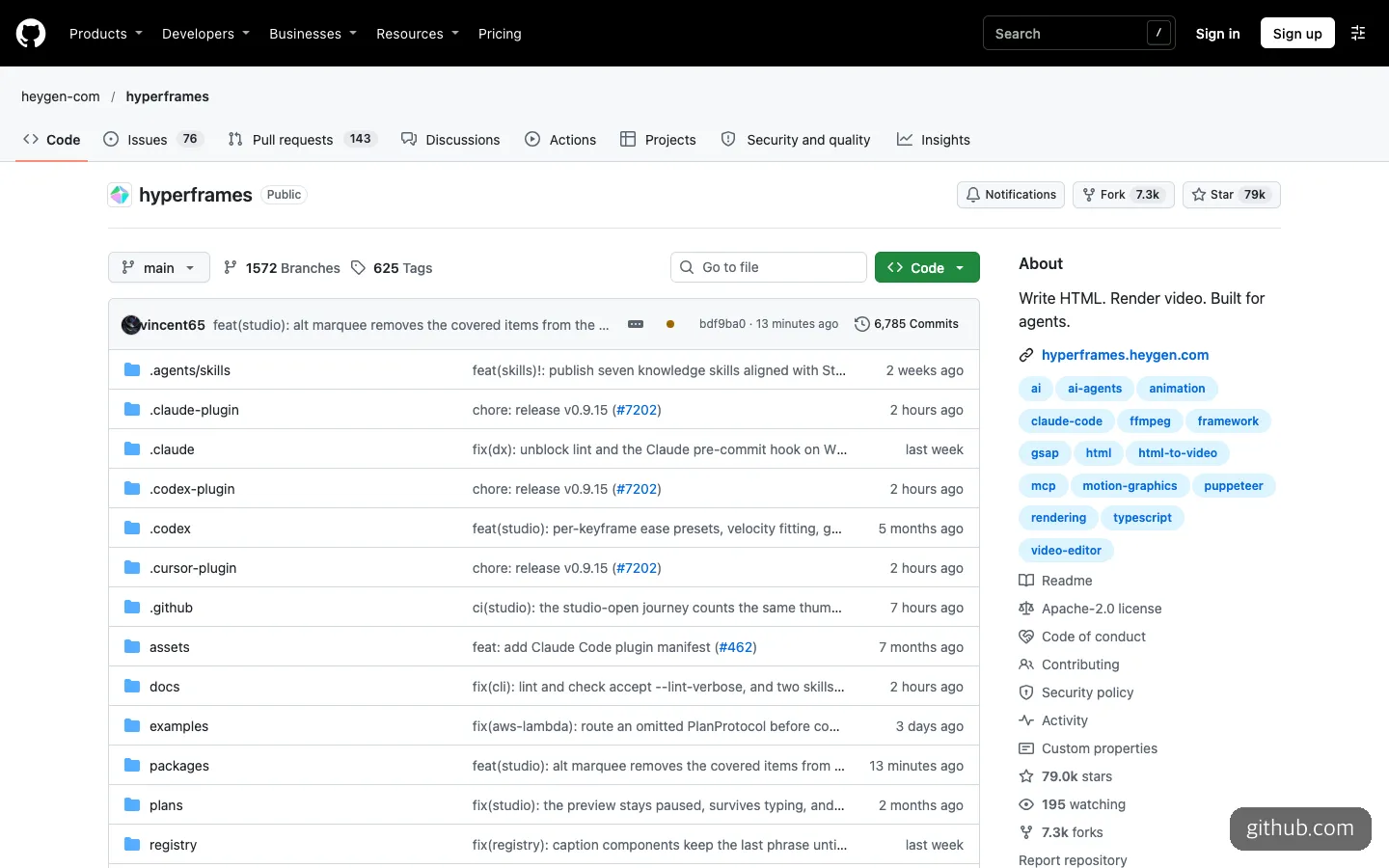
The HyperFrames repository, an open-source tool for making video with HTML. Plugin folders for Claude, Codex, and Cursor sit side by side.
Because the project files are plain HTML, an AI agent can work with them directly, which is why it suits people who vibe code. The repository has installation paths for a Claude Code plugin and agent skills, and it lists Codex, Cursor, and Gemini CLI as targets too. The sprite sheet method described above is also just a few lines of HTML that change the background position at set times, so you can hand it to an agent with something like “unpack this GIF into a 16-cell sheet and play it at 12 frames per second.”
What fell short
The biggest issue is size. At around 315 pixels, a GIF is plenty for a small sticker on one side of a phone screen, but in cuts that fill the screen I had to enlarge it separately or cover it with effects. The motion wasn’t always smooth either. I got the run three times, and even the last one needed its first three frames thrown out.
The missing information on the ChatGPT side is also frustrating. The official materials don’t say whether you can choose the frame count and size, or how many GIFs you can make per day. That all eight of our GIFs had 16 frames is something I only learned by opening them myself. And the GIF format itself is a few seconds of silent looping with a limited color palette, so scenes that need long performances or dialogue are still a job for video tools.
In short, if you want to use short character motions as pieces of a motion graphic, it is worth trying right now. But don’t put the GIF into a video as is. Unpack it into frames, pick only the scenes you need, and set the speed for each. That gave far better results.
Frequently asked questions
Can I make GIFs on a free account?
According to TestingCatalog, it is rolling out to all tiers in stages. However, usage limits by tier haven’t been published, and some accounts may not show the feature yet.
Can I make several motions with the same character?
Save the character with the reference image feature, then request only the motion you want to change. The eight GIFs in this video also came from the same character, with the face, fist, full body, and run requested separately and joined into cuts.
Can I drop a GIF straight into a video editing tool?
In ordinary editing tools, you can use the GIF file as is. With a tool like HyperFrames that jumps around the timeline to capture frames, the playback beat can drift, so unpacking the frames into images and placing them one at a time on the timeline is more stable.
Sources 8
- Images, upgraded—introducing ChatGPT Images 2.6 (OpenAI Developer Community)
- OpenAI on X: GIFS! With ChatGPT Images 2.6
- OpenAI API Docs: Image generation guide
- OpenAI API Docs: GPT-Image-2.6 Flare Model
- The Decoder: ChatGPT can now turn text prompts and photos into animated GIFs
- TNW: ChatGPT can now make animated GIFs with OpenAI's Images 2.6
- TestingCatalog: OpenAI launches Images 2.6 with GIFs and image reference
- GitHub - heygen-com/hyperframes
AI helped with research and the first draft; the operator tried the subject firsthand, checked and edited this article before publishing. Let us know if you spot a mistake.