
One person says they made 300 short-form videos in three months without knowing how to use video editing software. The story comes from the creator of Cutfac, in an introductory post on Show GN, the project-showcase section of GeekNews (a Korean tech news community), on October 30, 2026. The creator says the videos pulled millions of views across five platforms. Cutfac is an AGPL-3.0 open-source Mac video editor that Wyverse Labs released in late October 2026. You point at what needs fixing with a timeline range or a box on the screen, describe the change in chat, and your own Claude Code or Codex edits the video.
The reason behind it is quite specific. After handling hundreds of videos through conversation with an agent alone, the creator found it hard to pin down exactly “where” to make a fix, the preview could show only one version at a time, and undoing changes was a hassle. Cutfac tries to solve all three problems on a single screen.

The official homepage. The first line says it runs on a Mac with Claude Code or Codex.
Editing by pointing with a box
You do two things in Cutfac: point at what needs fixing, and choose the result. The agent does the actual editing. The architecture document states plainly that you can’t cut video directly in the browser view and that only the agent edits.
When you select a range and a box, the information from that moment is saved as files. A copy from before the fix, a short clip cut from just the selected range, and a frame image with your box drawn on it are stored separately for each piece of feedback, and these files are passed to the agent along with timecodes. It’s like sending a picture instead of describing “the subtitle in the upper right at about 3 seconds” in words.
Here are the features from the official introduction, grouped together.
- Get several versions from a single edit request, compare them side by side, then pick one or discard them all
- Manage many videos on a board divided into Draft, Review, and Done
- Give it a site, app, or video link and it learns the product and tone, then saves hook, pacing, and subtitle style as a “format” to reuse on the next video
- English and Korean support
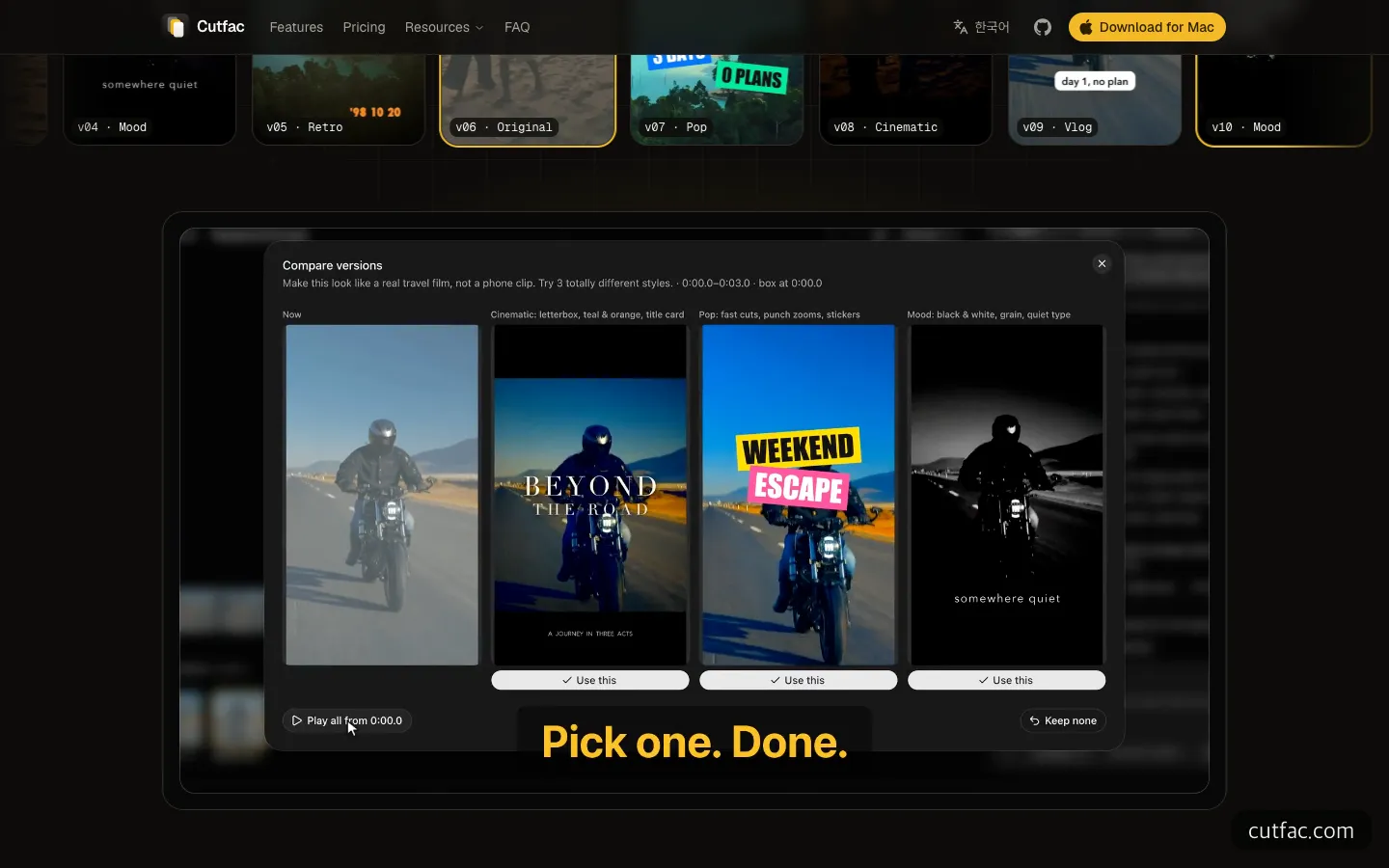
The homepage demo screen, where three styles are requested from one original and compared side by side.
I didn’t install and run the app; I only checked the demo that plays on the homepage. In the demo, a request for “three completely different styles, like a real travel video” appears with a range from 0:00.0 to 0:03.0 and the box position attached. A cinematic version with letterboxing around the original, a pop version with fast cuts and stickers, and a mood version in black and white with grain play side by side, and each version has a “Use this” button below it. That is the biggest difference from opening versions one at a time in a chat window.
When is Cutfac a good fit?
The good fits narrow down to three.
First, when you keep churning out short-form videos in the same format. If you post a few promo videos for an app or service every week, a structure where you save a format once and only swap the material saves time. Second, if you already make videos with Claude Code or Codex and your conversations drag on because you’re explaining “not here, over there.” Box selection is aimed squarely at that problem. Third, when you don’t want to upload video files to an outside server. Rendering is handled by ffmpeg on your own Mac, and projects remain as folders and YAML files, so you can open them as-is in Finder or Git.
The cases that don’t fit are just as clear. If you use a Windows PC or an Intel Mac, you can’t use it right now (per the official download page, it is for Apple silicon Macs, M1 or later, only). And if you’re polishing a single video frame by frame, an editor like Premiere or Final Cut is the right tool. Cutfac isn’t a tool for cutting by hand; it’s a tool that leaves judgment and quality to the agent.
How do you use Cutfac?
There are two routes: download the signed Mac app, or get the source and build it yourself. The repository README says both have the same features.
Either way, you need these first.
- An Apple silicon (M1 or later) Mac
- Claude Code or Codex installed and logged in (not included in Cutfac, so install separately)
- For a source build, Bun 1.3 or later and ffmpeg
- Optional: yt-dlp for learning from links, whisper for subtitles
If you use the app, the first launch checks the agent’s status (ready, needs update, needs login, or missing) and then asks about your goal, the sites to learn from, and the platforms you’ll post to. It also asks for Screen Recording and Accessibility permissions, which you can skip.
The source build is three command lines from the README.
bun install && bun run build
bun src/cli.ts init ~/my-videos
bun src/cli.ts serve --workspace ~/my-videos
init also connects the agent. Claude Code is attached through .mcp.json in the working folder and Codex through codex mcp add, and if you pass --no-connect, it only shows the commands without connecting. When you run serve, the board opens in your browser on localhost port 4317, and unless you specify otherwise, it’s reachable only from inside your own Mac.
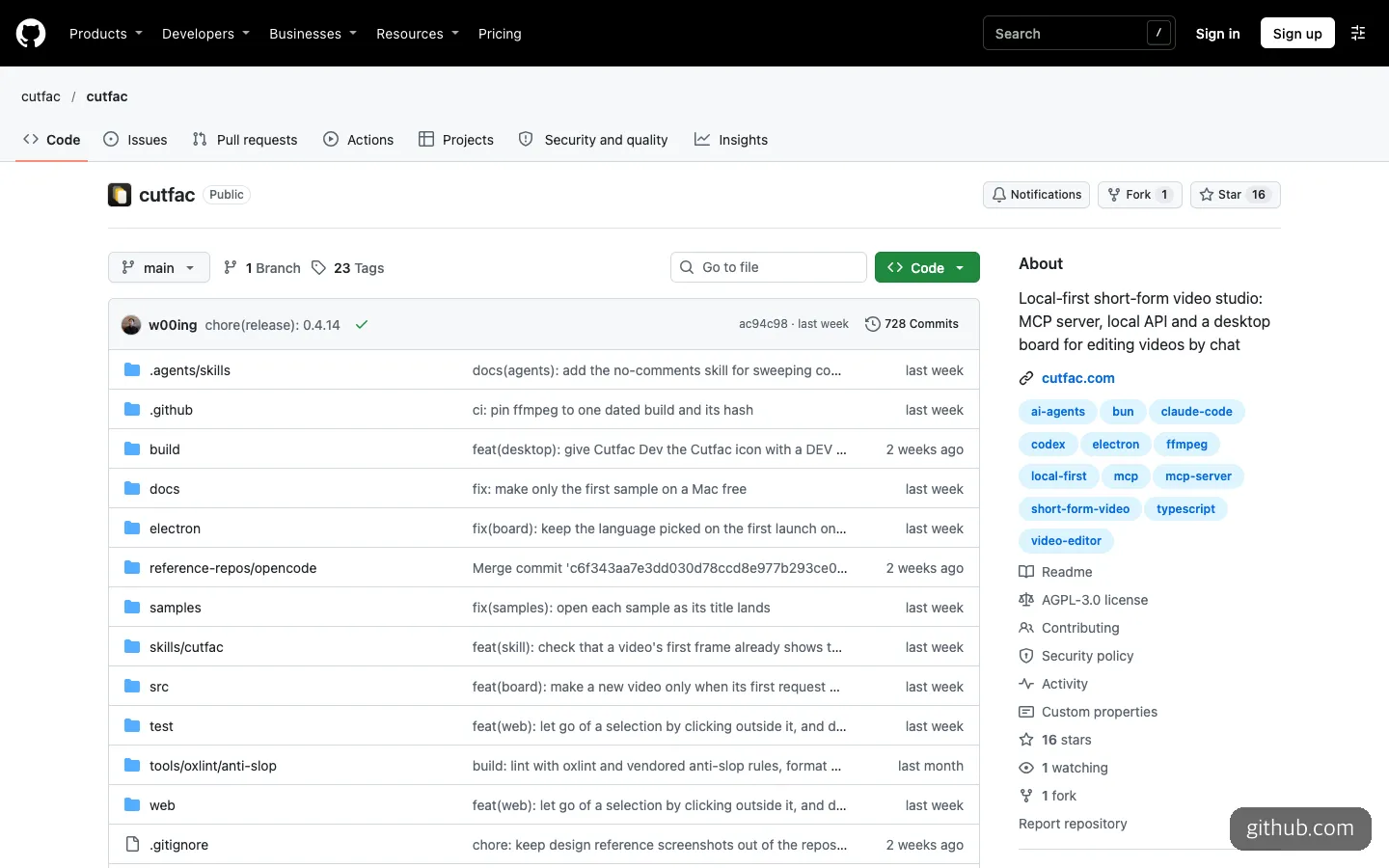
The official repository front page. Tags like claude-code, codex, mcp, and ffmpeg show what this tool is made of.
If the terminal is unfamiliar, you can hand off the installation itself to an AI coding tool. For example, ask Claude Code to read the Cutfac repository README and build it from source, to install Bun 1.3 or later and ffmpeg first if they’re missing, and to run init with ~/my-videos as the working folder. If you add a request to see the agent connection commands before it runs them, you’ll know what is changing as you go.
After installation, you can leave boxes and notes on the board and tell the agent to read them. Cutfac also provides MCP tools for the agent to use, such as list_open_feedback, which reads the remaining feedback, and review_media, which makes a strip of 6 frames at the result frame and at each cut boundary so the agent can check it visually. That keeps your requests short. You might ask it to read the open feedback with list_open_feedback and handle it in order, make two versions of the one where the subtitles change, and when it’s done, check with review_media that the cut boundaries don’t jump.
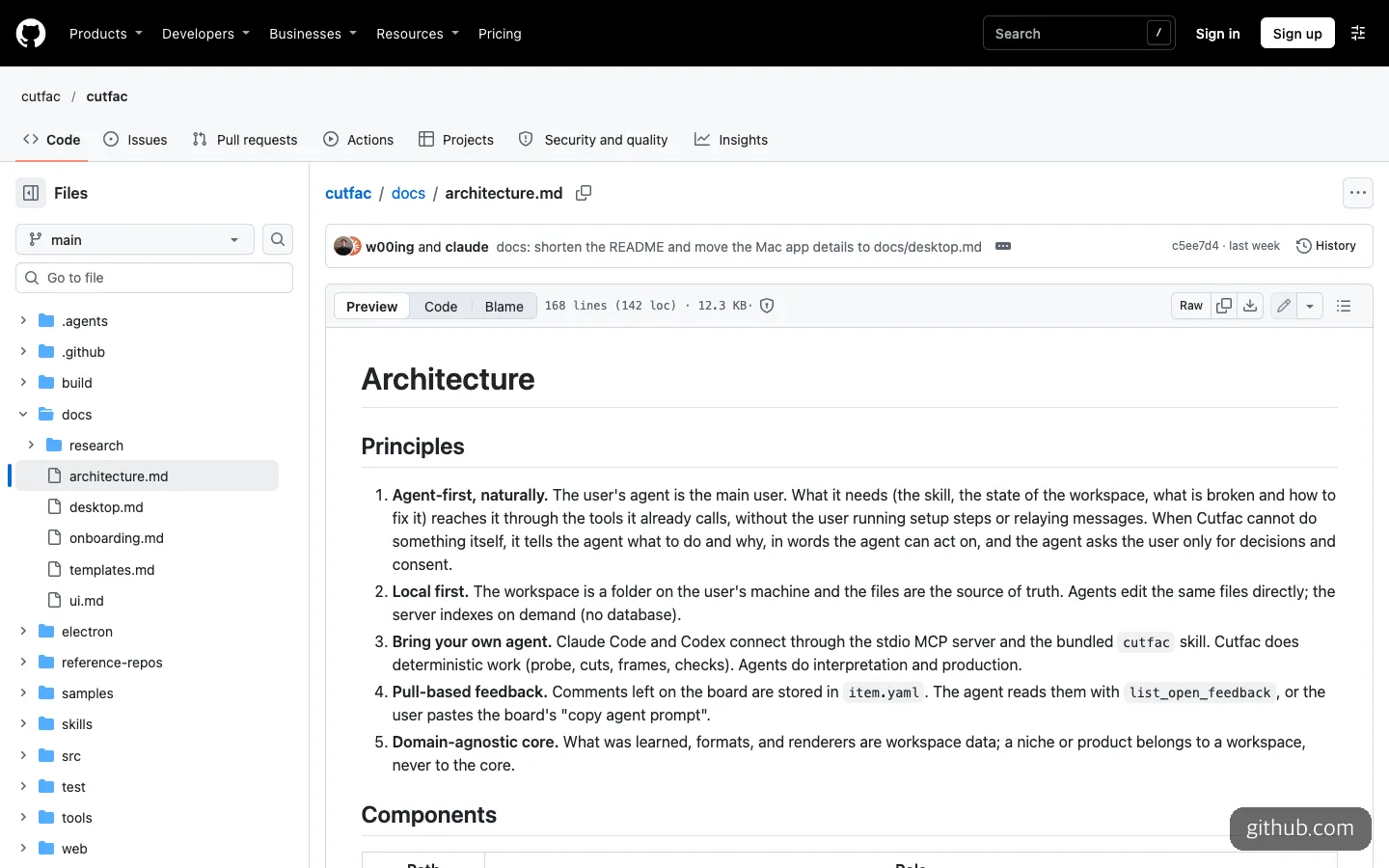
The design principles in the architecture document. They say the agent is the primary user and Cutfac does only fixed tasks such as cuts, frames, and checks.
Between the free build and the $49 app
The pricing structure is simple. If you build from source, it’s free with no account or license key, and the pricing page also says “free forever.” The signed app lets you use every feature on your first 3 videos without a card, and after that it’s a one-time payment. The 3 videos are counted per Mac, so deleting a video doesn’t give the count back.
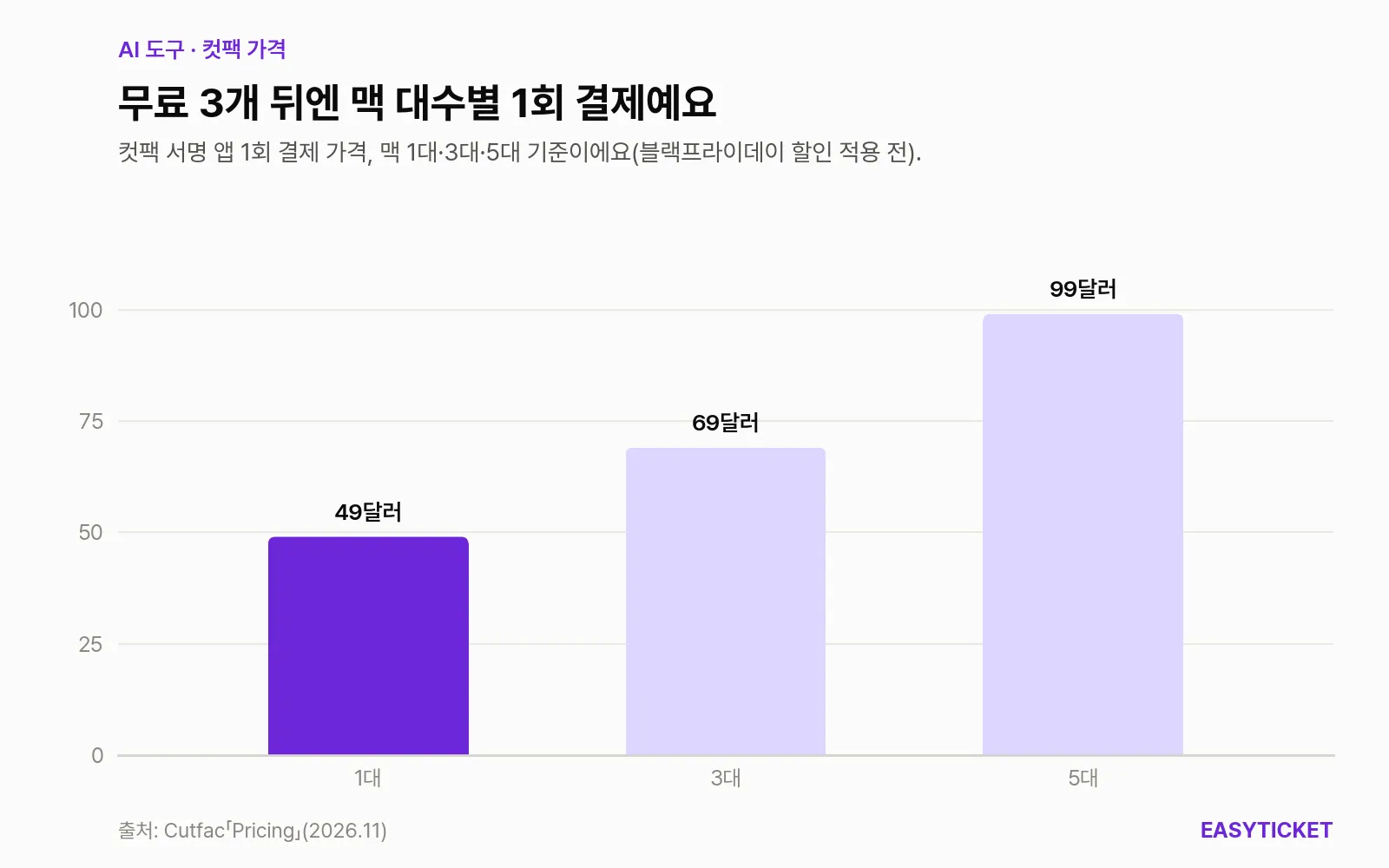
To keep using the signed app after the 3 free videos, you pay once, depending on the number of Macs (list price before discount).
As of November 6, 2026, the list price is $49 for 1 Mac, $69 for 3 Macs, and $99 for 5 Macs. Right now a 40% Black Friday discount is applied at checkout, bringing 1 Mac down to $29.40. The GeekNews post lists the launch price as $29, which differs from the current list price, so it’s worth checking the pricing page again before you pay. It includes one year of updates, and after the year is up, the last version you received keeps working with no limit on the number of videos. A full refund within 14 days is also listed.
The deciding factor is the terminal. If installing Bun and ffmpeg and running three commands doesn’t bother you, or if you can hand that job to Claude Code, a source build is enough. What the signed app adds is an installation that opens without warnings and automatic updates. If you don’t want to open a terminal at all, it makes sense to create 3 videos with the app first and then decide on payment.
How it differs from similar tools
A few other tools are aiming at the same spot: “editing video with Claude Code or Codex.” Putting three side by side makes the differences clear.
| Category | Cutfac | Cutcrow | ChatCut Claude Code plugin |
|---|---|---|---|
| Operating system | Apple silicon Mac | Windows 10/11, Linux (no Mac) | Mac (Apple silicon and Intel), Windows 10 or later |
| Open source | Yes (AGPL-3.0) | Not mentioned on the official page | No (commercial desktop app) |
| Free usage range | Entire source build; 3 videos in the app | 1080p with watermark, 3 projects | Some features require a membership |
| Paid | One-time payment from $49 | One-time payment of $45 ($34 until November 30) | Membership |
| Agent connection | Your own Claude Code or Codex login | Your own plan or API key | Local MCP server, browser login |
| Characteristics | Box selection, version comparison, format saving | Aimed at Windows and Linux users | Goes as far as generating images, video, and voiceover |
(As of November 6, 2026, per each official page)
If you use a Mac and want to leave room to look into the code or modify it yourself, Cutfac is the only choice of the three. Windows users are closer to Cutcrow, and if your goal is to have AI generate the video material itself and attach it, ChatCut is a closer match.
What to know before you use it
The first thing to look at is security. The architecture document itself states that with Codex, once you allow an import, the shell that runs what was imported is not restricted. For Claude Code, it blocks reading outside the working folder. If you plan to import a format from a link of uncertain origin, connecting through Claude Code is safer.
You also need to account for the project’s size. As of November 6, 2026, the repository has 16 stars, 1 fork, and 728 commits, with 23 releases and the latest at 0.4.14. The only contributors are the creator and Claude, so it is effectively a one-person project. Recent commits continuing through late October show it’s active, but it’s still too early to build an entire long-term workflow on it.
There are also several structural limits.
- On a single video, agent tasks run one at a time in a queue, and if one fails, it stops until a person steps in.
- Quality judgment is left to the agent, so the level of the output depends on the model you use and your plan’s limits. Cutfac says only that it has no separate AI cost, and actual usage is drawn from your own Claude Code or Codex plan.
- The documentation and demos are mostly in English. The app screens support Korean, but to understand the structure at first, you’ll need to read the English docs.
- The documentation says features like publishing management and cloud rendering require a server.
The license is AGPL-3.0. Using it to make videos on your own Mac is no problem, but if you modify the code and provide it to others as a service, you’re obliged to publish the modified source. The repository also notes separately that the Cutfac name, logo, and icon are trademarks of Wyverse Labs and are not covered by the license.
If you already make short-form videos with Claude Code and have an Apple silicon Mac, the cheapest test is to make 3 videos with the signed app and see whether box selection is faster than conversation.
Frequently asked questions
Can I use it on a Windows PC?
Not right now. As of November 6, 2026, the official download page says it supports only Apple silicon Macs, M1 or later. If you’re on Windows or Linux, Cutcrow, which works in a similar way, is an alternative.
Are my videos uploaded to an outside server?
According to the GeekNews post and the repository description, rendering is done by ffmpeg on your Mac, and projects remain as files in a folder on your Mac. Cutfac doesn’t see your API key either, and the agent runs on your own Claude Code or Codex login. Still, as with other coding work, what the agent processes is passed to the respective AI service.
Can I connect AI tools other than Claude Code?
The official documentation explains how to connect only two: Claude Code and Codex. There is no confirmed material on whether it works with Cursor or other MCP-supporting tools.
Sources 7
AI helped with research and the first draft; the operator tried the subject firsthand, checked and edited this article before publishing. Let us know if you spot a mistake.