
You tell an AI, “Build a feature that lets me gift a coffee subscription to a friend,” and a few minutes later it replies, “All done.” But if you don’t read code, you have no way of knowing which files changed, whether it touched the payment code, or whether it wrote a key straight into the source. Floorplan is a free plugin for Claude Code and Codex that Hayden Smith released in late October 2026 (MIT license). An AI reads your codebase and draws the parts of your app and their connections as a map with plain-English names.
Here is EasyTicket’s conclusion up front. It is a worthwhile first look at “what is my app made of” for people who hand an entire app over to AI. But it is too early to lean on its security check. Our judgment here rests on clicking through the official web demo and reading the documentation, not on installing it ourselves.
A plugin that turns your app into a plain-language map
The repository description is one line: “See how your app actually fits together.”
The work is split in two. Extracting files, imports, endpoints, and web requests is done mechanically by scripts that use no tokens. The AI only groups those results into parts and gives them names and descriptions. That is why the boxes on the map carry names that say what they do, such as “Main server” and “Staff app,” instead of folder names like brewline-api.
The live demo shows a single fictional coffee shop app called Brewline. The map organizes 4 repositories, 59 files, and 22 endpoints into 9 parts and 3 guided flows. The conversation on the left is a prewritten scene, and only the map on the right can actually be clicked.
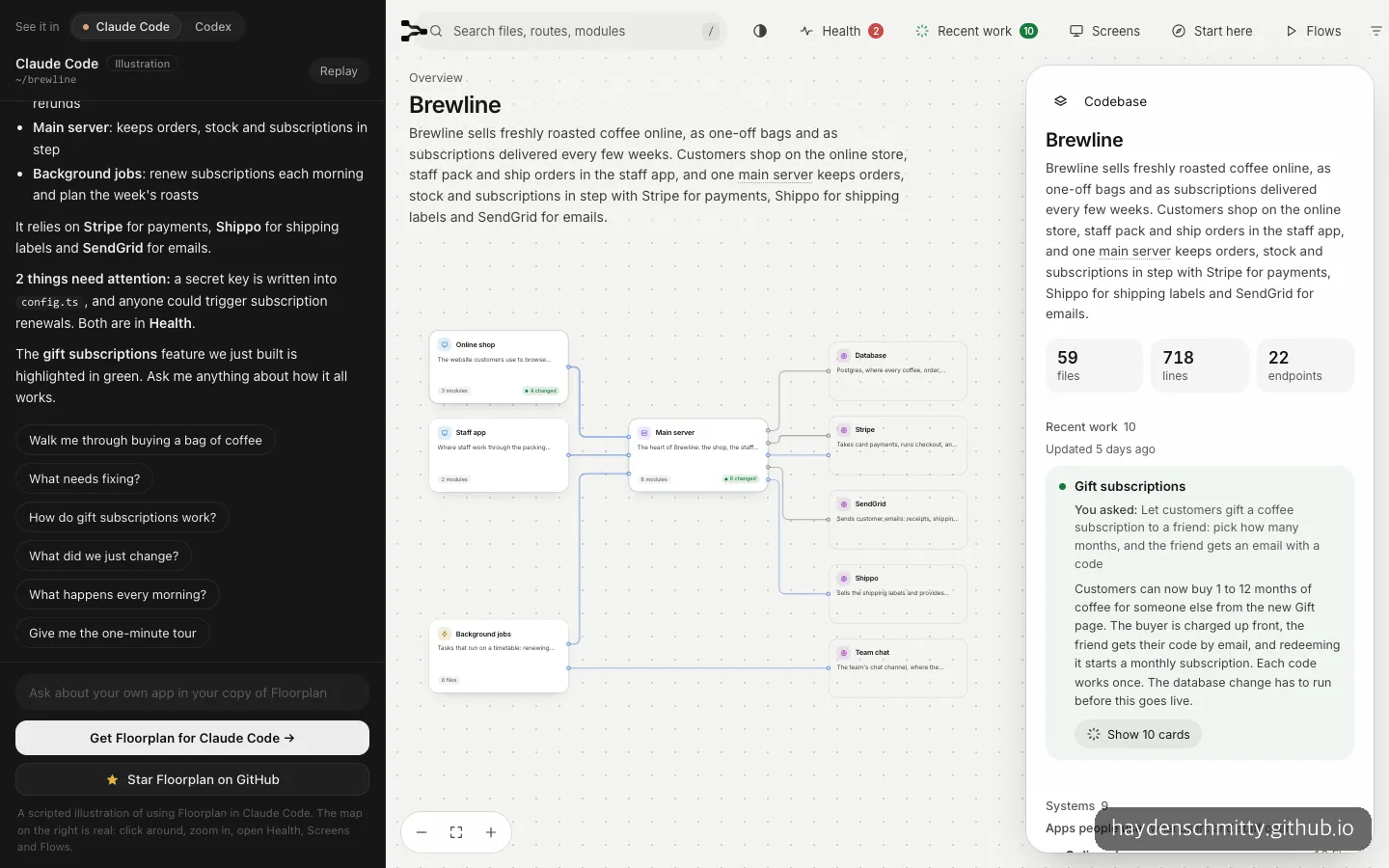
In the demo map, the online store, staff app, main server, and scheduled jobs are linked by lines to payment, email, and shipping services.
You can read at a glance, from the boxes and connecting lines on the right, that Stripe handles payments, SendGrid handles email, and Shippo handles shipping labels. The biggest first impression was that you can learn how many outside services the app depends on without opening a single line of code.
Trying Health, Flows, and Recent work in the demo
The most useful-looking feature was the Health button. In the demo, two items showed up. One warned that an API key was written directly in a settings file. The other warned that an endpoint could change data without checking that the user was logged in.
The wording doesn’t sound like developer documentation. It says things like, “Anyone who can see the code can use this key, so swap in a new one.” Each item comes with a button that shows its location on the map, a “Fix with Claude” button that has the AI fix it right away, and a “Not a problem” button. The second item carried a caveat: “This is fine if it’s meant to be public.” The tool doesn’t know your intent, so the final call is yours.
Starting with version 0.6.0, released on October 31, 2026, Health checks more items. They are secret keys leaked to the browser (OpenAI, Stripe, Supabase service-role), Supabase tables with RLS turned off, database rules open to anyone for reading and writing, Stripe webhooks that don’t verify signatures, and overly permissive CORS. These are mistakes that often blow up in vibe-coded apps, so the choice of items looks accurate.
Flows lets you follow “what happens when someone pays?” with your eyes. Click “Buying a bag of coffee” and a 7-step guide bar appears at the top. Each time you advance with the arrows, only the cards used in that step stay dark.
Recent work paints the cards the AI changed most recently in green. In the demo, 10 cards changed by the gift subscription feature were highlighted, and the right-hand panel kept my request along with a summary of what changed. It even included a cautionary note: “This change requires the database fix to be applied first.” For checking after the fact what the AI did, I think this will get used more often than Health.
We also opened it on a phone. The documentation says phones and tablets have been supported since 0.5.0, but on a 390px screen the chat panel on the left disappears and only the map and a row of icons remain. The text in the boxes was small, and the descriptions were hard to read until I tapped each one to bring up a speech bubble. I also waited about 4 seconds before the map first unfolded.
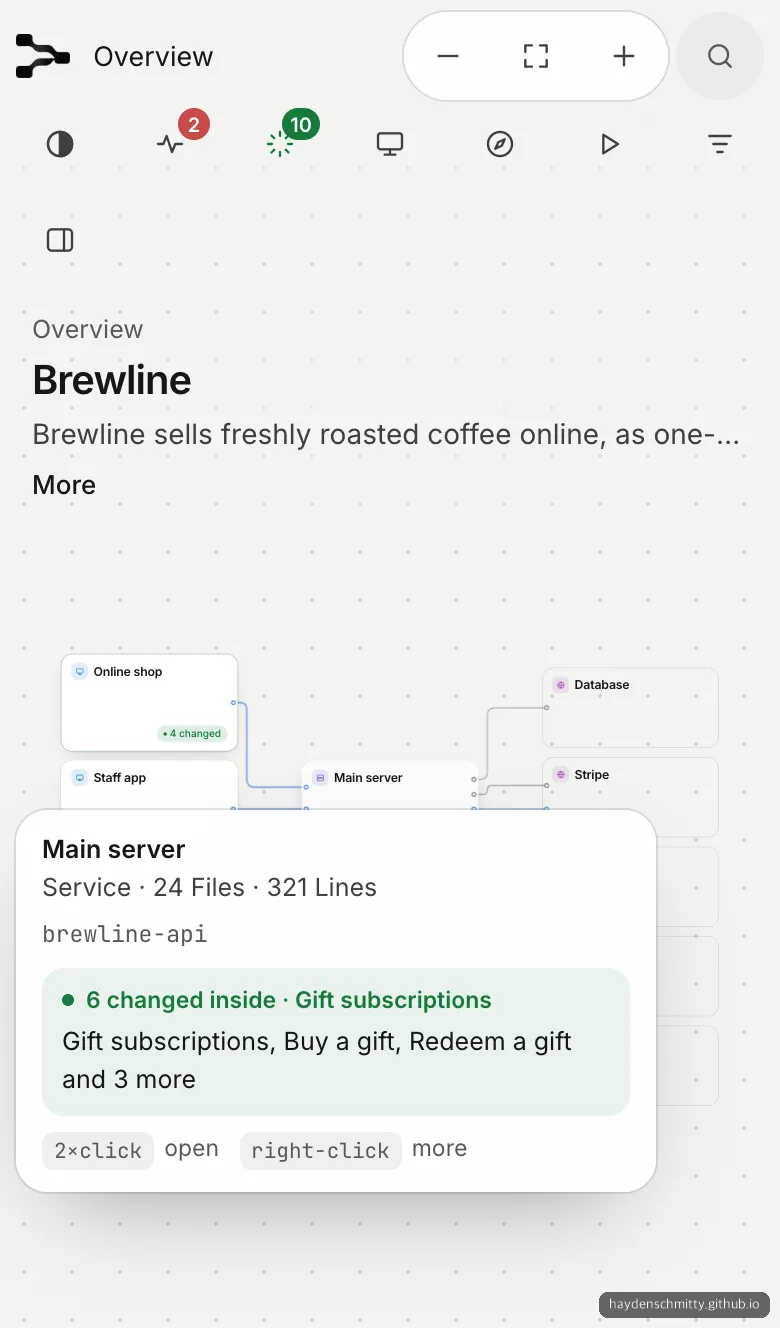
On a phone, you have to tap a box to see its description, and you see only the map without the chat panel.
When Floorplan is worth using
It fits three situations.
First, when you have been adding features with AI for weeks and can no longer explain the overall shape of your app. One map answers “where is what” for you. Second, right after asking for a big feature. If you use Recent work to look only at what changed, you get a sense of whether the AI touched something it shouldn’t have. Third, when you want to skim for common security mistakes before launch. It points out keys written into code or open Supabase tables in plain language, and even attaches the request sentence to fix them.
You can use it on an app you haven’t built yet, too. Give it a PRD or planning document and it draws a “blueprint” map, and Health turns into a design review that flags endpoints anyone could use to change data, or pieces that connect to nothing.
The cases where it doesn’t fit are just as clear. For a developer who needs to trace the call relationships of every single function, Floorplan is too shallow. The same goes for code outside the supported languages. It reads TypeScript, JavaScript, Python, Go, Rust, Java, Kotlin, Scala, and Vue, Svelte, and Astro files, but for other languages the documentation itself says support is light.
How to install and use Floorplan
You need Claude Code (the Code tab of the desktop app, or the CLI) or Codex, plus Node.js 18 or later. No API key is needed, and it runs on the plan you already use. The documentation recommends the Claude Code CLI, because the Ask window inside the map needs the CLI to read your actual code and answer.
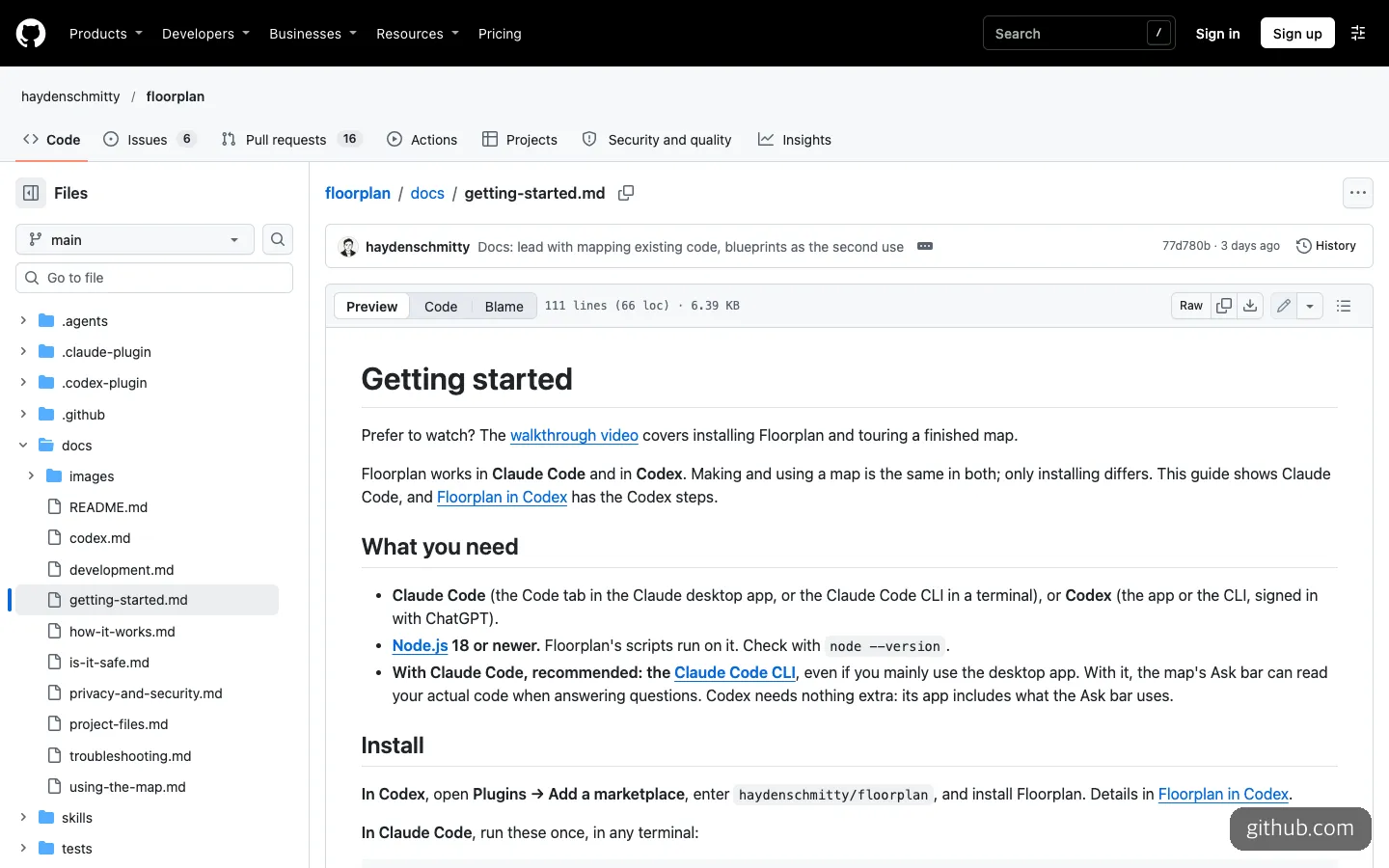
The getting started documentation lists Claude Code or Codex and Node.js 18 or later as prerequisites.
For Claude Code, the two lines in the getting started documentation are all you need. After installing, open a new session so the plugin is picked up.
claude plugin marketplace add haydenschmitty/floorplan
claude plugin install floorplan@floorplan
For Codex, it’s these two lines. If the terminal is unfamiliar, you can also add haydenschmitty/floorplan as a source on the Plugins screen of the Codex app.
codex plugin marketplace add haydenschmitty/floorplan
codex plugin add floorplan@floorplan
After that, you just open your project folder and tell the AI what you want in plain words. If it asks whether to allow running a node script along the way, allow it. The first scan takes a few seconds, a small app takes a few minutes to finish its map, and a large app takes longer. The map opens on its own, and a one-minute tour plays first. Here are the request sentences from the README, copied as written.
- To draw it for the first time:
Make me a floorplan of this app. - After building more features:
Update the floorplan.(It rereads only the changed files.) - To fix what the check found:
Fix the important issues from the floorplan's Health check - To draw a blueprint from a planning document:
Here's my PRD. Make me a floorplan of what we'd need to build.
In Codex, you can also call it with $floorplan. The best way to use this tool is to make it a habit: after handing off one big feature, redraw the map with Update and skim Recent work.
How it differs from Understand Anything and Archify
Two tools are often grouped with it because of similar names. All three turn code or ideas into pictures, but they target different people. The “who it’s for” row in the table below is a comparison the Floorplan documentation wrote itself, so please keep in mind that it is not a neutral assessment.
| Floorplan | Understand Anything | Archify | |
|---|---|---|---|
| Target user | People who build with AI and don’t read code | Developers who want to understand a large codebase down to the function level | Anyone explaining a system, process, or idea |
| Form | Plugin for Claude Code and Codex | Plugin for several AI coding tools | Agent skill |
| License | MIT | MIT | Apache-2.0 |
| Unique features | Health check, recent work tracking, PRD blueprint | Browsing, searching, and asking questions on a code knowledge graph | Turning ideas and plans into diagrams |
| GitHub stars (as of Nov. 2, 2026) | About 1.8K | About 89.6K | About 92.4K |
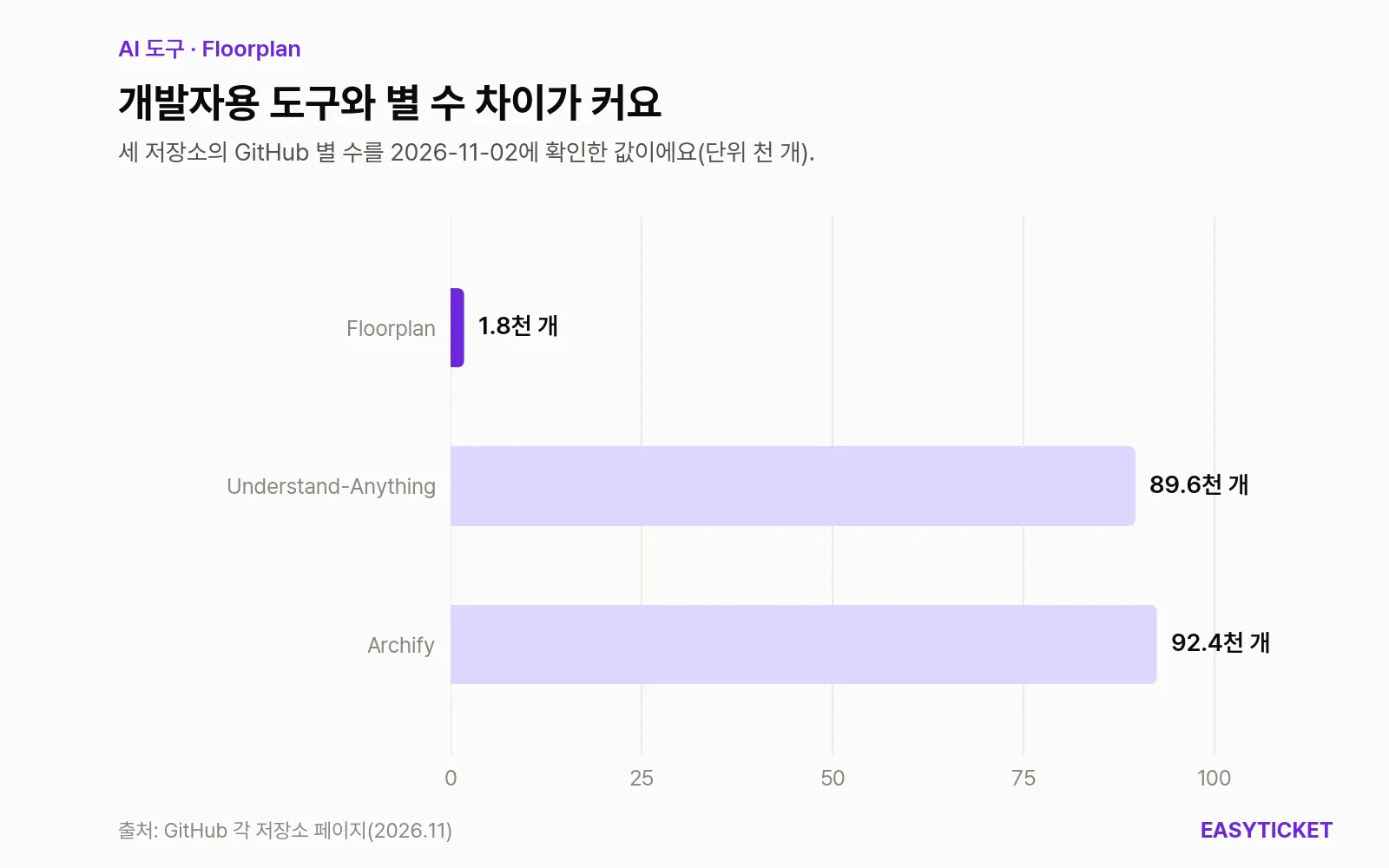
Compared with developer-oriented tools in the same family, Floorplan’s star count is still small.
In stars, the gap is about 50x. Even so, a feature like Health, which tells people who don’t read code “what is risky” in plain words, doesn’t exist in the other two tools. If you are a developer who edits code directly, Understand Anything is the right fit. If your starting point is “I want to understand what the AI built,” Floorplan is closer.
A new tool with fast-growing stars: what to keep in mind
The release notes date the first release, 0.1.0, to October 27, 2026. In the five days after that, it climbed to 0.6.1 (November 1), and on some days the version changed three or four times. According to Trendshift’s tally, stars that had been growing by around 100 a day jumped by 327 on October 31 and 929 on November 1.
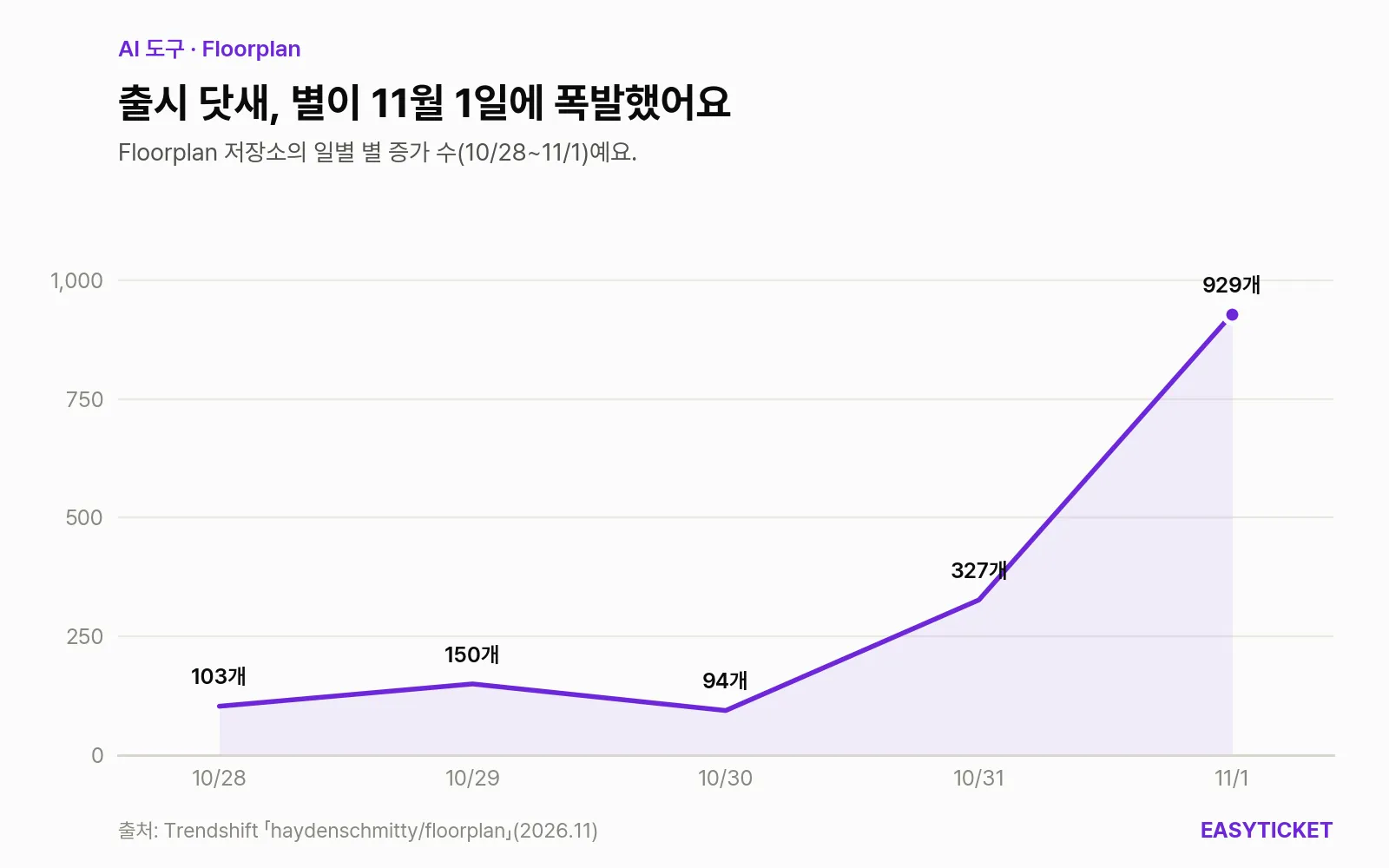
Stars that grew by around 100 a day after release began rising sharply on October 31.
Change is as fast as the attention is heavy. As of November 2, 2026, 6 open issues and 16 open PRs had piled up. That means a feature description written today may be different next week. You can get updates with one line: claude plugin update floorplan@floorplan.
The tool is upfront about the limits of its security check. The README calls Health “A check, not an audit.” Because it matches requests to endpoints by pattern rather than with a compiler, some connections may be missed, and the documentation says some server functions that run in the background are not connected to the map automatically. If your app handles payments or personal data, don’t take a quiet Health check as proof that it is safe.
On privacy, it looks clean. It says the scan, the map, and the server that serves the map all run on your own computer, with no analytics or tracking. There are no hooks, MCP servers, or external dependencies either. The only files it writes are its own floorplan/ folder and, if you consent, one section of CLAUDE.local.md. There is one exception: when you ask about the map from the Claude app without the CLI. In that case the map (names, descriptions, structure), not your source code, is uploaded to your claude.ai account, and it asks you first before uploading.
Also, the demo screens and explanations are in English. Map names and descriptions are written in plain English too, so if English is a burden, it is better to keep the map open and ask the AI to explain it in Korean.
Frequently asked questions
Is Floorplan free?
The plugin is open source under the MIT license, so it is free. It runs inside the Claude Code or Codex plan you already use, without entering a separate API key. The step that adds names and descriptions is done by the AI, so it does use some of your quota, and the documentation says only that updates cost less than the first run.
Can I use it if I can’t read code at all?
It was built for exactly those people. Just ask the AI to run the two install lines for you, and after that you draw the map with a single English sentence. Even so, some Health results, such as “this is fine if it’s meant to be public,” must be judged by someone who knows the intent of your app.
How do I remove it when I’m done?
Remove the plugin with claude plugin uninstall floorplan@floorplan, then delete the project’s floorplan/ folder and the Floorplan section in CLAUDE.local.md, and it will be clean. Both are files that are not committed by default, so they leave no trace in your repository history.
If you’ve handed a big feature to an AI, draw the map once before your next commit and start by skimming the cards painted green.
Sources 8
AI helped with research and the first draft; the operator tried the subject firsthand, checked and edited this article before publishing. Let us know if you spot a mistake.