
If a POST request gets a 301 redirect, is it okay to switch it to GET? AI coding tools answer questions like this without hesitation, but they rarely tell you which sentence in the standard the answer came from. grounded-expert is a Claude Code skill (MIT license) that the developer pko89403 released on GitHub in October 2026. When it gets a domain question, a subagent searches official specs, documentation and standards in real time and checks the answer’s claims against them.
It is not a widely known tool yet. As of November 9, 2026, it has 1 GitHub star, and the only public mention is an introduction its creator posted on GeekNews, a Korean developer news site, on November 5. Still, the approach is worth a look. Instead of feeding the AI more material, it changes the procedure the AI follows to produce an answer. This article is based on reading the repository and its documentation. I did not install or run it, and I could not find a public demo.
A procedure of looking things up, not playing the expert
The creator’s reasoning is simple. Persona prompts such as “You are an HTTP expert” make the model answer from memory, and models state wrong facts as if they were right. In the creator’s view, what separates an expert is the procedure: look it up, cite the evidence, and fix it when it’s wrong. A December 2025 report from Wharton researchers points in a similar direction. On GPQA Diamond and MMLU-Pro questions, expert personas did not consistently improve factual accuracy (Gemini 2.0 Flash is mentioned as an exception, and the report adds that personas may still be useful for things like adjusting tone).
The most striking part of the output is the table attached to each verifiable claim. The claim, an evidence-level tag, a quote from the source, the source name and the URL sit on one line. The material you need to decide whether to trust the answer arrives inside the answer itself.
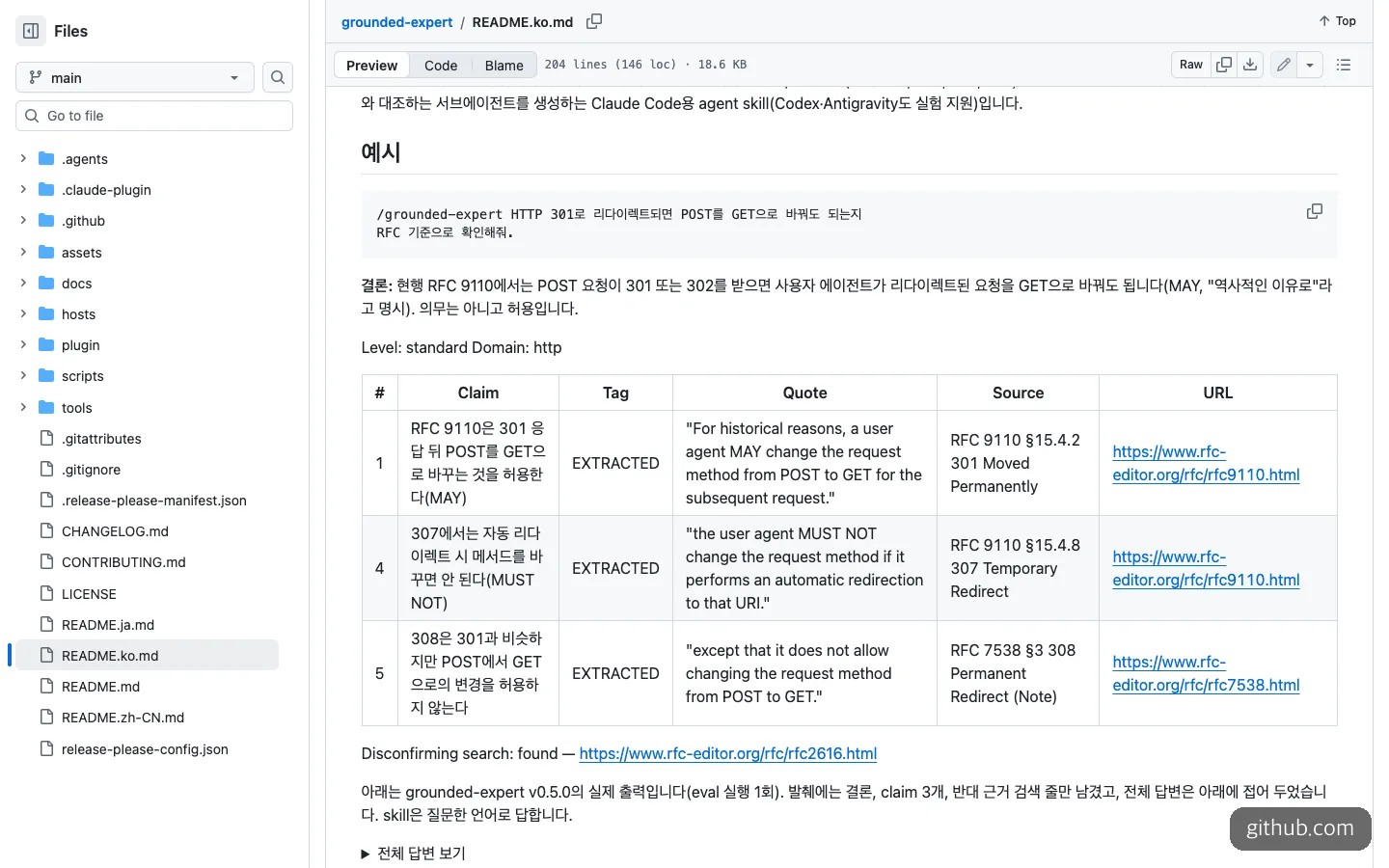
An example answer to the HTTP 301 question, giving the conclusion together with per-claim quotes and the results of a search for contrary evidence.
| Tag | Meaning | How the reader should treat it |
|---|---|---|
| EXTRACTED | A phrase from a primary source, quoted verbatim with a single URL | Open the link and just compare the wording |
| INFERRED | A claim not stated outright in any one passage (including those routed through secondary sources) | Check whether the inference holds |
| not confirmed | None of the pages opened supports it | Don’t treat it as fact |
| REUSED | An item reused from a recently verified record | Suspect the document may have changed in the meantime |
The most impressive part of the README example is the opening of the English answer. It states that because it went through a summarizing fetch tool, the quotes are the tool’s reproduction, and that it did not read the RFC text directly. That said, every tag visible on screen is EXTRACTED, so this excerpt doesn’t show what an answer looks like when no evidence could be found. The example is also a single run with v0.5.0, so output from the latest version may differ.
Open the instruction file and the procedure turns out to be fairly concrete. It explicitly forbids persona phrasing, and at the default level it requires at least two independent sources plus a search for contrary evidence. If every search or fetch fails, it is supposed to say so at the top of the answer instead of filling the gap from memory.
When is grounded-expert worth using?
One test is enough. Is the cost of a wrong answer higher than the cost of the tokens, and does official documentation exist that can confirm the answer? If both are true, it’s worth trying.
It fits well in these cases:
- Checking what a standard or spec allows. An example is the difference between 301 and 307, where one word, MAY or MUST NOT, splits implementations.
- Needing a record of why you decided something. The quotes and URLs remain in a table, so it’s easy to trace later why you built it that way.
- Verifying text you have already written. The creator noted at the top of the documentation that the Korean README translation was reviewed with this skill.
The cases where it doesn’t fit are just as clear. The skill is designed to skip questions that can be answered from the conversation or codebase alone. The same goes for easy questions the model already answers well; the creator himself says the accuracy gain is small on those. If you want to keep feeding the latest library usage into the model while you write code, Context7, compared below, is the better fit.
How to install it, and what to hand the AI
You need Claude Code plus web search and URL fetch tools. The README doesn’t mention any separate API key, but real usage is incurred on every call. Type this into the Claude Code chat window as the documentation says.
/plugin install grounded-expert --marketplace pko89403/grounded-expertThis form works on Claude Code 2.1.275 or later. To install with claude plugin install from a terminal outside Claude Code, you need 2.1.292 or later.
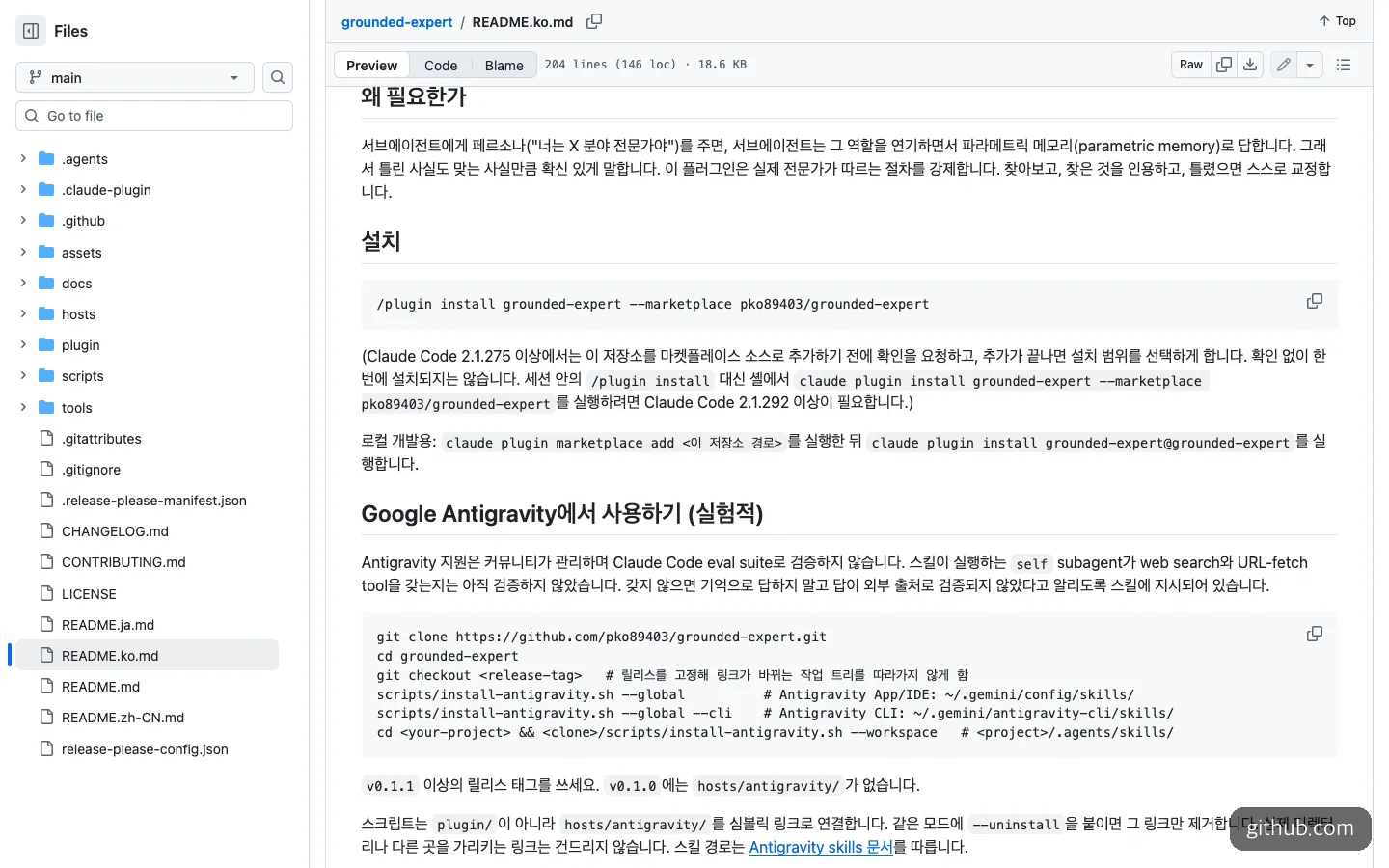
The Korean README, with the one-line install command and the Claude Code version requirement.
Before installing, it’s safer to have Claude Code check it first, like this.
Don't install it yet. Read the plugin folder of github.com/pko89403/grounded-expert.
Tell me in plain language whether hooks/hooks.json, .mcp.json and bin/ exist, and if they do, what they run on my computer.
You use it by putting a slash command in front of your question. It can also trigger automatically when a question needs accurate domain facts. Naming the document to use as the standard in your question narrows the scope.
/grounded-expert Check against the RFC whether it's okay to change POST to GET when an HTTP 301 redirect occurs.The README uses the notation above, but Claude Code’s documentation presents plugin skills in the form /plugin:skill, so checking the actual name in the slash menu avoids confusion. Before it runs, a plan card appears and asks for confirmation. In unattended automation it stops here, so as the documentation advises, you need to include the phrase Pre-approved: run the subagent now; do not ask for confirmation. in the prompt.
Tokens and time by verification level
There are three levels. Quick uses one source and no search for contrary evidence. Standard, the default, uses at least two independent sources and also searches for contrary evidence. Thorough adds cross-checking by parallel subagents for each source type.
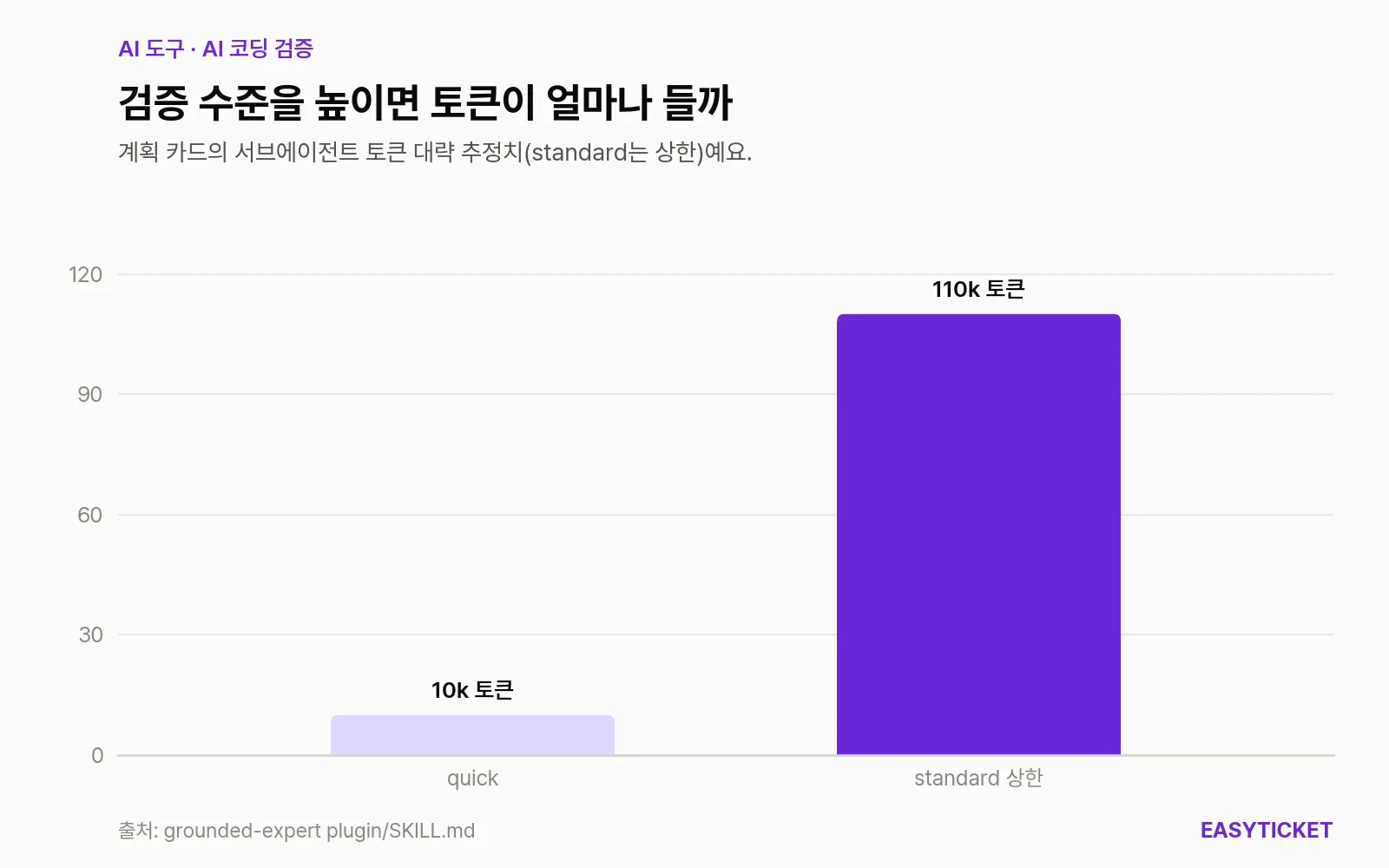
Subagent token estimates written on the plan card. For standard, the upper end of the range is plotted.
What the chart shows is that the default’s upper bound runs up to eleven times quick. By the rough estimates in the instructions, quick takes about 10,000 tokens and under a minute, while standard takes about 10,000 to 110,000 tokens and 1 to 10 minutes. Questions with several parts take longer, and thorough has no measured figures yet. That’s why you should first decide whether a question is worth a few minutes of waiting in the middle of your workflow.
How does it differ from Context7 and GitMCP?
All three keep the AI from leaning on memory, but they do different jobs. Context7 and GitMCP, the most widely used of the comparison group, supply documentation, while grounded-expert verifies an answer’s claims.
| grounded-expert | Context7 | GitMCP | |
|---|---|---|---|
| What it does | Finds official sources and assigns a quote and tag to each claim | Delivers version-specific library docs and code examples | Turns GitHub repositories and Pages into documentation hubs for AI |
| Best when | Checking facts about specs and standards | Referencing the latest APIs while coding | Having the AI read a specific repository’s docs |
| Getting started | One line: /plugin install | npx ctx7 setup (Node.js 22.13 or later) | Enter gitmcp.io/{owner}/{repo} in the MCP settings |
| License | MIT | MIT (server code only, backend not public) | Apache 2.0 |
| GitHub stars (Nov. 9, 2026) | 1 | 64.4k | About 8.5k |
If you could pick only one tool to accompany daily coding, Context7 comes first. It has far more users, and everyday coding questions don’t need minutes of verification each time. The Context7 README does note, however, that its documentation content is community-contributed and that accuracy and security are not guaranteed. The two are less rivals than a division of labor, so a natural combination is to use a documentation-supply tool day to day and bring in grounded-expert only for questions where a wrong answer would hurt.
Limits to know before you use it
The first thing to point out is that the effect has not yet been proven with numbers. The creator admitted it is slower and uses more tokens because of the searching, and said the effect on questions the model gets wrong is still being measured. The README also says the instructions are not an enforced guarantee. A quote and URL don’t make an answer correct, so for an important decision, a person opening at least one link is the right way to use this tool.
Maintenance is active, but that also means it is still in motion. According to GitHub releases, the first, v0.1.0, came out on October 20, 2026, and the latest, v0.10.0, on November 7, so 15 releases shipped in 18 days. The plan is to move to 1.0.0 once the procedure and evaluation stabilize.
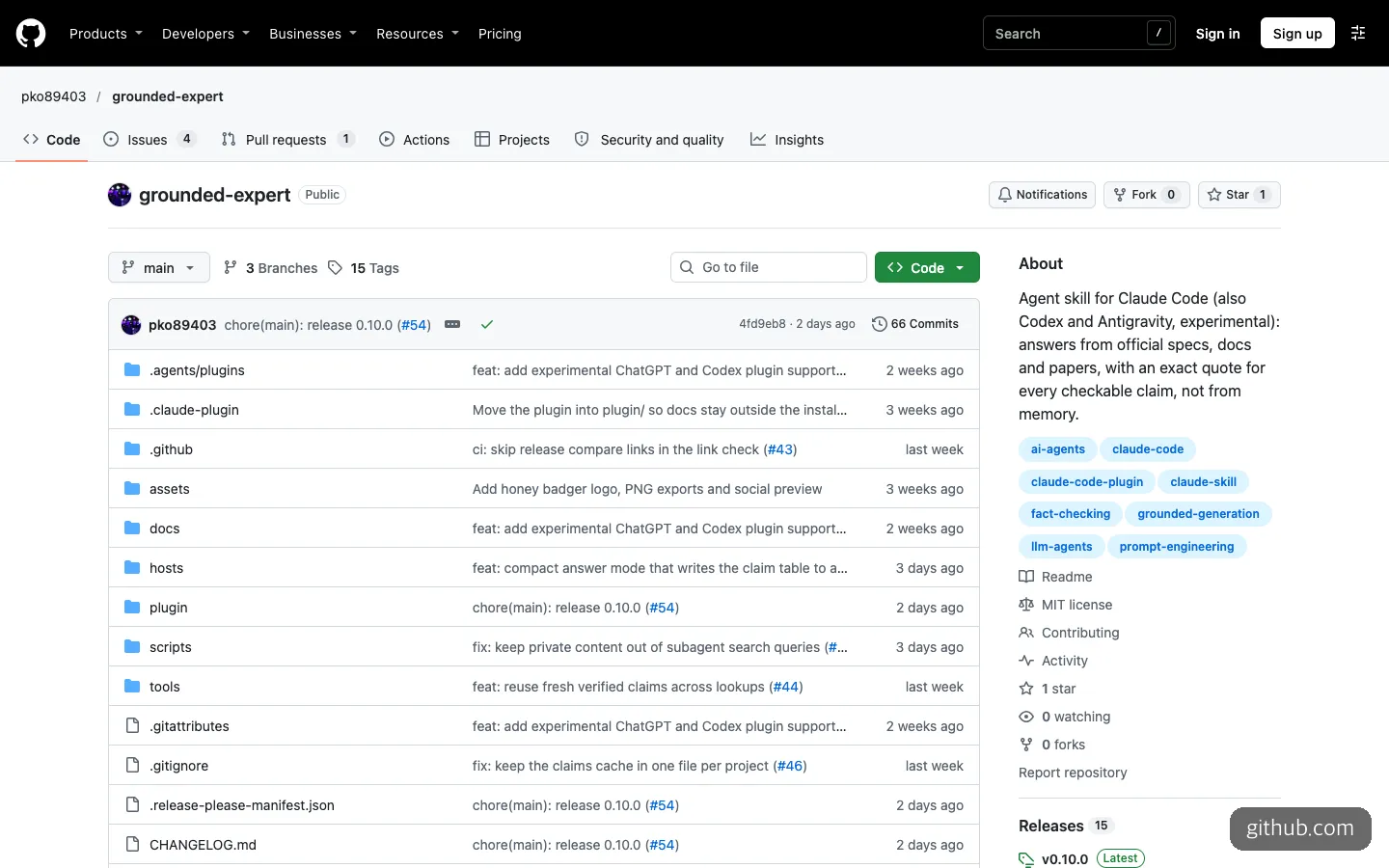
The repository’s front page, with 1 star and 0 forks. Releases have already reached 15.
On security, keep in mind the warning in Claude Code’s official documentation. An installed plugin can run arbitrary code with your permissions, and a marketplace run by an individual, like this repository, counts as third-party. That is why the pre-install check request above is needed.
The content of your questions also deserves care. The tool says no data is sent to the author, but search terms built from your question go to the search provider, and page requests go to the sites visited. The rule to build search terms from general terms only is not enforced, so keep customer information and internal service names out of your questions.
One small thing caught my eye as well. When you open the instruction file on GitHub, a red banner reporting a YAML error appears at the top. I couldn’t confirm whether it causes problems when Claude Code reads the file, but it’s an unsettling first impression for someone seeing it for the first time.
EasyTicket’s take is this. For now, it’s better seen not as a tool to leave on every day, but as one to apply selectively to the few questions where being wrong would hurt.
Frequently asked questions
Is grounded-expert free?
The code is free under the MIT license. However, the search and subagent runs incur real usage on every call. The same goes when you run the evaluation suite.
Can I use it with Codex or other AI coding tools?
Support for Codex and Antigravity is experimental. The README says Antigravity has not been validated by the evaluations built for Claude Code, and that it is not yet confirmed whether the subagent receives the search tools. For stable use, Claude Code is the baseline.
Can I use it if I don’t know much about code?
You just write your question in plain words, so using it isn’t hard. If the English source quotes feel unfamiliar, you can ask the AI to explain again whether the claim and the quote in the table really mean the same thing.
Where are the verification records kept?
You can save reference files, answers and verification records (claims.md) in the project’s .claude/grounded-expert/ folder. Entries in claims.md older than 7 days are deleted. If you don’t want them uploaded to Git, add the folder to .gitignore.
Sources 8
AI helped with research and the first draft; the operator tried the subject firsthand, checked and edited this article before publishing. Let us know if you spot a mistake.