
Tell Claude Code to “replace these two loops with built-in functions,” open the diff, and half the screen is painted red and green. Yet all that really changed was four spots, sum, len, max and min, plus a single comma. OmniDiff is an open-source diff tool that Marko Ivankovic built in Rust and released as v0.3.0 on November 1, 2026. It compares code by syntax instead of by line, so it shows what was moved and what was only modified.
These days an AI agent can edit code in dozens of places a day, which makes it more important for a person to read the results quickly. This article looks at whether OmniDiff is worth using for that job right now.
What line-based diffs miss
An ordinary diff like git diff compares line by line. If a single character changes inside a line, the whole line becomes “deleted, then newly added.” That is fine when a person makes small edits by hand. It gets harder when an agent strips out loops and restructures code in a refactor, because you have to hunt for the parts that truly changed among screens full of painted lines.
On OmniDiff’s official showcase page, you can pick real change examples and flip between the two views. Open the “Replace two loops with built-ins (Python)” example in Unix diff and 23 lines are marked. On the left, lines 6 to 10, 14 to 21 and 27 are solid red, and on the right, many lines are solid green.
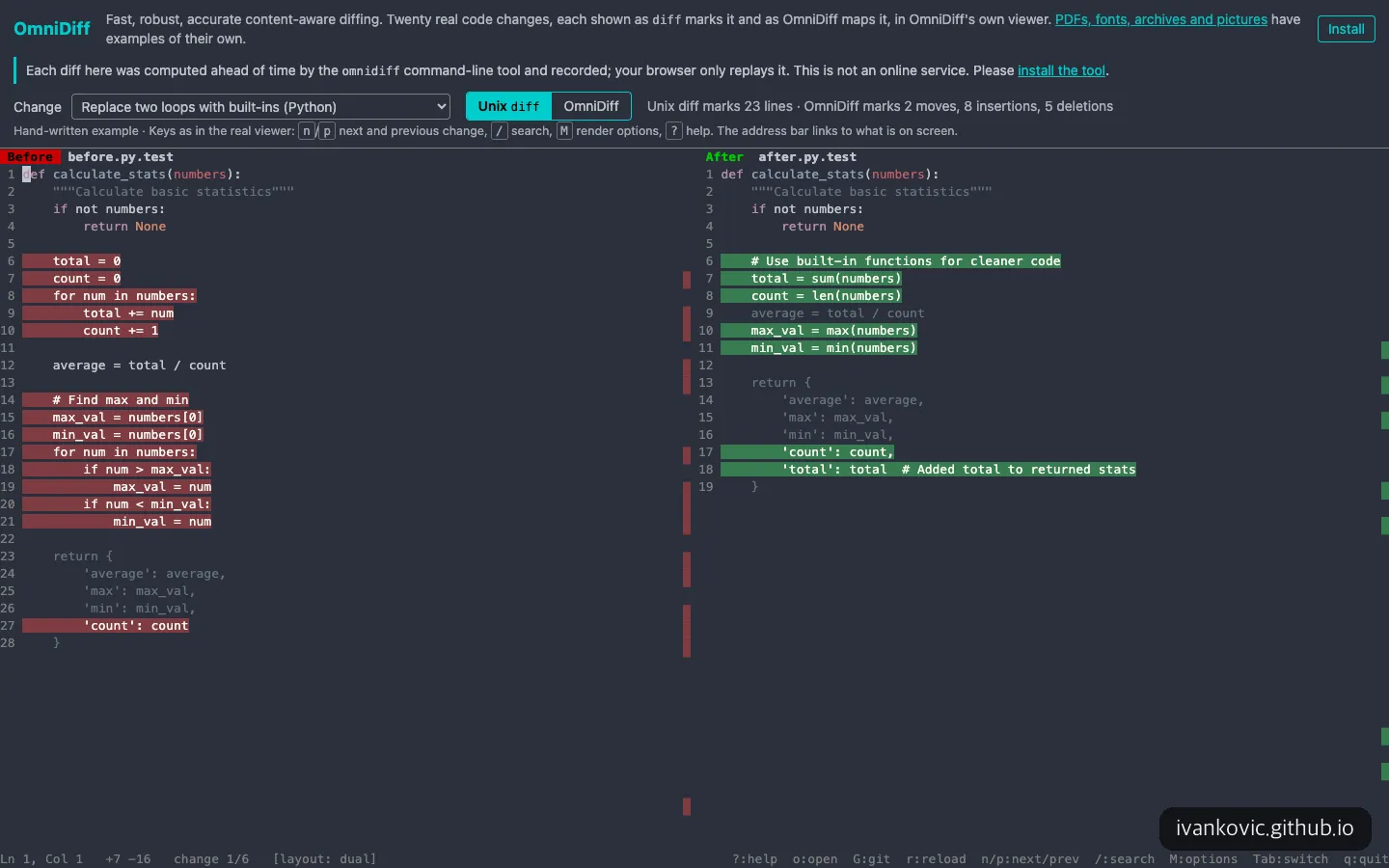
Viewed line by line, the same Python change paints 23 lines solid.
Click the OmniDiff button and the same change is reorganized as 2 moves, 8 insertions and 5 deletions. The max_val = numbers[0] line is not shown as wholly deleted, only the numbers[0] part is marked, and on the right only new pieces such as sum(numbers) and max(numbers) are green. On the 'count': count line, only the trailing comma is painted. A change that looked almost entirely rewritten in a line-based view reads here as loops swapped for built-in functions, plus a total added to the return value.
One caveat: this showcase is a page where the browser replays results that were calculated in advance. The top of the page even says it is not an online service and tells you to install the tool. You can’t paste in your own code. It only lets you browse 20 examples, which I found a little disappointing.
What kind of tool is OmniDiff?
OmniDiff uses the tree-sitter parser to compare 25 languages by structure. Most of the languages you touch often in vibe coding are included: Python, JavaScript, TypeScript (including TSX), Java, Kotlin, Swift, Go, Rust, C and C++, HTML, CSS, JSON and YAML. On the other hand, it only recognizes Markdown, SQL and Dart and compares them line by line like plain text, so the benefit shrinks if you work mostly on Flutter apps or documents.
It also handles files outside of code. It identifies images such as PNG and JPEG, archives such as zip and tar, fonts and PDFs by the bytes inside the file, then compares each according to its contents. There are three ways to run it: an interactive screen you page through with the keyboard inside a terminal, headless output that prints text only, and a mode where you attach it as a diff tool for git or Jujutsu (jj).
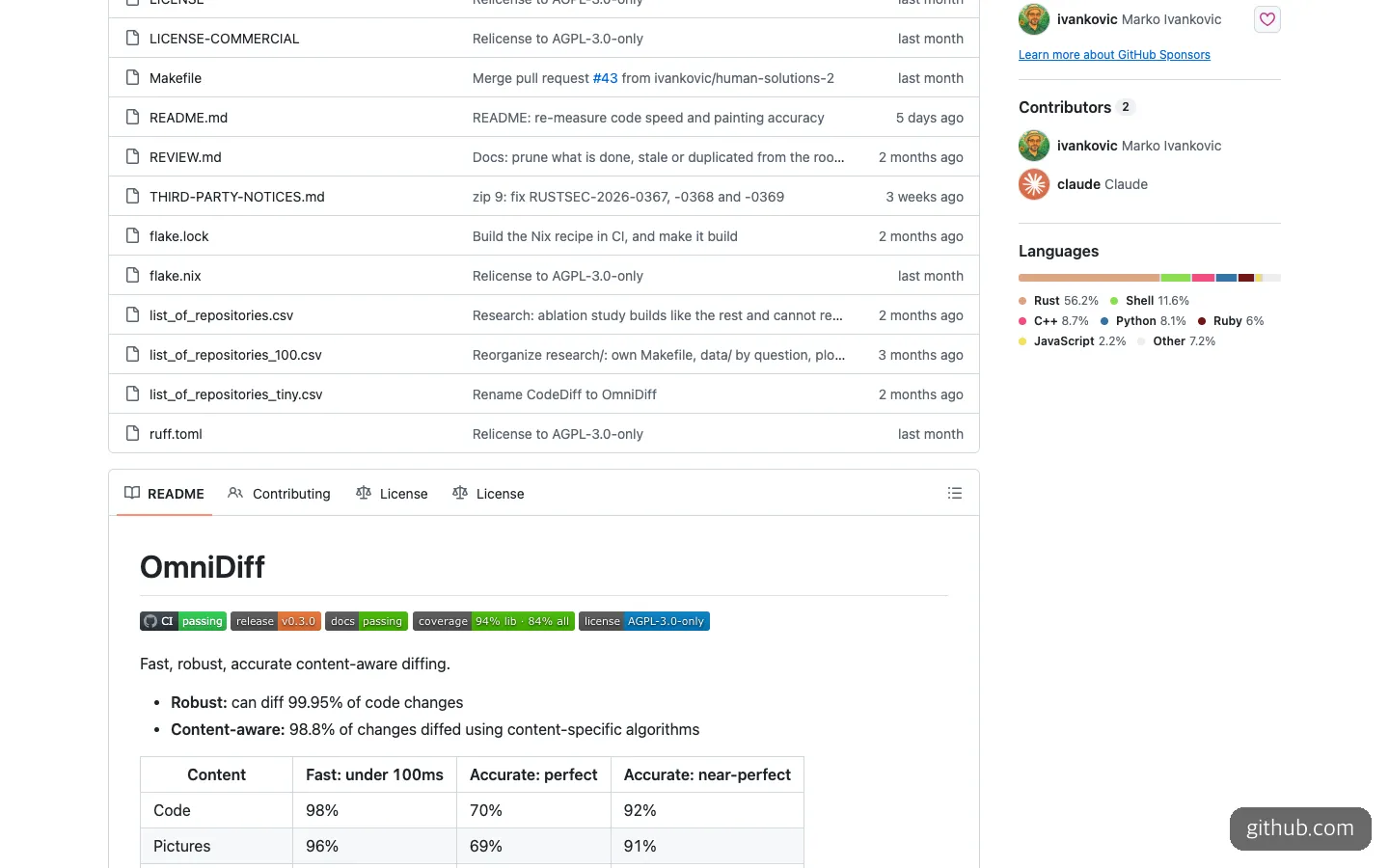
At the top of the README are the license badge and a speed and accuracy table by content type. Claude is listed alongside the author in the contributors section.
As of November 6, 2026, the repository has 1.1k GitHub stars and 1,536 commits. Claude appears in the contributors section next to the creator, and the README says AI (currently Claude Code) is used heavily in development and that every commit discloses this. A tool built with an agent has become a tool for reading an agent’s results. It does not accept outside contributions for now.
The project drew attention on Hacker News. The Show HN post had 319 points and 97 comments as of November 6, 2026. According to the post, the tool was refined using real diffs taken from the Gentoo package repository, and the text includes the line “Yes, I do use AI. No, I do not vibecode.”
When it helps, and when it doesn’t
For someone checking code that an agent has edited, these are the situations where it fits well.
- Skimming refactoring results. Changes that turn loops into functions or move code to another location look messiest in a line-based diff. On Hacker News, the project explained that git’s
--color-movedonly catches moves line by line, while OmniDiff matches pieces of the syntax tree, so it also catches “code that was moved and edited at the same time.” - Asking an agent to summarize changes.
--mode jsonoutputs a diff as a single JSON document, and its fields are defined in a JSON Schema file inside the repository. The README doesn’t call it “for agents,” but EasyTicket thinks this output works well as material for having an AI summarize “what changed.” That said, we didn’t run the JSON output ourselves. - Checking whether images, fonts or PDFs changed. When an agent swaps an app icon or a web font, git usually says nothing more than “binary files differ.”
The situations where it doesn’t fit are just as clear. If you only review changes in the built-in diff view of VS Code or Cursor, the gain is still small, because the README itself says it can’t replace the built-in diff view. There is a VS Code extension, but it layers highlighting on top of the editor, and as of November 6, 2026 it has 78 installs. Cross-file move detection and 3-way merges are also not supported yet.
Installing OmniDiff and handing it to your AI
All you need is a terminal and git. The docs don’t mention API keys or GPUs. Each release includes executables for Linux, Mac (Intel and Apple silicon) and Windows, and on a Mac, Homebrew is the simplest route. The commands in the README are as follows.
# Homebrew (macOS, Linux)
brew install ivankovic/omnidiff/omnidiff

# Build from source (needs a C compiler and rustc 1.92 or later; the first build takes a few minutes)
cargo install --locked omnidiff

# Nix
nix run github:ivankovic/omnidiff
After installing, pass it two files and the screen opens right away.
omnidiff BEFORE AFTER              # interactive screen
omnidiff --headless BEFORE AFTER   # text output
omnidiff --mode json BEFORE AFTER  # JSON output

omnidiff git configure             # connect to git
git difftool --tool=omnidiff
One easy point of confusion here: even after connecting it to git, git diff and git log -p still output plain text, and the interactive screen you page through with the keyboard opens only from git difftool. Keys like n/p (next and previous change) and / (search), which you can see below the showcase, are controls on that screen.
You don’t need to memorize the commands. Just hand the job to Claude Code or Codex like this.
Install omnidiff with Homebrew and connect it to git difftool using omnidiff git configure.
When that's done, tell me the command to open the file you just edited with git difftool --tool=omnidiff.
Compare the file before the edit and the file after it using omnidiff --mode json,
then read the result and summarize it, separating code that was moved from parts where behavior actually changed.If you add --exit-code, it returns exit code 1 when the files differ, so you can also use it to have an agent check by script whether something really changed.
How it differs from difftastic and delta
OmniDiff is not the first syntax-based diff. The closest comparison is difftastic, and the widely used delta is a different kind of tool altogether.
| OmniDiff | difftastic | delta | |
|---|---|---|---|
| What it does | Syntax-based comparison | Syntax-based comparison | A pager that colors existing diffs |
| License | AGPL-3.0-only (separate commercial license) | MIT | MIT |
| GitHub stars (Nov. 6, 2026) | 1.1k | 26.2k | 32.7k |
| Languages | 25 for structural comparison | More than 30 | Syntax highlighting only |
| Image, PDF and font comparison | Yes | No | No |
| JSON output | Yes | Not in the sources | Not in the sources |
| Self-reported weaknesses | Missed accuracy goal, very large files | Slow on files with many changes, heavy memory use | Not a structural comparison |
Delta only dresses up a line-based diff, so the problem this article describes (a refactor getting painted wholesale) remains. The real choice is between difftastic and OmniDiff.
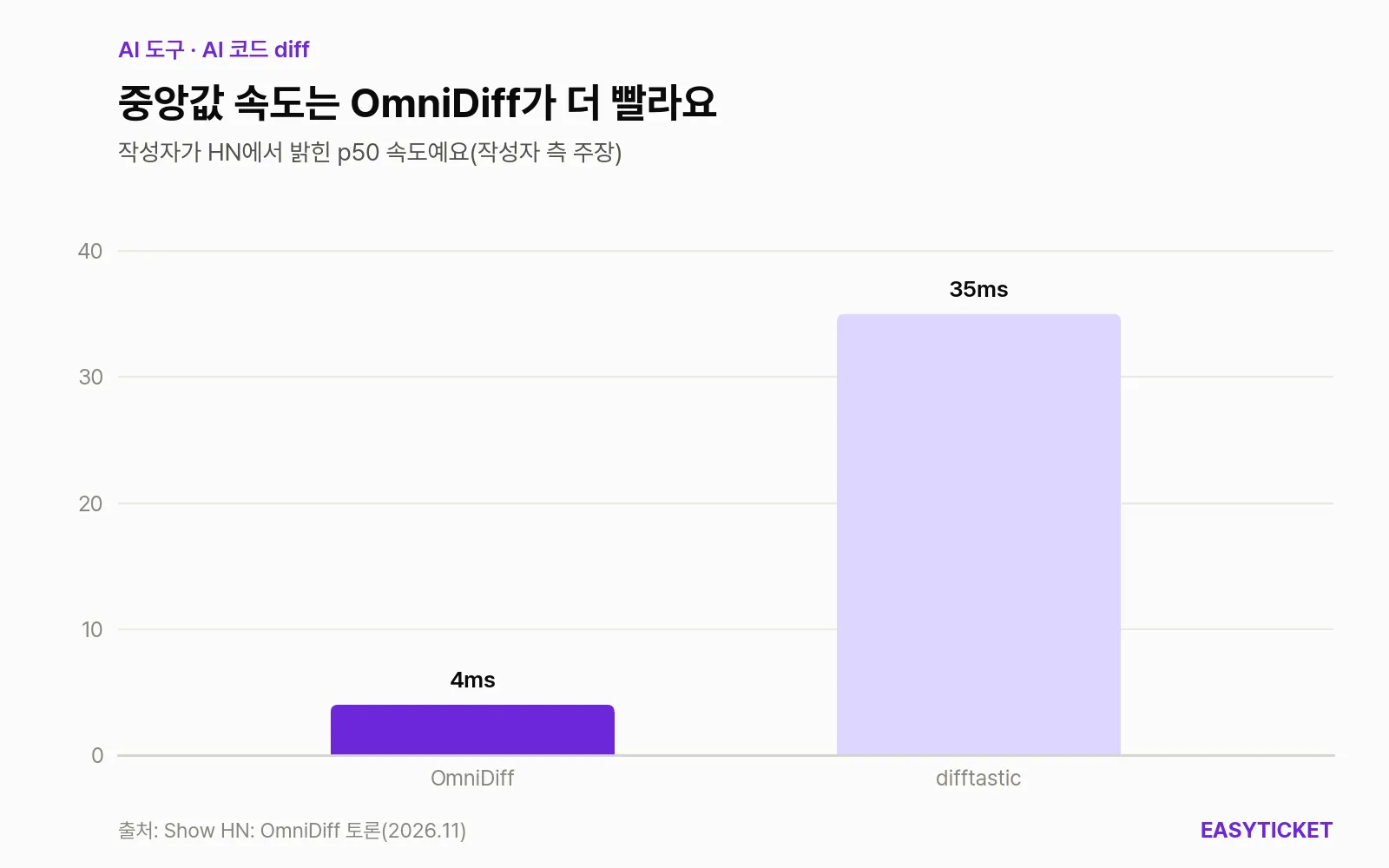
Median processing speeds as stated by the author on Hacker News. These are not independently measured figures.
On Hacker News, the project said its median speed of 4ms beats difftastic’s 35ms. The README also lists a median of 4.2ms, so that number at least lines up. Reactions on accuracy were mixed, though. One user said that in their own tests they could barely see a difference from difftastic and asked for concrete examples, and the project acknowledged that its research is not yet complete. If you value a long-proven tool and the convenience of the MIT license, difftastic is the right pick. If you need JSON output or image and PDF comparison, there is a reason to try OmniDiff.
The numbers, the license and what to watch out for
The first thing to point out is that the accuracy figure differs depending on where you read it. On Hacker News, the project said 90% of diffs are accurate (versus 64% for difftastic). But the README’s limitations section says the share with no mismatches at all is 60.0% (—full) and 69.6% (—minimal), still short of the 90% goal. The criteria may differ, but it’s safer to judge by the README’s lower numbers.
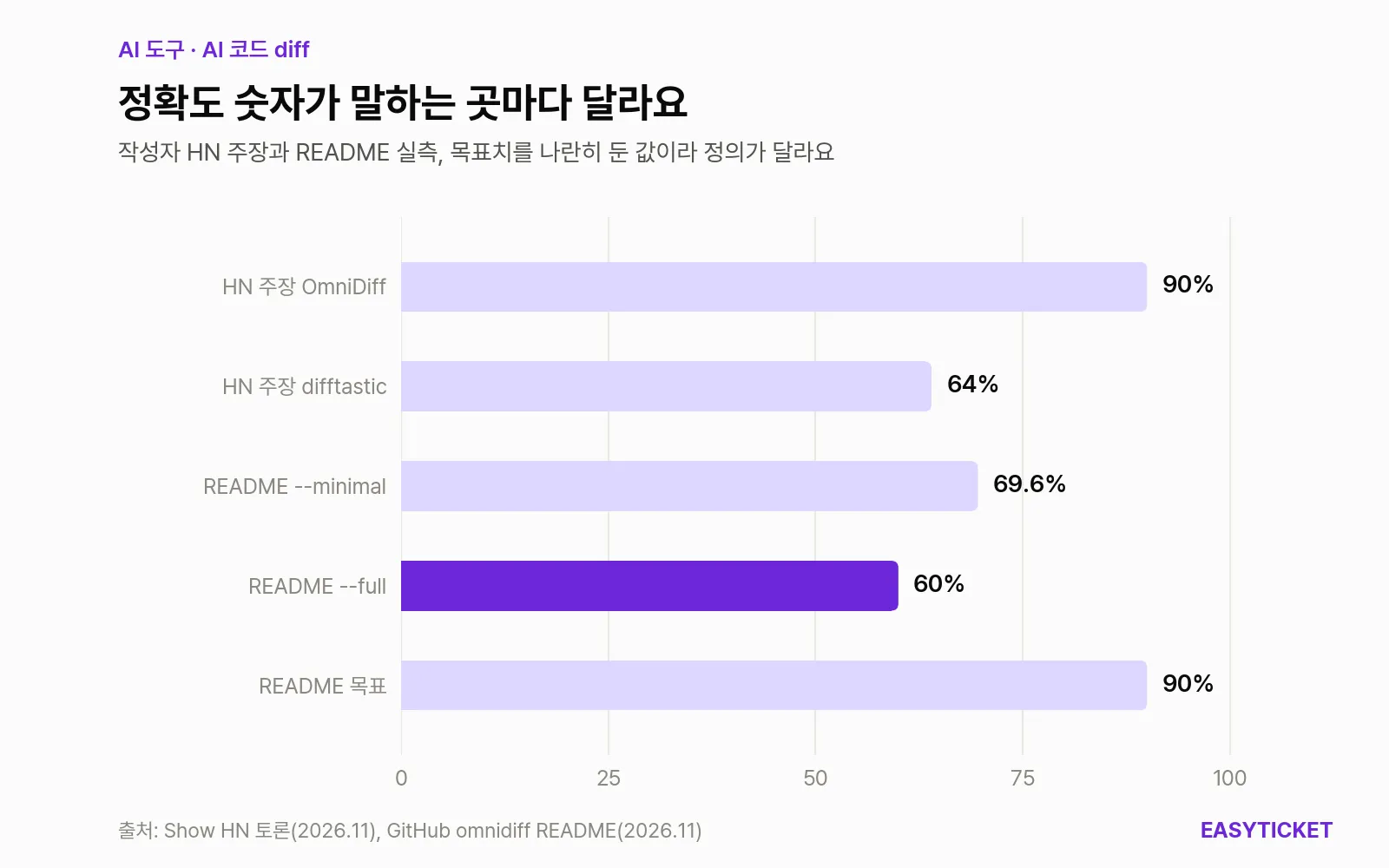
The 90% stated on Hacker News and the 60.0% to 69.6% in the README use different criteria, so they don’t match.
Speed is also fast for the most part, but it has a tail. According to the README, the 99th percentile is 177ms, and only 57% of PDFs finish within 100ms. It processed 99.95% of 442,530 code file pairs, and failures came mostly from auto-generated or very large files. On Hacker News there was also a report of the program crashing on a file with a large byte array inside a header. If your change includes a huge data file produced by an agent, keep this in mind.
The license isn’t something to wave off, either. The default is GNU AGPL 3.0 (AGPL-3.0-only from 0.3.0, or-later before that), and a commercial license is sold separately through a monthly GitHub Sponsors subscription. It states that with the commercial license, the AGPL’s source disclosure obligation doesn’t apply when used inside an organization. If you plan to use it for company work, or to modify the tool and build it into another service, read the LICENSE-COMMERCIAL file first. The repository’s commit history shows the license notation changed last month, so it’s reasonable to assume it could change again.
The last point is maturity. Its first crates.io listing was on October 1, 2026, and as of November 6, 2026 it has 250 downloads. The browser-based code review tool that comes with it is v0.0.0, and the docs say users take the risk themselves. In short, try it first as a helper for checking agent-edited code on your own machine, and it’s not too late to decide on putting it into a team workflow after seeing the next release.
Frequently asked questions
Is OmniDiff free?
Yes, it’s open source, so downloading and using it costs nothing. But the license is AGPL-3.0-only, so if you use it inside an organization and want to avoid the source disclosure obligation, you need to buy a commercial license through a monthly GitHub Sponsors subscription.
Can I use it on Windows?
Each release includes a Windows executable. There are also ones for Linux and Mac (Intel and Apple silicon), and there is a signed apt repository for Debian and Ubuntu.
Can I use it without knowing code?
You can hand installation and git setup to a tool like Claude Code. After that, you just open the screen with git difftool --tool=omnidiff and look at the painted parts, which is actually easier to read than a line-based diff. Still, judging whether the changes are correct remains a human job.
Can I preview the results before trying it?
On the official showcase, you can view 20 real code changes side by side with Unix diff. It’s a page that replays pre-calculated results, so you can’t put in your own files.
Sources 7
AI helped with research and the first draft; the operator tried the subject firsthand, checked and edited this article before publishing. Let us know if you spot a mistake.